6 Best Large-Button Calculators for Seniors in 2026
Six easy-to-read large-button calculators for older adults, compared on display size, key spacing, voice help, and power, for bills and daily math.




At a Glance
Plenty of people in their fifties, sixties, and beyond do their own bills, taxes, and household budgets, and a pocket calculator with pinhead keys makes that harder than it should be. The good news is that a desk model with roomy keys and a clear screen fixes most of it. You do not need anything medical, just a calculator built to be seen and pressed comfortably.
This guide covers six picks for adults who want fewer squints and fewer mistakes, and for the family members who shop for them. They range from a plain four function model to a talking calculator, a model with double size plus and equals keys, and a pair of big-screen desktops. We evaluated each from product specs and buyer feedback, weighing readability, key spacing, ease of setup, and upkeep.
Start with the criteria if you are buying for someone else, because the right pick depends on their eyes and habits more than on any single spec.
6 Criteria to Look For Before Buying a Large-Button Calculators for Senior
Key buying criteria so you get the right fit the first time.
Screen size for comfortable reading
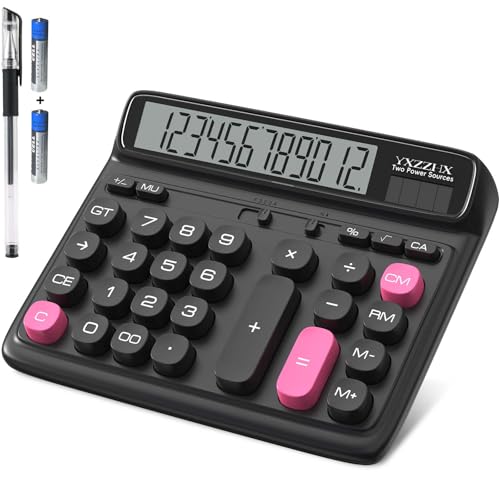
Reading comfort starts with the largest digits you can get at arm's length. A 5-inch LCD like the yxzzhx lets you sit back, while the pxy offers a 4-inch display and the Lily's Home offers a jumbo, tilted twelve digit LCD. If you hold the calculator closer than a forearm away, upgrade the screen before anything else. Strong contrast matters as much as size.
Key spacing and target size
Stiff fingers and slight tremors make small gaps expensive. The Lily's Home has large keytops, and the Comix white lists large computer style keys. Look for gaps wide enough that a pressing fingertip rarely touches two keys. If you often hit neighbors on a phone, you want the widest targets available.
Oversized keys for common actions
Most adding sequences end with plus or equals, so enlarging those keys pays off all day. The Lily's Home is the only pick that lists double size plus and equals keys. For people who do bills, this is a practical edge over a uniform keypad. It costs nothing in complexity, since the keys do the same job.
Voice output as a backup channel
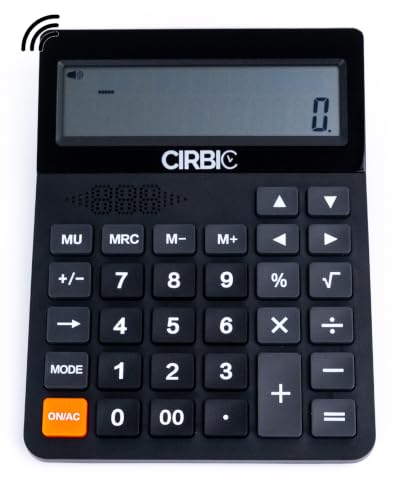
Speech gives a second way to check your entry when the screen is hard to read. The Cirbic announces numbers and results and its volume runs from mute to loud. That is a feature you only need if the screen alone fails you. If you read well, skip the voice and enjoy a quieter room.
Stability on the desk
A calculator that slides wastes effort and invites missed presses. The Comix white lists four anti-slip pads, and heavier or wider bodies stay planted better than a light one. Press the unit with a hand on the desk and see whether it shifts. A stable base lets the heel of your hand rest while you press.
Power that you do not have to think about
A forgotten battery change is a common household nuisance. The yxzzhx provides two AA batteries and also runs on solar, and the CATIGA ships with a battery beside its solar panel. Keep a spare cell in the same drawer as the calculator. Solar-first models cut battery trips but need a lit room.
6 Best Large-Button Calculators for Seniors in 2026
Lily's Home Jumbo 12-Digit Calculator (White)
About this pick
Lily's Home calls this the Jumbo, and the name fits the layout rather than just the screen. The keyboard is spacious with large keytops, and the plus and equals keys are double size, which are the two keys most people press constantly. The upright, eye-angled LCD shows twelve digits and faces you rather than the ceiling.
Double size keys are a thoughtful choice for older hands, because the most common sequence of numbers followed by plus and then equals gets the biggest targets. The trade is that the body is large, so it is a desk fixture. It stays simple to use, with no hidden menus to puzzle over.
Power comes from a dual system of solar and battery, which keeps it running without much attention. Set it by a window and the solar panel does much of the work. Against the Comix, which also lists large keys, the Lily's Home stands out for the oversized plus and equals, while the Cirbic offers speech that this one lacks.
Best for: Adults who add up long lists all day and want the plus and equals keys to be easiest to hit.
Check price on AmazonSpecs
- Display: Jumbo 12 digit, tilted
- Keys: Large keytops, double size + and =
- Power: Solar and battery
- Color: White
Pros
- +Double size plus and equals keys suit constant adding
- +Spacious keyboard with large keytops for bigger fingers
- +Upright, eye-angled LCD faces you at a desk
- +Dual solar and battery power for steady use
Cons
- −No voice output if the numerals themselves are hard to see
- −Large body wants a permanent spot on the desk
Cirbic Talking Desktop Calculator
About this pick
Cirbic is the one pick here that talks. It announces each number you enter and the result, which lets someone with weak eyesight confirm entries by ear. The volume adjusts from mute to loud, so you can silence it at the library or turn it up in a noisy kitchen.
A large dual-line LCD shows the current entry and the previous result at once, and the oversized, high contrast keys are meant to reduce input errors. The tradeoff is that speech makes it less discreet, and anyone sharing a room should expect to hear every digit unless the volume is muted. For a person who still reads fine, a talking function may be more than needed.
Setup is as simple as it gets, though you should keep spare batteries nearby for a unit that speaks. Next to the Lily's Home, which relies entirely on the screen, the Cirbic gives a second channel for checking work. Compared with the pxy, it sacrifices some quiet in exchange for the voice.
Best for: Older adults whose eyes struggle with digits and who want spoken confirmation as a backup.
Check price on AmazonSpecs
- Voice: Announces numbers and results
- Volume: Adjustable, mute to loud
- Display: Large dual-line LCD
- Keys: Oversized, high contrast
Pros
- +Speaks every entered number and each result
- +Volume runs from mute to loud for any room
- +Dual line screen shows entry and last result
- +High contrast oversized keys help limit input errors
Cons
- −Spoken digits are not private in a shared room
- −Voice may be unnecessary for people who read well
pxy 12-Digit Big Button Desk Calculator
About this pick
The pxy desk calculator gives you a big 4-inch LCD that shows twelve digits clearly from any angle, according to the listing. That detail is useful for anyone whose chair or desk position changes through the day. The big buttons follow a computer keyboard 10 key layout, which is handy for people who learned on a numeric keypad.
A familiar layout cuts the learning curve, since no one has to relearn where digits live. The tradeoff is that a 4-inch screen is large but smaller than the 5-inch yxzzhx, and the keys do not offer color coding. It is a plain, no-surprise tool.
It runs on two way power, solar or battery, which keeps the display alive in a dim study. Use it as an everyday household calculator that will rarely need attention. Compared with the Comix, the pxy gives a larger declared screen, and compared with the CATIGA it uses a 10 key arrangement that suits people used to a computer keypad.
Best for: People who already know a numeric keypad and want a big, clear screen without extras.
Check price on AmazonSpecs
- Display: 12 digit, 4 inch LCD
- Keys: 10 key big buttons
- Power: Solar or battery
- Layout: Computer keyboard style
Pros
- +Big 4 inch display reads clearly from any angle
- +10 key layout matches the numeric keypad you may know
- +Runs on solar light or battery for flexibility
- +No menus, so the unit stays easy to learn
Cons
- −Screen is smaller than the 5 inch yxzzhx
- −No color coding or voice help on the keys
yxzzhx 5-Inch LCD Desktop Calculator
About this pick
The yxzzhx is the screen-first pick for older eyes, using a 5-inch LCD with twelve digits and a tilt tuned for desk work. The tilt cuts the habit of hunching over to see the numbers, which helps a stiff neck. The listing describes the angle as lining up with your natural line of sight.
Because the display is the star, the keys do not draw attention. They are sized sensibly, but they are not a special oversized design like the Lily's Home double size keys. A person with a tremor may prefer a model that focuses on the key shape instead.
Two AA batteries are provided, and the unit works on solar in good light, so it is a low-maintenance option. Keep it on a steady surface, since a wide body can be nudged. Next to the pxy at 4 inches, the extra inch is what lets low vision readers sit back, and next to the Cirbic it relies on sight alone.
Best for: Readers who need the biggest numerals and want to sit back from the desk.
Check price on AmazonSpecs
- Display: 5 inch LCD, 12 digits
- Power: Solar or battery
- Batteries: 2 AA provided
- Screen: Tilted for desk use
Pros
- +5 inch LCD shows twelve large digits at a glance
- +Screen tilt reduces hunching and neck strain
- +Two AA batteries are provided for immediate use
- +Solar power cuts how often cells need changing
Cons
- −Keys are not specially oversized like the Lily's Home
- −Wide body can be nudged on a slippery desk
Comix 12 Digit Large Button Calculator (White)
About this pick
Comix in white uses large computer style keys with a clear sound when pressed. The 12 digit display shows bold numerals at a 30 degree angle, which is easier to read than a flat screen. Four anti-slip pads sit under the body and keep it still while you press.
That anti-slip detail matters more than it sounds. A calculator that slides across a table forces you to chase it with one hand while you press with the other. The tradeoff is a plain layout without the double size plus and equals keys that the Lily's Home offers.
The white finish is easy to wipe down, and the keys are straightforward to learn. Plan on a battery supply, since the listing for this line treats solar as secondary. Compared with the CATIGA, the Comix adds a stated 30 degree screen and anti-slip pads, while the CATIGA keeps a lighter press and fewer details.
Best for: Those who want a stable, familiar desk calculator that stays put under pressing hands.
Check price on AmazonSpecs
- Keys: Large computer keys
- Display: 12 digit, 30 degree angle
- Feet: 4 anti-slip pads
- Color: White
Pros
- +Four anti-slip pads keep the body from sliding
- +Bold twelve digit display is angled at 30 degrees
- +Large computer style keys with a clear press sound
- +White finish wipes clean and shows key labels well
Cons
- −Lacks the oversized plus and equals keys of the Lily's Home
- −Battery matters more than solar on this model
CATIGA 12 Digit Big Button Desk Calculator
About this pick
CATIGA is the calculator to hand to a first-time user, because it does only what the label says. The face has big, sensitive buttons for the basic four functions and a large LCD with twelve digits. Nothing else competes for attention.
That plainness is both its strength and its limit. A person who never uses percent or memory will not miss them, but someone who wants a running subtotal needs to look elsewhere. It does not speak and it does not magnify beyond a large standard screen.
It ships with a battery that works alongside a solar panel, so there is nothing to buy before you start. Gift it to a parent who dislikes technology and expects no manual. Beside the Cirbic it is simpler but silent, and beside the yxzzhx it offers an easier layout in exchange for a smaller screen.
Best for: Anyone buying a first large-button calculator for a person who avoids gadgets.
Check price on AmazonSpecs
- Keys: Big sensitive buttons
- Display: Large LCD, 12 digits
- Functions: Basic 4 function
- Power: Solar and included battery
Pros
- +Only four function keys, so nothing to learn
- +Sensitive keys respond to a gentle press
- +Large twelve digit screen for ordinary sums
- +Battery supplied with a solar panel for backup
Cons
- −No memory or percent for running subtotals
- −Silent and not magnified beyond a standard large LCD
How We Evaluated These Large-Button Calculators for Seniors
Each pick was assessed across 5 criteria weighted for real-world use.
Readability for older eyes
We weighed stated screen size, digit count, and tilt, treating a 5-inch LCD as the strongest listing. The yxzzhx earned the top mark, the pxy followed with 4 inches, and the Lily's Home scored for its jumbo tilted screen. Contrast is described only loosely in listings, so we relied on buyer feedback where available. No digit heights were measured by us.
Key comfort and spacing
Key size and spacing were judged from listing descriptions such as spacious keyboard, big buttons, and large computer keys. The Lily's Home scored high for the double size plus and equals, and the Comix for anti-slip stability. A tidy key face with room around each key beat a crowded one. Hand fatigue was considered where buyers mention it.
Ease of learning
A calculator for someone who dislikes tech should need no manual. The CATIGA with four function keys and the pxy with a familiar 10 key layout score best. Models with memory or voice add steps, though the Cirbic earns credit for the real value of speech. Fewer menus mean fewer calls to a relative for help.
Power and upkeep
We checked which batteries ship in the package, since a dead unit on day one is frustrating. The yxzzhx includes two AA, the CATIGA includes a battery, and the Comix leans on its battery. Dual power was preferred over battery only. Solar assist helps, but a spare cell is still wise.
Lineup positioning
The yxzzhx leads on screen size at 5 inches, the Cirbic leads on accessibility with spoken results, and the Lily's Home leads on key layout with double size plus and equals. The Comix leads on stability with four anti-slip pads, while the pxy leads on familiarity with a 10 key arrangement. The CATIGA leads on simplicity. Each serves a slightly different person.
How to Choose the Right Large-Button Calculators for Seniors
By How Well You See the Screen
Be honest about your reading distance and the lighting in the room.
| Situation | Pick | Reason |
|---|---|---|
| Digits blur even at a large size | Cirbic Talking Desktop Calculator | Speaks entries and results and offers high contrast keys |
| You want the biggest screen without speech | yxzzhx 5-Inch LCD Desktop Calculator | 5 inch LCD tilted toward your eyes |
| You sit at varied angles through the day | pxy 12-Digit Big Button Desk Calculator | Big 4 inch display reads clearly from any angle |
| Reading is fine, you want less strain | Comix 12 Digit Large Button Calculator (White) | Bold 12 digit display at a 30 degree angle |
| You just want a calm, plain screen | CATIGA 12 Digit Big Button Desk Calculator | Large 12 digit LCD without distractions |
If you ever lean toward the screen, move up one row on this table.
By Budget
Tiers follow how much each model offers, not a price. Compare live listings before buying.
| Tier | Pick | What you get |
|---|---|---|
| Entry | CATIGA 12 Digit Big Button Desk Calculator | Four functions, sensitive keys, battery included |
| Entry to mid | Comix 12 Digit Large Button Calculator (White) | Large keys, 30 degree screen, anti-slip pads |
| Mid | pxy 12-Digit Big Button Desk Calculator | 4 inch display and a 10 key layout |
| Mid to premium | Lily's Home Jumbo 12-Digit Calculator (White) | Double size plus and equals and a jumbo tilted screen |
| Premium | Cirbic Talking Desktop Calculator | Voice output with adjustable volume and a dual line display |
The yxzzhx belongs near the upper end when the screen is the main need.
Talking vs Silent Calculators
The question is whether you need your ears to confirm what your eyes cannot.
Talking calculators
A speech chip reads each digit and result aloud, so you can verify an entry without reading it. The Cirbic Talking Desktop Calculator is the pick on this side, with adjustable volume and a dual-line display. Choose this if even a large screen leaves you guessing.
Silent calculators
Silent models rely on the screen and keys, with no audio to share or mute. The yxzzhx 5-Inch LCD Desktop Calculator, the pxy 12-Digit Big Button Desk Calculator, and the Lily's Home Jumbo 12-Digit Calculator (White) all sit here. Choose this side if you read well and want a quiet room.
If unsure, a silent model with a 5 inch screen is the safer start, and you can add a talking unit later.
By Where You Set It Up
Placement changes which feature helps most.
| Situation | Pick | Reason |
|---|---|---|
| Kitchen table with a slick surface | Comix 12 Digit Large Button Calculator (White) | Four anti-slip pads keep it from sliding |
| Home office with a window | yxzzhx 5-Inch LCD Desktop Calculator | Solar works in light, with 2 AA batteries provided |
| Dim study or den | CATIGA 12 Digit Big Button Desk Calculator | Included battery supports the solar panel |
| Shared living room | Lily's Home Jumbo 12-Digit Calculator (White) | Silent, with large keys and a tilted jumbo screen |
Wipe down the keys and screen on a regular basis so grime does not hide labels.
For Bills and Taxes Specifically
Paperwork days mean long lists and many repeated sums.
Look for
Large plus and equals keys, a screen that shows a full total, and a stable base. Twelve digits is plenty for household figures. A clear clear key helps when you start over.
In this comparison
The Lily's Home Jumbo 12-Digit Calculator (White) is the best fit, since its double size plus and equals match adding lists. The Comix 12 Digit Large Button Calculator (White) is a stable second. The Cirbic Talking Desktop Calculator is ideal if you want spoken confirmation of each entry.
Read the grand total back against the paper before you file the number.
When to Spend More
| Spend more if | Save if |
|---|---|
| Digits are a real struggle, the Cirbic Talking Desktop Calculator adds speech | Reading works fine, the CATIGA 12 Digit Big Button Desk Calculator is enough |
| You need the biggest screen, the yxzzhx 5-Inch LCD Desktop Calculator offers 5 inches | A 4 inch display like the pxy's already suffices |
| You add long lists, the Lily's Home Jumbo 12-Digit Calculator (White) gives double size plus and equals | You do occasional sums, the Comix 12 Digit Large Button Calculator (White) is sturdy enough |
| You share a desk with sliding papers, anti-slip pads on the Comix matter | Your desk is grippy, a light unit works |
Spend where a problem actually happens in your day.
Frequently Asked Questions
What should I look for when buying a calculator for an older parent?
Start with screen size and key spacing, then check how easy the layout is to learn. A 5-inch display like the yxzzhx and a spacious keyboard like the Lily's Home are strong signs. Keep the function count low unless your parent already uses memory keys. Ask what frustrates them now, and buy to fix that.
Is a talking calculator a good idea if my parent has some vision loss?
It can be, since spoken digits let them confirm an entry without reading. The Cirbic adjusts from mute to loud, so it works in a quiet room too. It is optional if a 5-inch display is readable. Try a large screen first and add voice if they still guess.
How many digits does an everyday calculator need?
Twelve digits is far more than household budgets require, and every pick here offers it. The point is not the count but the size and contrast of each digit. A twelve digit display on a bigger screen gives bolder numerals. Do not pay more for digits you will never fill.
Why do anti-slip feet matter?
A calculator that slides makes you press harder and chase it with your other hand. The Comix white lists four anti-slip pads to prevent that. Rubber feet also help a light unit stay put on polished wood. If your pick lacks feet, a small piece of non-slip shelf liner underneath works.
Do large buttons make the calculator harder to carry?
Yes, these are desk models, and the wider body is part of what gives the larger keys room. They suit a table or desk, not a purse. If you want portability, a smaller model trades away comfort. Keep one at the usual spot where you do paperwork.
Does solar power work indoors?
In a lit room the solar cell tops up the display, but a dim corner may rely on the battery. The yxzzhx and CATIGA both pair solar with a battery for that reason. Keep a spare cell, and replace the battery when the digits fade. Solar assist on the Comix is secondary.
Can a large-button calculator really prevent mistakes?
It can reduce them, but it will not remove them. Bigger keys lower the chance of hitting a neighbor, and a big screen helps you catch an error. Always glance at the display before pressing equals. Habits such as rechecking the total still matter.
Bottom Line
best overall: Lily's Home Jumbo 12-Digit Calculator (White) - best key layout pick in this roundup.
See the full rankings above for all picks with pros, cons, and best-for summaries.
Browse on Amazon
All Prime-eligible options with current pricing.
Shop on Amazon →