6 Best Large-Button Calculators in 2026
Six large-button desk calculators compared by screen size, key shape, tilt, and power, so you can pick one that is easy to read and press.


At a Glance
Large-button calculators are one of the simplest upgrades for anyone who squints at a pocket model or hits the wrong key twice in a row. The idea is plain: bigger numerals, roomier keys, and a display you can read without leaning in. This lineup covers six desktop models, all with 12-digit readouts, and several of them run on solar power with a battery backup.
We evaluated each one from the product specs and buyer feedback, looking at display size, key spacing, screen angle, power source, and how much clutter the key layout adds. Two models stand out for 5-inch displays, one for a mechanical click, and one for a fuller memory and rounding key set. None of them speak aloud, so they suit people who can still read a bright, large screen.
Read the buying criteria first if you are unsure what to prioritize, then use the scenario tables to match a pick to your desk and habits.
6 Criteria to Look For Before Buying a Large-Button Calculator
Key buying criteria so you get the right fit the first time.
Display size and digit height
Bigger digits are the first thing that eases eye strain, and a 12-digit readout covers nearly every household total. Look for dark, crisp numerals on a light background instead of faint gray ones. The pendancy and the yxzzhx both use a 5-inch LCD, the largest screens in this lineup, while the CATIGA 12 Digit, M&G, HIHUHEN, and Mr. Pen use standard large LCDs that still show twelve digits. If you catch yourself leaning toward the screen, step up to a 5-inch model.
Key size, shape, and spacing
Key size matters less than the gap and shape around each key. Recessed wells, like the M&G's recessed buttons, catch a fingertip, and raised tops help you feel the edge. Aim for keys wide enough to press with the pad of your finger rather than the tip. The CATIGA 12 Digit lists big buttons and the pendancy lists giant response keys, so either suits larger hands. Avoid compact pocket layouts with tight spacing, since wrong-key errors climb quickly.
Screen angle for desk use
A flat display is read from above, which means leaning in or tilting your head. A tilted screen faces you and cuts neck strain. The pendancy lists a 30 degree angle and the yxzzhx describes a tilted display aligned to your line of sight. Choose an angled model if the calculator lives on a desk all day. A flat one is only fine for occasional handheld use.
Power source and backup
Solar with a battery backup is the practical setup, since the screen keeps working in a dim room and the battery sits idle in bright light. Check which cell is included so you can start right away. The M&G ships with an AAA battery, the HIHUHEN with one AA, and the yxzzhx with two AA batteries. If a model lists solar only as an assist, plan to keep a spare cell on hand.
Key feel and noise level
Some buyers want a quiet soft press, others want an audible click to confirm each digit. Mechanical switch keys give that click but add volume in a shared room. The Mr. Pen uses mechanical switches, while the M&G and CATIGA 12 Digit use more conventional keys. Think about where you will use it, because a loud click that helps at a home desk can annoy in an office.
Function count versus simplicity
Every extra key is one more thing to learn and one more chance to misfire. A four function layout like the CATIGA 12 Digit keeps things calm. The HIHUHEN adds MC, MR, M+, and M- memory keys plus percent, square root, rounding, and a decimal setting, which pays off for bills and budgets. If you only add, subtract, multiply, and divide, skip the extras and keep the simpler face.
6 Best Large-Button Calculators in 2026
CATIGA 12 Digit Desk Calculator
About this pick
The CATIGA 12 Digit Desk Calculator keeps the formula simple: a large LCD, big buttons, and only the four basic operations. The display shows twelve digits, which is more room than most household sums ever need. Buttons are described as responsive, so a press registers without hammering.
The tradeoff of that simplicity is that it skips extra tricks such as the memory and rounding switches found on the HIHUHEN. It also does not have a giant screen, so people with very low vision may want a 5-inch model instead. For general home paperwork, checkbook balancing, and tip math, it hits a comfortable middle ground.
Power comes from a solar panel with a battery that ships in the box, so it works out of the packet and keeps going in dim rooms. Place it near a window or lamp and the battery sees less use over time. Compared with the 5-inch pendancy, this one is the calmer, smaller choice for a crowded desk, and it asks for less thinking than the Mr. Pen.
Best for: Someone who wants a plain, dependable large-button desk calculator without extra keys.
Check price on AmazonSpecs
- Display: 12 digit large LCD
- Power: Solar and battery
- Functions: 4 function
- Battery: Included
Pros
- +Large, responsive buttons make accurate key presses easy
- +Twelve digit LCD leaves room for long totals
- +Solar panel plus a battery included in the box
- +Four function layout keeps the keypad uncluttered
Cons
- −No memory or rounding keys for heavier bookkeeping
- −Display is smaller than the 5 inch models here
pendancy 5-Inch LCD Desktop Calculator
About this pick
The pendancy desktop calculator is built around a 5-inch LCD with twelve big digits, which makes it one of the easiest screens to read in this group. The display sits at a 30 degree angle, so it faces you on a flat desk instead of glaring up at the ceiling. Keys are oversized and color coded, with orange, blue, and gray groups separating operators from digits.
That color coding helps if you often hunt for the equals or clear key, though the silver panel with bright keys looks more office than kitchen. The body is ABS plastic, light enough to slide across a desk, which cuts both ways since a hard press can push it around. It uses a full accounting style layout, so there are more keys to learn than on a four function model like the CATIGA 12 Digit.
Because the unit is wide, plan on a permanent spot rather than a drawer. Cleaning is a matter of a dry cloth over the keys and screen. Against the yxzzhx, which also offers a 5-inch screen, the pendancy is the one with bolder color groups, while the yxzzhx adds an explicit choice of solar or battery power.
Best for: People with tired eyes who want the biggest, brightest digits and clearly grouped keys.
Check price on AmazonSpecs
- Display: 5 inch LCD, 12 digits
- Screen angle: 30 degrees
- Body: ABS plastic
- Key colors: Orange, blue, gray
Pros
- +5 inch LCD gives the largest digits in this lineup
- +30 degree display angle faces you on a flat desk
- +Color grouped keys separate operators from digits
- +Light ABS body is easy to reposition on a desk
Cons
- −Wide body needs a permanent spot on the desk
- −Accounting style layout has more keys to learn
M&G 12 Digit Desk Calculator
About this pick
M&G pairs a twelve digit LCD with keys that sit in recessed wells, and that shape is the reason it earns a place here. Recessed tops give your fingertip a rim to land against, so sliding off the edge onto a neighbor is less likely. The raised button design aims at fast, accurate input, and the plastic keys are described as sturdy.
The cost of recessed keys is a slightly slower glide for quick typists who prefer flat tops. The display is large but not oversized, so it sits a step below the 5-inch models for low vision. Even so, it handles everyday totals cleanly and the layout stays familiar.
Power is dual, solar plus an AAA battery that comes in the package. That makes it ready on day one, and the solar cell takes over in a lit room. Compared with the HIHUHEN and its memory keys, the M&G is the less cluttered pick, and next to the Mr. Pen it is much quieter.
Best for: Anyone who tends to slip off keys and wants each button to feel like a defined target.
Check price on AmazonSpecs
- Display: 12 digit large LCD
- Key style: Recessed, raised design
- Power: Solar and AAA battery
- Battery: AAA included
Pros
- +Recessed keytops give your fingertip a rim to land on
- +Twelve digit LCD shows long totals clearly
- +AAA battery is included to pair with the solar cell
- +Quieter press than a mechanical switch model
Cons
- −Screen is not as large as the 5 inch models
- −Recessed tops slow fast flat key typing slightly
HIHUHEN Large Electronic Calculator
About this pick
HIHUHEN is the feature-rich member of this lineup, built around a Japanese LCD with twelve digits. Beyond the four operations it supports plus and minus sign changes, percent, and square root. It also offers rounding and a decimal place setting, plus CE and C keys for clearing part or all of an entry.
Memory keys MC, MR, M+, and M- are included, which suit anyone keeping a running subtotal while paying bills. More keys mean a busier face, so a first-time user may need a few minutes to learn which key does what. If you only add and subtract, those extras may be visual noise.
One AA battery is included alongside the solar cell, so it works straight away. Set the rounding and decimal switches once and leave them, since a stray setting can make totals look wrong. Next to the CATIGA 12 Digit, this is the choice for people who want memory, and beside the M&G it trades a simpler layout for more capability.
Best for: Budget keepers who need memory keys and rounding control on top of big buttons.
Check price on AmazonSpecs
- Display: Japanese LCD, 12 digits
- Power: Solar and 1 AA battery
- Memory: MC, MR, M+, M-
- Extras: Percent, square root, rounding
Pros
- +Memory keys MC, MR, M+, and M- track running subtotals
- +Rounding and decimal place setting control display
- +Percent and square root cover more than basic math
- +One AA battery comes in the box with solar power
Cons
- −Busier key face than the four function models
- −Stray rounding setting can confuse new users
Mr. Pen Mechanical Switch Calculator
About this pick
Mr. Pen swaps standard rubber dome keys for mechanical switches, so each press clicks like a keyboard. That feedback tells you a digit registered without checking the screen, which can help when your eyes are tired. It has a twelve digit large LCD and measures 6.2 by 4.4 inches.
At those dimensions the keys are roomy but the body stays compact, so it fits a tight desk better than the 5-inch models. The click is louder than a membrane keypad, which may bother a shared room. The display is large but not giant, so very low vision users may still want more.
Expect a feel closer to typing than to pressing a typical calculator. It suits basic numerical work at home, in school, or at a market stall. Compared with the M&G, the Mr. Pen gives louder and crisper feedback, while the pendancy gives a far bigger screen.
Best for: People who rely on touch and sound to confirm each press and want a compact body.
Check price on AmazonSpecs
- Display: 12 digit large LCD
- Keys: Mechanical switches
- Size: 6.2 x 4.4 inches
- Use: Home, office, school, market
Pros
- +Click on every press confirms the digit registered
- +Twelve digit LCD with a compact 6.2 x 4.4 inch body
- +Fits a small desk better than the wide 5 inch models
- +Handles basic sums for home, school, or market use
Cons
- −Audible click can be loud in a shared room
- −Screen is large but not oversized like the 5 inch models
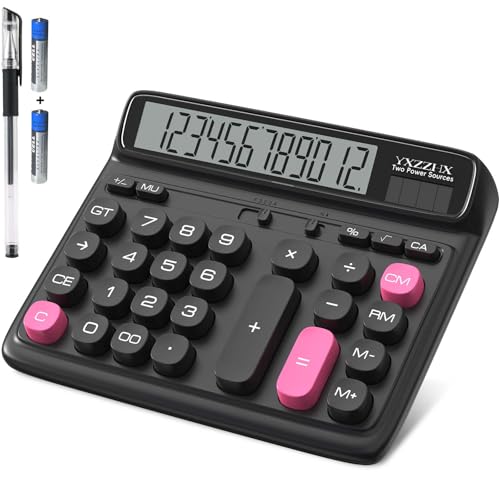
yxzzhx 5-Inch LCD Desktop Calculator
About this pick
The yxzzhx desktop calculator also uses a 5-inch LCD with twelve digits, giving it a screen on par with the pendancy. Its display is tilted for desk use, which keeps the numbers facing your eyes and reduces neck strain. The listing describes an ergonomic screen tilt aimed at lining up with your natural line of sight.
It runs on two way power, using sunlight or battery, and two AA batteries are provided. In good light it can also run without them. The trade is that a bigger screen means a bigger body, so it will not slip into a drawer as readily as the CATIGA 12 Digit.
Use it where it can stay put, such as a home office or a kitchen desk, with a window or lamp nearby. The angled screen is the headline benefit, because a flat calculator forces you to lean forward. If key color coding matters, the pendancy offers it, while this model puts the emphasis squarely on the display.
Best for: Desk users who want a large tilted screen and a choice of solar or battery power.
Check price on AmazonSpecs
- Display: 5 inch LCD, 12 digits
- Power: Solar or battery
- Batteries: 2 AA provided
- Screen: Tilted for desk use
Pros
- +5 inch LCD with twelve digits is easy to read
- +Tilted display lines up with your natural eye line
- +Runs on solar light or the two AA batteries provided
- +Reduces neck strain compared with a flat screen
Cons
- −Large body is harder to tuck into a drawer
- −Key layout lacks the color grouping of the pendancy
How We Evaluated These Large-Button Calculators
Each pick was assessed across 5 criteria weighted for real-world use.
Display readability
We looked at the number of digits, the stated screen size, and how each listing describes contrast. The pendancy and yxzzhx earned the highest marks because both state a 5-inch LCD. The other four were scored on how clearly their twelve digit screens are described. We did not measure digit height ourselves, so the scores reflect product specs and buyer feedback.
Key size and layout
Key shape, spacing, and labeling were weighed together, since a large key with no gap still causes errors. The M&G's recessed and raised design and the pendancy's color groups scored well here. We also considered how crowded each face feels. A simpler four function face gets credit for lower learning effort.
Screen angle and desk comfort
A tilted display was treated as a real comfort feature rather than a style note. The pendancy lists 30 degrees and the yxzzhx lists a tilted screen aligned to your eye line. Models without a stated angle were scored lower on this point. Anti-slip details and body weight were noted where the listing mentions them.
Power and upkeep
Dual power was favored because a dim room should not stop a calculation. We checked which batteries come in the box: the M&G includes an AAA, the HIHUHEN one AA, and the yxzzhx two AA. Models that list a solar panel as a helper only were noted as needing a spare cell. Auto power-off was counted as a plus where listed.
Lineup positioning
The CATIGA 12 Digit leads on simplicity, the pendancy and yxzzhx lead on screen size at 5 inches, and the HIHUHEN leads on function count with four memory keys. The Mr. Pen leads on key feedback with mechanical switches, and the M&G leads on key shape with recessed tops. No single pick wins every category, which is why the choice depends on your eyes, hands, and desk.
How to Choose the Right Large-Button Calculators
By Display Size
Start with how much help your eyes need, then match the screen.
| Situation | Pick | Reason |
|---|---|---|
| You read small print only with effort | pendancy 5-Inch LCD Desktop Calculator | Its 5-inch LCD gives the largest twelve digit readout here |
| You want a big screen that tilts toward you | yxzzhx 5-Inch LCD Desktop Calculator | 5-inch display tilted for desk use reduces leaning |
| Reading is fine but keys are the problem | M&G 12 Digit Desk Calculator | Recessed big buttons guide your fingertip |
| You want a plain screen on a small desk | CATIGA 12 Digit Desk Calculator | Large LCD with only four functions and a compact feel |
| You want clicks to confirm entries | Mr. Pen Mechanical Switch Calculator | Mechanical switches and a 6.2 x 4.4 inch body |
If a standard large LCD still strains your eyes after a day of use, a 5-inch model is the safer starting point.
By Budget
Tiers below follow feature level rather than exact cost, so check the current listing before you buy.
| Tier | Pick | What you get |
|---|---|---|
| Entry | CATIGA 12 Digit Desk Calculator | Four function basics with big buttons and a battery included |
| Entry to mid | M&G 12 Digit Desk Calculator | Recessed keys and dual power with an AAA battery included |
| Mid | Mr. Pen Mechanical Switch Calculator | Mechanical key feel in a compact 6.2 x 4.4 inch body |
| Mid to premium | HIHUHEN Large Electronic Calculator | Memory keys, rounding, percent, and square root |
| Premium | pendancy 5-Inch LCD Desktop Calculator | 5-inch screen, 30 degree tilt, and color grouped keys |
The yxzzhx belongs in the premium column when screen size is your top priority.
Recessed Keys vs Mechanical Switch Keys
Both aim at fewer missed presses, but they do it in different ways.
Recessed keys
Each key sits slightly below a raised rim, so your fingertip is guided into place and neighbors are harder to hit. The M&G 12 Digit Desk Calculator uses this shape, and the CATIGA 12 Digit Desk Calculator is a close, quieter cousin with big responsive buttons. Choose this side if you want a quiet press and accurate aim.
Mechanical switch keys
Each key has a real switch underneath, so you hear and feel a click that confirms the digit. The Mr. Pen Mechanical Switch Calculator is the pick on this side. Choose it if you rely on sound or touch rather than looking at the screen, and accept the louder press.
Quiet room and steady aim: recessed. Tired eyes and a private desk: mechanical.
By Power Source
Where the calculator sits and how often you use it should drive the power choice.
| Situation | Pick | Reason |
|---|---|---|
| Dim room most of the day | M&G 12 Digit Desk Calculator | AAA battery included alongside the solar cell |
| You want to start immediately | HIHUHEN Large Electronic Calculator | One AA battery comes in the box |
| Bright office with a window | yxzzhx 5-Inch LCD Desktop Calculator | Solar works in good light, with two AA batteries provided |
| You prefer fewer battery swaps | CATIGA 12 Digit Desk Calculator | Solar panel plus a battery that ships included |
Always keep a spare cell in a drawer, since a dead battery tends to fail on a busy day.
For Home Bill Paying Specifically
Monthly bills reward clarity and a few repeatable keystrokes.
Look for
Twelve digits so a large total never gets cut off, a clean clear key, and a screen angled toward you. If you add many bills in a row, memory keys are a bonus. Keep the decimal setting where you expect it.
In this comparison
The HIHUHEN Large Electronic Calculator is the strongest fit with its MC, MR, M+, and M- keys. The pendancy 5-Inch LCD Desktop Calculator is the best choice if reading the totals is the hard part. The CATIGA 12 Digit Desk Calculator handles plain sums with the least fuss.
Write the grand total on the bill before you clear the display, so one stray press does not cost you the answer.
When to Spend More
| Spend more if | Save if |
|---|---|
| You struggle with small print, move up to the pendancy 5-Inch LCD Desktop Calculator | Your eyes are fine with a standard large LCD, the CATIGA 12 Digit Desk Calculator is enough |
| You track running totals, the HIHUHEN Large Electronic Calculator adds four memory keys | You only add and subtract, skip memory and keep the M&G 12 Digit Desk Calculator |
| You work at a desk all day, the yxzzhx 5-Inch LCD Desktop Calculator has a tilted screen | You use it a few minutes a week, a flat compact unit like the Mr. Pen is fine |
| You want a click to confirm each digit, the Mr. Pen Mechanical Switch Calculator delivers | You share a quiet room, a conventional key model avoids the noise |
Spend where it fixes a real daily annoyance, not where it simply adds keys.
Frequently Asked Questions
How do I choose between a 5-inch display and a standard large display?
Think about how far you sit from the screen and how long you work. The pendancy and the yxzzhx use 5-inch LCDs, so they suit people who find twelve standard digits too small. The CATIGA 12 Digit, M&G, HIHUHEN, and Mr. Pen use ordinary large LCDs that are fine for most readers. If you lean forward to read, start with a 5-inch model.
Do large buttons really reduce mistakes?
Usually yes, because a wider key with a clear gap makes a missed press less likely. The shape matters as much as the size, since recessed tops like the M&G's help guide your finger. Raised keys and wide spacing also help if your hands are less steady. Expect fewer errors, but still look at the screen before you copy a total.
Is a talking calculator better for low vision?
Not necessarily. A talking model reads digits aloud, which helps if the display is hard to see even at a large size. The six picks here do not speak, but the pendancy and yxzzhx offer 5-inch screens that many low vision users still read comfortably. If numerals blur even then, look at a talking model instead.
How long does the solar and battery setup last?
The solar cell keeps the display going in a lit room, and the battery covers dim light. Models such as the M&G and HIHUHEN come with a battery, so you can start immediately. A weak display usually means the cell needs replacing, not that the unit has failed. Keep a spare AA or AAA on hand.
Are mechanical switch calculators too loud?
They are louder than conventional keys, because each press clicks like a keyboard. At home that feedback can be a benefit, since you know the digit registered. In a shared office or a quiet room the sound may bother others. The Mr. Pen is the one mechanical model in this lineup.
Do more functions make a calculator harder to use?
More keys mean more places to misfire, especially if memory and rounding settings are involved. The HIHUHEN includes MC, MR, M+, M-, percent, and square root, which helps bookkeeping but crowds the face. The CATIGA 12 Digit sticks to four functions. Pick based on what you do every week, not what you might do once.
How should I clean and care for a desk calculator?
A dry or slightly damp cloth works for the keys and screen. Avoid sprays, which can seep under the keys and into the circuit. Store it flat and out of direct heat so the LCD stays clear. Replace the battery when digits fade rather than letting it sit in the unit.
Bottom Line
best overall: CATIGA 12 Digit Desk Calculator - best overall pick in this roundup.
See the full rankings above for all picks with pros, cons, and best-for summaries.
Browse on Amazon
All Prime-eligible options with current pricing.
Shop on Amazon →