5 Best iPad Stands (2026)
Five iPad stands compared on size range, stability, height and portability, from compact desk docks to a 65 inch floor tripod for hands-free viewing.

At a Glance
An iPad stand sounds simple until you consider how differently people use one. Some want a small desk dock for video calls, some want a tall floor stand beside a recliner, and some need to carry it in a bag. The five picks here cover that range, from the UGREEN at about 4.7 by 4.2 inches folded to the SAMHOUSING tripod that extends from 16.7 to 65 inches.
Size support is the first spec to check. The UGREEN accepts devices from 4 to 11 inches, the Lamicall 4 to 13 inches, and the tounee 4.7 to 16.9 inches. The LISEN weighs 15.2 ounces and uses a gravity-based hold, while the tounee adds a locking mechanism and an all-metal alloy base.
We evaluated each stand using product specs and buyer feedback, focusing on how stable it stays, how easily it adjusts, and how well it fits an iPad in a case. This guide is written for active adults and the family members buying for them, so the advice favors simple adjustment and a stable base over gimmicks.
6 Criteria to Look For Before Buying a iPad Stands (2026)
Key buying criteria so you get the right fit the first time.
Supported screen size
Ranges differ widely: the UGREEN supports 4 to 11 inches, the Lamicall 4 to 13 inches, and the tounee 4.7 to 16.9 inches. Typical stands top out near 13 inches, so a 12.9 inch iPad Pro is the usual borderline case. Measure your iPad with its case. If you may upgrade later, buy for the larger size.
Case thickness
The UGREEN allows 0.55 inches including the case and the Lamicall uses an 18 millimeter hook width. Rugged cases quickly exceed those numbers. Measure the thickest part of your iPad with the case on and compare to the spec. A gravity-based design like the LISEN avoids the hook width problem.
Base weight and stability
The tounee has an all-metal alloy base and the SAMHOUSING tripod relies on its leg spread. Research shows taller arms behave like levers and need a heavier base, with some guides placing 4.5 pounds as a minimum for a full-size iPad at full extension. A light dock like the UGREEN is fine near the table. For tall setups, choose the heavier base.
Height and eye level
The SAMHOUSING reaches 65 inches and the tounee adjusts height with a locking mechanism, while the Lamicall and UGREEN sit low. Raising the screen toward eye level reduces forward neck bend. Video calls also look better when the camera sits near eye level. Use a tall stand for long sessions and a low dock for short ones.
Ease of adjustment
The UGREEN covers 15 to 100 degrees, the LISEN uses a bridge screw rod, and the tounee uses a locking mechanism. Hardly any listings document one-handed adjustment, yet it matters for stiff hands. Look for joints that hold their position without drooping. Test the stand for a few days and return it if it slips.
Portability versus permanence
The UGREEN folds to about 4.7 by 4.2 inches and the LISEN folds flat, while the tounee and SAMHOUSING are more permanent. If the stand moves between rooms, weight and fold size matter most. A stand that stays in one place can be larger and more stable. Be honest about how often you will carry it.
5 Best iPad Stands (2026)
Lamicall Adjustable iPad Stand
About this pick
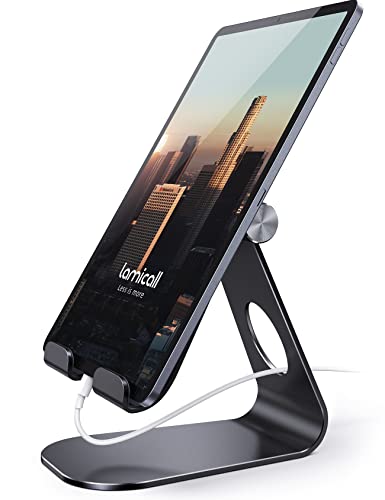
The Lamicall Adjustable iPad Stand is a sturdy aluminum dock that fits devices from 4 to 13 inches, covering every iPad from mini to Pro. It adjusts for vertical and horizontal viewing. Rubber pads and feet protect the device and keep the stand from sliding on a desk.
The hook width is 18 millimeters, so check that your iPad and case fit that gap. It is a balanced choice that does most things well without specializing. It suits people who want one dependable desk stand without a complicated setup.
Setup takes seconds, and the metal body wipes clean. It is not the tallest stand here, so it works best at a desk rather than for reading from a recliner. Compared with the UGREEN it supports up to 13 inches instead of 11, and compared with the tounee it is simpler but less adjustable in height.
Best for: Most iPad owners who want a sturdy desk dock
Check price on AmazonSpecs
- Device size: 4 to 13 inches
- Orientation: Portrait and landscape
- Hook width: 18 mm
- Material: Aluminum with rubber pads
Pros
- +Fits devices from 4 to 13 inches
- +Aluminum body feels solid
- +Rubber pads protect the iPad
- +Portrait and landscape supported
Cons
- −18 mm hook width limits thick cases
- −Not height adjustable like the tounee
tounee Dual Rod Aluminum Stand
About this pick
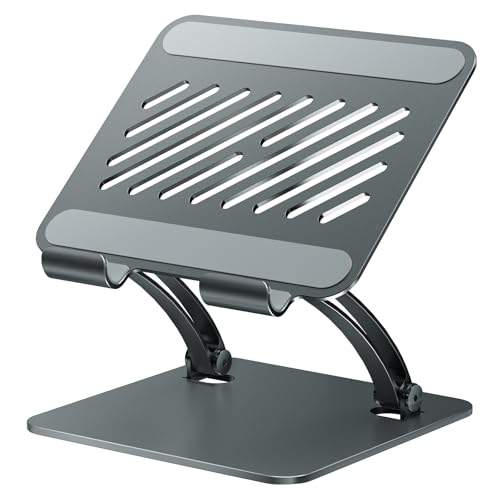
The tounee Dual Rod Aluminum Stand uses a locking mechanism to set height and angle, and it supports devices from 4.7 to 16.9 inches. The sturdy all-metal alloy base keeps it stable. It also works with Surface tablets, so households with mixed devices can share it.
The dual rod design gives more height control than a simple hook dock, but it also means more parts to adjust. It suits people with large iPads who want to raise the screen toward eye level. The locking mechanism is worth testing on arrival to ensure it holds under tapping.
Aluminum wipes clean, and the metal base adds heft. It is not pocket-size, so it lives on a desk. Compared with the Lamicall, it supports larger screens and adjusts height, while the UGREEN is far more portable.
Best for: Large iPads and mixed-device households
Check price on AmazonSpecs
- Device size: 4.7 to 16.9 inches
- Design: Dual rod, locking height and angle
- Base: All-metal alloy
- Compatibility: iPads, Surface, other tablets
Pros
- +Supports devices up to 16.9 inches
- +Locking height and angle adjustment
- +All-metal alloy base adds stability
- +Works with Surface and other tablets
Cons
- −Heavier and less portable
- −More adjustment steps than a simple dock
UGREEN Foldable iPad Stand
About this pick
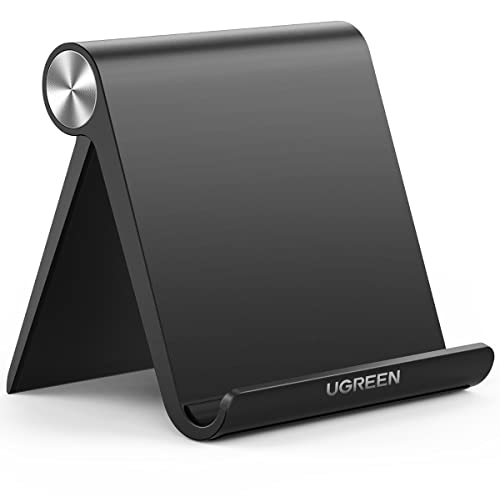
The UGREEN Tablet Stand is the compact choice, folding to roughly 4.7 by 4.2 inches. It holds 4 to 11 inch devices at angles from 15 to 100 degrees. That covers iPad mini, iPad Air and 11 inch iPad Pro.
Its limits are clear: the maximum device thickness is 0.55 inches including the case, and screens above 11 inches do not fit. A bulky protective case may push the iPad past the limit. It suits slim-cased iPads and anyone who wants a stand that disappears into a drawer.
It needs no assembly, and the foldable design fits in a pocket or bag. Compared with the Lamicall, it is smaller and cheaper in spirit but fits fewer sizes, and compared with the LISEN it gives a tighter grip.
Best for: Slim-cased iPads and small spaces
Check price on AmazonSpecs
- Device size: 4 to 11 inches
- Viewing angle: 15 to 100 degrees
- Folded size: 4.7 x 4.2 inches
- Max thickness: 0.55 inches with case
Pros
- +Folds to about 4.7 by 4.2 inches
- +Wide 15 to 100 degree range
- +Fits iPad mini through 11 inch Pro
- +Easy to carry or store
Cons
- −Case plus iPad must stay under 0.55 inches
- −No support above 11 inches
LISEN Foldable iPad Stand
About this pick
The LISEN iPad Stand folds flat and weighs 15.2 ounces, or 0.95 pounds. It uses a gravity-based system, with no clips or magnets, relying on back tilt to hold the iPad. A bridge screw truss rod keeps it extended and steady.
There is nothing to clamp, so you can drop the iPad in and out quickly. The tradeoff is that you must set the back tilt correctly and use it on a firm surface. It suits people who swap between iPad and other devices and dislike grips.
At nearly a pound it is not the lightest, but it is built to stand firm. It folds flat for travel. Compared with the UGREEN, it is heavier and more structural, and compared with the Lamicall it relies on gravity instead of a hook grip.
Best for: Quick drop-in use without clips
Check price on AmazonSpecs
- Weight: 15.2 ounces (0.95 pound)
- Hold: Gravity-based, no clips or magnets
- Adjustment: Height and angle with truss rod
- Folding: Folds flat
Pros
- +Gravity-based hold with no clips
- +Bridge screw adds stability
- +Folds flat for travel
- +Height and angle adjustable
Cons
- −Needs correct back tilt on a firm surface
- −At 0.95 lb it is heavier than dock stands
SAMHOUSING iPad Tripod Floor Stand
About this pick
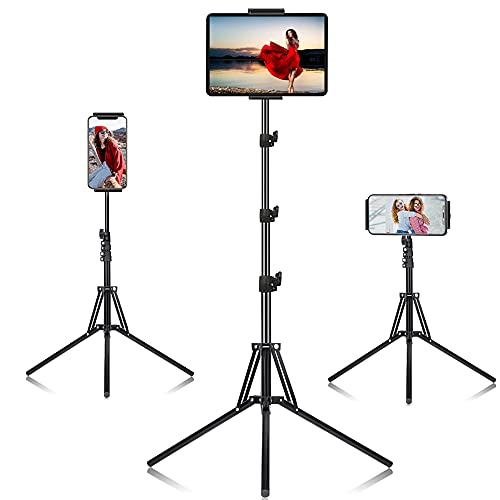
The SAMHOUSING iPad Tripod Stand is a floor stand with four height settings from 16.7 to 65 inches. The holder rotates 360 degrees, and a remote is included. It lets you place an iPad beside a chair, bed or treadmill without a table.
It is the most specialized pick here. The tripod needs floor space and a stable surface, and it is not designed to move between rooms daily. It suits people who watch or video chat from a recliner or bed and want a hands-free setup.
Setup involves extending the legs and choosing a height level. The tripod stores upright in a corner. Compared with the Lamicall, it adds height and distance, while the UGREEN is the opposite: low and portable.
Best for: Recliner or bedside viewing without a table
Check price on AmazonSpecs
- Height range: 16.7 to 65 inches
- Height levels: 4 settings
- Rotation: 360 degrees
- Extras: Remote included
Pros
- +Extends from 16.7 to 65 inches
- +Four height levels
- +360 degree rotation
- +Remote included
Cons
- −Takes floor space and is not portable
- −Tripod legs can be a trip hazard
How We Evaluated These iPad Stands (2026)
Each pick was assessed across 5 criteria weighted for real-world use.
Stability
We compared base materials and structures, from the tounee all-metal alloy base to the SAMHOUSING tripod legs. The more stable picks scored higher. We based this on specs and buyer feedback.
Size and case compatibility
We checked each stand's range, from the UGREEN at 4 to 11 inches to the tounee at 16.9 inches. We also noted case limits such as 0.55 inches. The Lamicall offered the best balance.
Adjustability
We looked at angle and height control, from the SAMHOUSING at four height levels to the UGREEN's 15 to 100 degrees. Simple, secure locks scored best. The most basic fixed-feeling option is the LISEN's gravity hold.
Portability
We rewarded stands that fold small, like the UGREEN. The tripod and tounee are the least portable. Weight in a bag mattered.
Ease of use for older users
We considered grips that are easy to operate and that hold without fiddling. Gravity holds and simple hooks ranked well. Multi-step locks counted slightly against.
How to Choose the Right iPad Stands (2026)
By iPad Size
| iPad | Recommended pick |
|---|---|
| iPad mini or 9th generation | UGREEN Foldable iPad Stand |
| iPad Air or 11 inch Pro | Lamicall Adjustable iPad Stand |
| 12.9 or 13 inch iPad Pro | tounee Dual Rod Aluminum Stand |
| Any iPad, drop-in use | LISEN Foldable iPad Stand |
| Any iPad, floor placement | SAMHOUSING iPad Tripod Floor Stand |
By Budget
| Budget tier | Recommended pick |
|---|---|
| Lowest-cost pick | LISEN Foldable iPad Stand |
| Low-to-mid | UGREEN Foldable iPad Stand |
| Mid-range | Lamicall Adjustable iPad Stand |
| Upper-mid | SAMHOUSING iPad Tripod Floor Stand |
| Premium for large devices | tounee Dual Rod Aluminum Stand |
Desk Dock vs Floor Stand
Desk dock
The Lamicall, UGREEN, LISEN and tounee sit on a table. They are compact and quick to use. They need a flat surface.
Floor stand
The SAMHOUSING stands from 16.7 to 65 inches beside a chair or bed. It needs floor space. It is best for hands-free viewing.
Choose the Lamicall for a desk and the SAMHOUSING for a recliner.
By Adjustment Style
| Preference | Recommended pick |
|---|---|
| Wide angle range | UGREEN Foldable iPad Stand |
| Locking height and angle | tounee Dual Rod Aluminum Stand |
| No clips or magnets | LISEN Foldable iPad Stand |
| Portrait and landscape hooks | Lamicall Adjustable iPad Stand |
| Remote and 360 rotation | SAMHOUSING iPad Tripod Floor Stand |
For Video Calls Specifically
Look for
A camera at roughly eye level, a stable base, and angle control. Low tablets show chins and ceilings.
In this comparison
The tounee raises a large iPad with its locking height, and the SAMHOUSING reaches 65 inches for standing calls. The Lamicall suits a normal desk setup.
When to Spend More
Spend more if
You have a 12.9 inch iPad Pro or need height. The tounee supports up to 16.9 inches and the SAMHOUSING reaches 65 inches.
Save if
You have a smaller iPad and a flat desk. The LISEN is the lowest-cost pick and the UGREEN adds portability.
Frequently Asked Questions
How do I choose between a dock stand and a tripod floor stand?
A dock such as the Lamicall sits on a table and keeps the iPad close, while the SAMHOUSING tripod stands from 16.7 to 65 inches beside a chair or bed. Choose a dock for desk work and a tripod for hands-free viewing away from a table. Many households end up using one of each.
How much should an iPad stand cost?
Prices range from the lowest-cost LISEN to the premium tounee. You mostly pay for size range and metal construction. A mid-range dock handles most needs.
Will my iPad case fit?
Check the numbers. The UGREEN allows 0.55 inches including the case and the Lamicall uses an 18 millimeter hook width. A gravity stand such as the LISEN avoids hook limits.
Do taller stands tip over?
They can if the base is light. Research notes that a high arm acts as a lever and needs a heavier base for a full-size iPad. The tounee uses an all-metal alloy base to address this.
Can one stand work with other tablets?
Yes. The tounee lists support for iPads and Surface tablets, and the Lamicall covers 4 to 13 inch tablets and phones. Always check the screen range.
How do I clean an aluminum stand?
Wipe it with a soft damp cloth and dry it. Avoid harsh cleaners near rubber pads. Check hinges and rods for grit.
Bottom Line
best overall: Lamicall Adjustable iPad Stand - best overall pick in this roundup.
See the full rankings above for all picks with pros, cons, and best-for summaries.
Browse on Amazon
All Prime-eligible options with current pricing.
Shop on Amazon →