5 Best E-Readers Under $75 in 2026
Five low-cost e-readers compared, from pocket E-Ink devices to a color-screen media reader and a 7 inch Android tablet, with honest tradeoffs for every reader.


At a Glance
The lowest rung of the e-reader market looks nothing like the famous names. You will not find a large sharp panel with a built-in bookstore here. What you will find is a mix of small E-Ink gadgets, a color-screen media reader and a budget Android tablet, each solving a different reading problem for very little money.
That variety makes the choice more interesting than it first appears. A 3.7 inch pocket reader and a 7 inch tablet are almost different product types, and picking by screen size alone can send you to the wrong one. The honest question at this level is how you read: in short bursts on the go, in long sessions at home, or in a mix of books, apps and video.
We evaluated these five from their listed specs and from patterns in buyer feedback, not hands-on testing. Read the cons carefully, because the weak spot of a cheap reader is rarely the screen. It is usually the software, the file formats it accepts or the lack of any store, and those details decide whether the device becomes a habit or a drawer item.
6 Criteria to Look For Before Buying a E-Readers Under $75
Key buying criteria so you get the right fit the first time.
E-Ink versus LCD screens
E-Ink reflects light like paper, which is why it stays readable in sunlight and tires the eyes less over a long evening. An LCD glows at you, handles color and video, and drains the battery far faster. Of the five picks, the Veidoo, XTEINK X3 and hamgeek RW01 are E-Ink, while the BK7019 and the HNVHNV use LCD or IPS panels. If you read for an hour or more at a time, start with an E-Ink pick.
Screen size and words per page
A small page means more page turns, and for many people that is the single biggest source of annoyance. As a rule of thumb, a 6 inch screen is the minimum for comfortable novel reading and anything under 4 inches is a short-session device. The Veidoo at 5.8 inches is close to that line, the X3 at 3.7 inches is a pocket tool and the hamgeek at 2.66 inches is the smallest. Pick the largest size you are willing to carry.
Where your books come from
None of these includes a bookstore like the major brands do, so you need to plan how books arrive. The Veidoo has WiFi and Android, the HNVHNV can install any store app through Google Play, and the BK7019 loads books from an SD card. The hamgeek and X3 expect you to copy files over. If you buy books regularly, the HNVHNV and Veidoo are the easiest to feed.
File formats you own
A reader that cannot open your files is a dead end. EPUB is nearly universal, but PDF and DRM-protected files are where cheap devices fall short. The BK7019 supports EPUB, PDF, TXT, FB2 and PDB, while the hamgeek RW01 is limited to TXT and EPUB. Check your own library before buying, especially if you hold many PDFs.
Battery life reality
E-Ink devices last weeks because the screen only draws power when the page changes. LCD devices last hours to a couple of days. The hamgeek RW01 states about a month of standby in clock mode, while the HNVHNV tablet needs regular charging. If you travel or dislike charging, favor the E-Ink picks.
Storage and expansion
Plain-text books are tiny, so storage matters mostly for audiobooks, comics and PDFs. The Veidoo offers 32GB with a TF card slot to 64GB, the hamgeek has 32GB and the HNVHNV pairs 32GB with expansion. Unless you carry thousands of scanned pages, any of these is more than enough.
5 Best E-Readers Under $75 in 2026
Veidoo 5.8 Inch Carta E-Ink Ebook Reader
About this pick
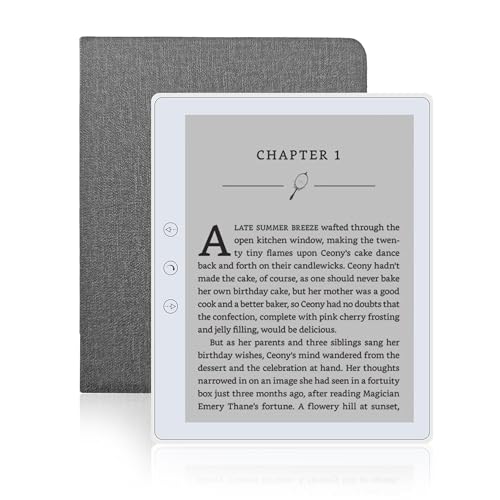
The Veidoo is the closest thing to a conventional e-reader in this price band. It uses a 5.8 inch Carta E-Ink touch screen, which gives you the matte, paper-like page that people actually want from the category. Storage is generous at 32GB, with a TF card slot that stretches it to 64GB, and a listing note says a cover is part of the package.
The tradeoff is size. A 5.8 inch panel shows fewer lines per page than a 6 or 7 inch one, so you turn pages more often and large-print readers will feel it. It also comes from a newer brand, so recent buyer feedback is worth reading before you commit, especially on software updates and support.
At 165 grams it is light enough for one-handed reading in bed, and it is the only pick here that pairs a full-size E-Ink screen with expandable storage and WiFi. Compared with the XTEINK X3 at 58 grams, it is bulkier but far easier on the eyes for long sessions. Compared with the HNVHNV tablet, it will last longer on a charge and avoids glare, but it cannot run video or the full range of apps a tablet can.
Best for: Readers who want a real E-Ink page for long evening sessions.
Check price on AmazonSpecs
- Screen: 5.8 inch Carta E-Ink touch
- Storage: 32GB, expandable to 64GB
- Weight: 165 grams
- Connectivity: WiFi
Pros
- +Carta E-Ink touch screen reads like paper
- +32GB onboard with a card slot to 64GB
- +Light 165 gram body for one-handed use
- +Cover included with the package per the listing
Cons
- −5.8 inch screen means more page turns
- −Newer brand, so check recent buyer feedback
- −No built-in bookstore, so you load books yourself
XTEINK X3 3.7 Inch Pocket E-Ink Reader
About this pick
The X3 is built for people who want a book to disappear into a pocket. At roughly 58 grams and 0.2 inch thick, it is thinner than most phones and lighter than a deck of cards, and a magnetic design lets it stick to metal surfaces. The paper-feel E-Ink panel is meant for focused reading rather than notifications.
Page turning is the clever part. You can tilt the device to flip pages using the gyroscope, or press the physical buttons, which is useful when you are holding a rail on a train or reading with one hand. That focus on single-hand use is the real reason to pick it over a larger screen.
The cost of all that portability is reading comfort. A 3.7 inch screen packs very little text per page, so a long novel means constant page turns and it is a poor match for dense layouts or larger type. Compared with the Veidoo at 5.8 inches, the X3 is easier to carry but harder to enjoy for hours. Compared with the hamgeek RW01 at 2.66 inches, it is a more serious reader that still fits in a jacket pocket.
Best for: Commuters and travelers who want the lightest reader possible.
Check price on AmazonSpecs
- Screen: 3.7 inch E-Ink
- Weight: About 58 grams
- Thickness: About 0.2 inch
- Page turning: Gyroscope and buttons
Pros
- +About 58 grams, easy to forget in a pocket
- +Gyroscope page turn works with one hand
- +Physical buttons back up the motion control
- +Paper-feel E-Ink display, no screen glare
Cons
- −3.7 inch screen means constant page turns
- −Poor fit for large type or dense layouts
- −Small page area tires the eyes on long reads
hamgeek RW01 2.66 Inch Mini E-Ink Reader
About this pick
The RW01 is a curiosity that works better than it sounds. Its 2.66 inch ink display sits in a body about 4 by 8.5 centimeters, which is closer to a key fob than a book. It has a backlight with a dark mode, 32GB of storage and support for TXT and EPUB files, so a large library of plain-text novels fits easily.
Battery life is the surprise. The maker states about a month of standby in clock mode and several weeks of use in reading mode, though the exact figure depends on how you read. That is a good fit for a drawer-to-pocket gadget that you pick up when you have a spare ten minutes.
Nobody should buy it as their only reader. The screen is tiny, so reading comfort drops fast on longer chapters, and the formats are limited to TXT and EPUB, so PDF owners are out of luck. Next to the XTEINK X3 at 3.7 inches, it is more portable and less practical. It suits a tinkerer, a gift for a commuter or a second device for waiting rooms, while the Veidoo is the better primary reader.
Best for: Commuters who want a second reader for short sessions.
Check price on AmazonSpecs
- Screen: 2.66 inch ink display
- Size: About 4 x 8.5 cm
- Storage: 32GB
- Formats: TXT and EPUB
Pros
- +Smallest, most pocketable pick in the group
- +Backlight with a dark mode option
- +32GB holds a very large text library
- +Weeks of reading per charge per the maker
Cons
- −Tiny screen limits comfort on longer chapters
- −Only TXT and EPUB files are supported
- −Not practical as your only reader
Gsycle BK7019 7 Inch Color Screen Reader
About this pick
The BK7019 is not an E-Ink reader at all. It uses a 7 inch color TFT LCD with a 16:9 ratio, and it handles EPUB, PDF, TXT, FB2 and PDB books from an SD card. It also plays MP3 music and shows photos, so it is closer to a simple media player that happens to read books.
A color panel has two clear benefits. PDFs with images, charts or recipe photos look right, and you can read in a bright room without the page looking washed out. Dedicated physical buttons turn pages, and a bookmark function helps you find your place, which makes the interface less fiddly than a touchscreen on a budget device.
The cost is eye comfort and battery life, because an LCD glows at you instead of reflecting light like E-Ink does. Long sessions on a backlit screen tire many readers, and the device lacks the weeks-long battery of the Veidoo or the hamgeek. Compared with the HNVHNV tablet at 7 inches, it is simpler and needs no account, but it cannot install apps. It is best as a PDF and music companion rather than a novel reader.
Best for: People who read PDFs, view photos and want music in one device.
Check price on AmazonSpecs
- Screen: 7 inch color TFT LCD
- Formats: EPUB, PDF, TXT, FB2, PDB
- Media: MP3 music and photos
- Storage: SD card
Pros
- +Color screen suits PDFs, photos and charts
- +Supports EPUB, PDF, TXT, FB2 and PDB
- +Physical page buttons and a bookmark function
- +Plays MP3 music from the same SD card
Cons
- −Backlit LCD tires eyes more than E-Ink
- −No store or apps, books come from a card
- −Battery life is shorter than E-Ink readers
HNVHNV 7 Inch Android Tablet E-Reader
About this pick
The HNVHNV is a small Android tablet that doubles as a reader, and it is listed as GMS certified, so Google Play comes pre-installed. That matters because you can install the reading apps you already use, from library apps to audiobook players, instead of being locked to a single store. The 1024x600 IPS touch screen is not sharp, but it is bright, and a quad-core Unisoc SC7731E processor handles basic apps.
The 6GB of memory is a bit of a headline. The listing shows 2GB of physical RAM plus 4GB of virtual memory, which is a software trick and not the same as real RAM, so expect modest speed. It adds 32GB of storage with card expansion, Bluetooth, WiFi and two cameras, which no E-Ink pick offers.
The tradeoff is the screen type. Reading on an LCD in bright sun is harder than on E-Ink, and the battery drains in a day or two instead of weeks. Compared with the BK7019 at the same 7 inches, it is a more capable device that costs you simplicity. Compared with the Veidoo, it wins on flexibility and loses on reading comfort, so choose it only if one gadget must do several jobs.
Best for: Readers who want library apps, video and games on one device.
Check price on AmazonSpecs
- Screen: 7 inch 1024x600 IPS
- Memory: 6GB RAM (2GB plus 4GB virtual)
- Storage: 32GB, expandable
- Cameras: 2MP and 5MP
Pros
- +Google Play is pre-installed per the listing
- +Runs your own reading and audiobook apps
- +Bluetooth and WiFi plus two cameras
- +Card slot expands the 32GB of storage
Cons
- −LCD is harder to read outdoors than E-Ink
- −Battery needs charging every day or two
- −Part of the 6GB memory is virtual, not real RAM
How We Evaluated These E-Readers Under $75
Each pick was assessed across 5 criteria weighted for real-world use.
Reading comfort
We compared screen type, size and likely eye strain over long sessions, based on listed panel specs and buyer feedback. The Veidoo's 5.8 inch Carta panel led, while the BK7019 and HNVHNV lost points for being backlit LCDs. The tiny hamgeek screen scored low for sustained reading.
Portability
This category weighs weight, thickness and pocket fit. The XTEINK X3 at roughly 58 grams and the hamgeek RW01 at about 4 by 8.5 centimeters lead, while the Veidoo at 165 grams sits in the middle. Tablets and the BK7019 are the bulkiest.
Content access
We looked at how easily a normal reader can get books onto each device. The HNVHNV with Google Play and the Veidoo with WiFi scored best, while card-loaded devices such as the BK7019 scored lower. Format support, including PDF, was part of the score.
Battery and upkeep
E-Ink devices earned credit for multi-week use, and LCD devices lost points for frequent charging. The hamgeek's stated month of standby was the best number on paper. We did not run battery drains ourselves, so these are editorial estimates.
Value at this budget
Since every pick is already inexpensive, value means how much of a true reading experience each one delivers. The Veidoo leads for balance, the X3 for portability and the HNVHNV for versatility. The BK7019 and hamgeek are niche tools with clear limits.
How to Choose the Right E-Readers Under $75
By Screen Type and Size
Screen technology and size decide most of the daily experience, so start here.
| Situation | Best pick | Why |
|---|---|---|
| Long evening novel reading | Veidoo 5.8 Inch Carta E-Ink Ebook Reader | Largest E-Ink page in the group at 5.8 inches |
| One-handed reading on a commute | XTEINK X3 3.7 Inch Pocket E-Ink Reader | 58 grams with gyroscope page turn |
| Short sessions in waiting rooms | hamgeek RW01 2.66 Inch Mini E-Ink Reader | Pocket-key-fob size with a backlight |
| Reading PDFs with pictures or charts | Gsycle BK7019 7 Inch Color Screen Reader | Color 7 inch panel supports PDF |
| Reading plus apps and video | HNVHNV 7 Inch Android Tablet E-Reader | Android with Google Play |
If you can only buy one, a 5.8 inch E-Ink screen is the most comfortable compromise here.
By Budget
Everything in this guide is already inexpensive, so the tiers show what each step buys inside the cap.
| Tier | Pick | What you get |
|---|---|---|
| Entry | hamgeek RW01 2.66 Inch Mini E-Ink Reader | Ultra-compact E-Ink with a backlight, for short reads only |
| Entry | Gsycle BK7019 7 Inch Color Screen Reader | Color screen and SD card playback, no store or apps |
| Mid | XTEINK X3 3.7 Inch Pocket E-Ink Reader | Pocket E-Ink with gyroscope and button page turns |
| Premium within cap | Veidoo 5.8 Inch Carta E-Ink Ebook Reader | Real reading screen with 32GB, WiFi and card slot |
| Premium within cap | HNVHNV 7 Inch Android Tablet E-Reader | Android, Google Play, cameras and 7 inch IPS |
Moving to a higher price class usually adds sharper screens and a bookstore, which none of these have.
E-Ink vs Backlit LCD
These screens behave differently, and the right one depends on how you use light.
E-Ink
E-Ink reflects ambient light, so it reads like printed paper and uses almost no power between page turns. The Veidoo, XTEINK X3 and hamgeek RW01 use it. Choose it for long reading sessions, outdoors use and travel.
Backlit LCD or IPS
A backlit panel shines light at you, shows color and runs video, but uses far more battery. The BK7019 and HNVHNV fall here. Choose this side if color PDFs, apps or video matter more than reading comfort.
Many buyers do best with an E-Ink reader for books and a phone for everything else.
By How You Load Books
Getting books onto the device is the hidden step in every budget reader.
| Method | Pick | What to know |
|---|---|---|
| Install a store or library app | HNVHNV 7 Inch Android Tablet E-Reader | Google Play brings your own apps |
| WiFi plus file transfer | Veidoo 5.8 Inch Carta E-Ink Ebook Reader | Android with WiFi and a TF card slot |
| Copy files over a cable | XTEINK X3 3.7 Inch Pocket E-Ink Reader | Best for people who manage their own files |
| Insert an SD card | Gsycle BK7019 7 Inch Color Screen Reader | Simple, but supports no store |
| Drop in plain text files | hamgeek RW01 2.66 Inch Mini E-Ink Reader | TXT and EPUB only |
Plan how you will buy or borrow books before you choose a device.
For Large-Print Readers Specifically
Bigger text needs a bigger page, and small screens suffer first.
Look for
Look for at least a 5.8 inch panel, adjustable font size and a backlight or front light. Fewer words per page means more turns, so prefer a screen you can hold comfortably with both hands.
In this comparison
The Veidoo at 5.8 inches is the best E-Ink choice for larger type, and the BK7019 and HNVHNV at 7 inches give the biggest pages, but with LCD glare. The X3 and hamgeek screens are too small to recommend for enlarged text.
Test font settings during the return window before you commit.
When to Spend More
A bigger budget changes what the device is, not only how well it works.
| Spend more if | Save if |
|---|---|
| You want a sharp 6 or 7 inch E-Ink screen with a built-in store | A 5.8 inch panel like the Veidoo's is good enough |
| You read in bed and need an adjustable warm light | You mostly read in daylight |
| You need waterproofing for the bath or beach | You read indoors and handle devices carefully |
| You want reliable software updates and support | You are comfortable with a lesser-known brand |
If you are unsure, buy the Veidoo first and decide whether an upgrade is worth it after a month.
Frequently Asked Questions
Which is better for reading, an e-reader or a tablet?
For long reading, E-Ink readers are easier on the eyes and last weeks per charge. A tablet like the HNVHNV is better if you also want apps, video and a camera. Many people find that a tablet is fine for short sessions but tiring for a whole novel.
Do these come with a bookstore?
No, and that is the biggest difference from the big-name readers. You load your own files or install a store app. The HNVHNV makes that easy through Google Play, and the Veidoo has WiFi, while the others rely on files you copy.
Is a 3.7 inch reader too small?
For short sessions and commuting it works well, and the XTEINK X3 is the lightest option. For long novels you will turn pages often and the text will feel cramped. If this is your only reader, the Veidoo's 5.8 inches is a better starting point.
Can I read PDFs on a budget e-reader?
Some can, but quality varies. The BK7019 lists PDF support and its color screen suits charts, while the hamgeek is limited to TXT and EPUB. Small E-Ink screens make fixed-layout PDFs hard to read, so zooming is usually needed.
Do cheap e-readers last?
E-Ink devices have few moving parts and tend to last, but build quality and software updates vary by maker. Check recent buyer feedback and keep your receipt. The Veidoo comes from a newer brand, so that advice applies most there.
Are the batteries replaceable?
Assume they are not, as most small devices use sealed batteries. Plan to keep the device charged and avoid leaving it fully drained for months. E-Ink models lose very little charge when idle, which helps.
What is the biggest mistake buyers make?
Buying by size or color alone. A color LCD sounds modern but tires the eyes, and a tiny E-Ink screen sounds clever but feels cramped. Match the screen type and size to how long you actually read each day.
Bottom Line
best overall: Veidoo 5.8 Inch Carta E-Ink Ebook Reader - best overall pick in this roundup.
See the full rankings above for all picks with pros, cons, and best-for summaries.
Browse on Amazon
All Prime-eligible options with current pricing.
Shop on Amazon →