6 Best Digital Talking Clocks in 2026
Six digital talking clocks that pair a readable display with a spoken time, compared on screen size, alarms, dimming and daylight saving.



At a Glance
A digital talking clock gives you two ways to read the time: you can look at the display or ask the clock to say it out loud. That pairing is the whole appeal for older eyes, because on a good day you glance across the room, and on a bad day you press a button and listen. The best models make both routes effortless rather than forcing a choice.
The picks here are all display clocks, so screen quality matters as much as the voice. We looked at screen size and resolution, how well each one dims at night, how many alarms and reminders it carries, and whether daylight saving changes happen on their own. Most of this lineup comes from one family of large screen clocks, so the differences are subtle and worth reading carefully.
We evaluated each pick based on product specs and buyer feedback, not hands-on lab work. The aim is a clock that a retired parent, or a busy adult, can set once and then stop thinking about.
6 Criteria to Look For Before Buying a Digital Talking Clock
Key buying criteria so you get the right fit the first time.
Screen size and resolution
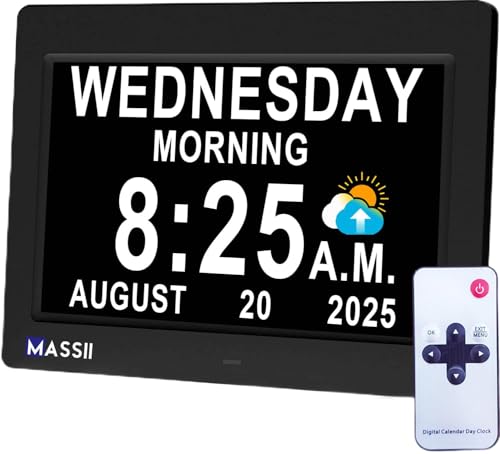
The point of a digital talking clock is that the display and voice back each other up, so the screen must be readable from where you sit. Measure the distance from your chair to the clock and favour larger numerals when that distance is long. The MASSII 11.5 Inch Extra Large Talking Clock gives 11.5 inches at 1280x800, while the GOLOZA is 7 inches. A bigger panel needs a roomier surface, so plan the shelf before you buy.
Dimming at night
A bright screen in a dark bedroom can wake a light sleeper and strain tired eyes. Look for a clock with several brightness levels or an automatic dimmer. The MASSII 27 Alarms Digital Talking Clock has 10 dimmer levels, and the MASSII Dementia Clock with Sleep Trainer adds smart dimming and a morning brightening cue. The RRSDJJ avoids the issue by showing time only briefly, projected for 5-10 seconds.
Alarm and reminder count
More alarms are useful only if you will program them. Count the reminders you actually need, such as medication, appointments and calls. The MASSII 27 Alarms clock offers 27 alarms and 20 custom reminders, the Teaching Clock offers 24, and the GOLOZA has unlimited alarms with 3 medicine reminders. If you only need a wake-up call, a clock with a simple snooze such as the RRSDJJ with its 10 minute snooze is enough.
Automatic daylight saving
Changing a clock twice a year is a small chore that older users often forget, leaving the display an hour off for weeks. Automatic daylight saving removes the problem if the clock keeps its settings. The MASSII 27 Alarms, the MASSII Dementia Clock and the Teaching Clock all advertise it. Check that your region follows daylight saving before relying on the feature.
Voice and volume steps
A talking clock should be understood without strain and without startling. Look for volume steps rather than a single loud setting, and test the first announcement at a low level. The GOLOZA gives 10 volume levels, which is the finest control in this lineup, while the MASSII 11.5 Inch is described as loud. Match the voice level to the room, not just the listener.
Menu complexity
Every extra function is another menu a helper may have to explain. Decide whether you want a clock that does one job well or a household command centre. The MASSII Digital Teaching Clock adds a checklist and calendar, while the RRSDJJ keeps to a dome press and a snooze. The simpler the menus, the more likely the clock is used correctly after the first week.
6 Best Digital Talking Clocks in 2026
MASSII 27 Alarms Digital Talking Clock
About this pick
This MASSII is the all-rounder of the group, with a 1280x800 HD display that speaks the time and date. It carries 27 alarms and 20 custom reminders, and its screen is described as blue-light-free with a soft glow. A 10-level dimmer and automatic daylight saving make it low maintenance once it is running.
The long feature list is the main caution. A person who simply wants a readable clock will never touch most of those reminders, and the dual timer controls add a layer of menus. It is best for a household that wants a single clock to handle wake-up, appointments and the occasional special event, with one family member handling the programming.
Day to day, the clock sits on a shelf or counter and mostly runs untouched. Against the MASSII Dementia Clock, which adds a sleep trainer and smart dimming, this model leans toward timers and seven timer cycles. Compared with the GOLOZA at 7 inches, it offers a bigger canvas, though the GOLOZA wins on volume steps.
Best for: Households that want one large clock for alarms, reminders and spoken time.
Check price on AmazonSpecs
- Resolution: 1280x800
- Alarms: 27
- Custom reminders: 20
- Dimmer: 10 levels
- Seven timer cycles: Yes
Pros
- +HD 1280x800 screen is crisp from across a room
- +27 alarms plus 20 reminders cover a full routine
- +Automatic daylight saving avoids manual resets
- +10-level dimmer keeps the glow comfortable at night
Cons
- −Long feature list is more than many people need
- −Timer and reminder menus take time to learn
MASSII Dementia Clock with Sleep Trainer
About this pick
This version of the MASSII emphasises the bedroom, with a sleep trainer that brightens the screen at a chosen morning time and dims it for bed. The IPS panel runs at 1280x800, and smart dimming shifts brightness without a button press. Voice announcements cover the date and time, and custom reminders can mark things like birthdays or meetings.
The sleep trainer is a pleasant extra for adults who wake in the night and want a gentle cue, but it is another setting to configure. Its screen is bright enough to read from the bed, and the auto daylight saving removes a twice-yearly chore. The cost is the same learning curve as its siblings, so a first-time user should expect an afternoon of tinkering.
Ownership is calm once configured. Compared with the MASSII 11.5 Inch Extra Large Clock, which offers a very similar feature set, this model is better described for dementia-friendly use and smart dimming. It has far more alarm slots than the RRSDJJ projection clock, but lacks the projection feature.
Best for: People who want a bedside clock that dims and brightens on a schedule.
Check price on AmazonSpecs
- Screen: IPS, 1280x800
- Alarms: 27
- Brightness: 10 levels, smart dimming
- Extra: Sleep trainer
Pros
- +Sleep trainer sets a clear morning and night cue
- +Smart dimming adjusts brightness automatically
- +IPS panel stays readable from a bedside angle
- +27 alarms leave room for medication and visits
Cons
- −Sleep trainer adds another setup step
- −Almost identical to other MASSII models
MASSII 11.5 Inch Extra Large Talking Clock
About this pick
At 11.5 inches, this is the largest screen in the lineup, and it is the clock to pick if reading distance is the problem. It speaks the time out loud, supports 27 alarms and 20 custom reminders, and offers an auto dimmer with 10 levels. Automatic daylight saving and a sleep trainer function round out the set.
Because it is so large, it needs a proper shelf or table surface rather than a crowded nightstand. That size is a strength in a living room or kitchen, where it can be read from a chair across the room, and a limitation in a small bedroom. Its voice is described as loud, which helps in noisy rooms but means you should check the volume before the first night.
In practice it behaves like a small wall calendar that also talks. Against the GOLOZA at 7 inches, it offers much more visual real estate, and against the Teaching Clock, it prioritises size over colour. The MASSII Dementia Clock matches its alarm count but uses a smaller IPS panel emphasis on sleep.
Best for: Anyone who needs the largest possible numerals across a room.
Check price on AmazonSpecs
- Display size: 11.5 inch
- Resolution: 1280x800
- Alarms: 27
- Dimmer: 10-level auto
Pros
- +11.5 inch screen reads easily from across a room
- +Loud talking time works in busy kitchens
- +10-level auto dimmer eases the glare at night
- +Sleep trainer function is included
Cons
- −Size needs a roomy shelf or counter
- −Loud voice may need turning down first
GOLOZA 7-Inch Digital Dementia Clock
About this pick
The GOLOZA is a compact 7-inch digital clock with a press-to-talk time announcement and ten volume levels. It also supplies three medicine reminders and unlimited alarms, plus holiday and birthday alerts that start three days ahead. For a smaller table, it feels less overwhelming than the 11.5-inch giants.
Its compact size is the trade: the numerals are smaller, so it suits closer viewing distances. The feature set is friendly, with prompts framed around medication and family events, but it lacks the HD resolution and dimming figures that the MASSII line advertises. It is a sensible choice for a nightstand or desk.
Ownership is about picking a volume once and leaving it. Versus the MASSII 27 Alarms clock, it gives you finer volume steps and fewer screen specs, and versus the RRSDJJ it is much more focused on seniors. If a calm, mid-sized display with easy loudness control is the goal, the GOLOZA hits that target.
Best for: Closer viewing distances where a mid-size screen and 10 volumes are enough.
Check price on AmazonSpecs
- Display: 7 inch
- Volumes: 10 levels
- Medicine reminders: 3
- Alarms: Unlimited
Pros
- +Ten volume levels allow fine loudness tuning
- +Three medicine reminders support a pill routine
- +Unlimited alarms avoid a slot ceiling
- +Compact 7-inch body fits a small table
Cons
- −Smaller numerals than the 11.5 inch model
- −No resolution or dimmer specs listed
MASSII Digital Teaching Clock Talking Time
About this pick
This MASSII takes a different approach, with large, colourful letters on a clear display and a checklist to-do view. It has 24 alarms that speak aloud, 20 custom reminders, a calendar and automatic daylight saving. The talking time feature makes it useful for anyone who wants the day spelled out.
It was designed as an interactive time-learning clock, so some of the design is playful. For older adults, that colourful layout can help separate morning from evening tasks, but the to-do list adds yet another function. It is the best fit for people who like to see their day laid out.
Setup rewards patience, but afterwards the daily routine is easy. It has three fewer alarms than the 27-alarm MASSII models and no sleep trainer, but it adds the checklist the others lack. Compared with the GOLOZA, it offers more reminders; compared with the RRSDJJ, it has a far larger library of alarms.
Best for: People who like a visual to-do list beside the spoken time.
Check price on AmazonSpecs
- Alarms: 24
- Reminders: 20 custom
- Extra: To-do checklist
- Daylight saving: Automatic
Pros
- +Colourful letters separate tasks at a glance
- +Checklist view helps plan the day
- +24 spoken alarms cover a busy schedule
- +Calendar and auto daylight saving included
Cons
- −Playful design may feel less traditional
- −Three fewer alarms than the 27-alarm models
RRSDJJ Voice Talking LED Projection Alarm Clock
About this pick
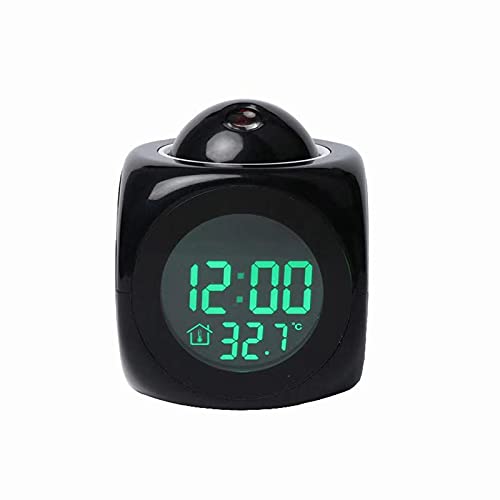
The RRSDJJ is the odd one out: a small bedside alarm that projects the time onto a surface for five to ten seconds after you press the dome. It also displays temperature, has a ten-minute snooze and five wake-up melodies, and gives a voice report of the time. That makes it a tidy bedroom companion rather than a household command centre.
Its limits are plain. The projection fades quickly, there is no listed alarm library on the scale of the MASSII line, and the listing offers little detail on volume. It is aimed at the general bedroom market rather than seniors, so reminders and medication prompts are not part of the package.
On the nightstand it is simple to use: press the dome, glance at the ceiling or wall, and listen. Against the MASSII Dementia Clock, which carries 27 alarms and a sleep trainer, this is a lighter and more modest concept. Compared with the Teaching Clock, it trades the checklist for a projection and a temperature readout.
Best for: A bedside clock that shows the time on the ceiling without sitting upright.
Check price on AmazonSpecs
- Projection: 5-10 seconds
- Snooze: 10 minutes
- Alarm tones: Five melodies
- Shows: Time and temperature
Pros
- +Projection shows time on a wall for 5-10 seconds
- +Temperature readout sits beside the time
- +Five alarm melodies give some choice
- +Ten minute snooze suits slow mornings
Cons
- −Few reminders compared with the MASSII clocks
- −Projection turns off after a short time
How We Evaluated These Digital Talking Clocks
Each pick was assessed across 5 criteria weighted for real-world use.
Display readability
We compared screen size, resolution and described brightness behaviour. The MASSII 11.5 Inch leads on size at 11.5 inches, and several MASSII models share the 1280x800 panel. The GOLOZA scores lower on size but remains suitable for close viewing.
Night comfort
Dimming and wake behaviour matter for bedrooms. The MASSII Dementia Clock with Sleep Trainer and the MASSII 27 Alarms clock lead with smart dimming and 10 brightness levels. The RRSDJJ takes an alternative route by showing the time only briefly.
Alarms and reminders
We counted how many alarms and reminders each clock offers and how easy they appear to schedule. The MASSII 27 Alarms clock leads with 27 alarms and 20 reminders, followed by the Teaching Clock at 24. The GOLOZA stands out for unlimited alarms and 3 medicine reminders.
Maintenance burden
Resets and upkeep were assessed from the listed specs. Automatic daylight saving on the MASSII models reduces chores, while the RRSDJJ lists none. We also weighed the learning curve of each menu structure.
Fit for older users
Although every pick talks, some are designed with seniors in mind. The GOLOZA and the MASSII Dementia Clock are framed around older users, whereas the RRSDJJ is a general bedroom product. Our ranking reflects both the stated audience and the practical features.
How to Choose the Right Digital Talking Clocks
By Viewing Distance
How far you sit from the clock should drive the screen choice.
| Situation | Pick | Why |
|---|---|---|
| Read from across a living room | MASSII 11.5 Inch Extra Large Talking Clock | Largest panel at 11.5 inches |
| Read from a bed or armchair | MASSII Dementia Clock with Sleep Trainer | IPS 1280x800 screen with smart dimming |
| Read at arm's length on a desk | GOLOZA 7-Inch Digital Dementia Clock | Compact 7-inch body is enough up close |
| Glance from the pillow without turning | RRSDJJ Voice Talking LED Projection Alarm Clock | Projects time for 5-10 seconds |
Stand where you usually sit and imagine the screen at that distance before deciding.
By Budget
Without quoting prices, rank the picks by how much capability they carry.
| Tier | Pick | What it adds |
|---|---|---|
| Entry | RRSDJJ Voice Talking LED Projection Alarm Clock | Projection, temperature and a simple snooze |
| Entry | GOLOZA 7-Inch Digital Dementia Clock | 10 volumes and 3 medicine reminders |
| Mid | MASSII Digital Teaching Clock Talking Time | 24 alarms plus a checklist view |
| Premium | MASSII 27 Alarms Digital Talking Clock | 27 alarms, 20 reminders and 10-level dimmer |
| Premium | MASSII 11.5 Inch Extra Large Talking Clock | The biggest screen with auto dimming |
The MASSII Dementia Clock sits at the premium end because of the sleep trainer.
Large Screen vs Compact Screen
Size changes where the clock can live and how far it can be read.
Large screen
A large panel gives the biggest numerals and reads from across a room, but it needs a deeper shelf and can overpower a small bedroom. The MASSII 11.5 Inch Extra Large Talking Clock, the MASSII 27 Alarms clock and the MASSII Dementia Clock belong here. Choose it for living rooms and kitchens.
Compact screen
A compact clock fits a nightstand and feels less intimidating, but numerals are smaller. The GOLOZA at 7 inches and the RRSDJJ projection clock sit on this side. Choose it when the clock will be within arm's reach.
If you cannot choose, place a large clock where you spend the day and a compact one by the bed.
By Feature Preference
Pick the extra that you will truly use.
| Preference | Pick | Reason |
|---|---|---|
| A to-do checklist | MASSII Digital Teaching Clock Talking Time | Checklist view with 20 custom reminders |
| A sleep schedule | MASSII Dementia Clock with Sleep Trainer | Morning brightening and night dimming cue |
| Fine volume control | GOLOZA 7-Inch Digital Dementia Clock | 10 volume levels |
| Temperature on the display | RRSDJJ Voice Talking LED Projection Alarm Clock | Shows temperature next to the time |
| Seven timer cycles | MASSII 27 Alarms Digital Talking Clock | Dual-control timer with cycles |
Ignore features that sound clever but do not match your routine.
For Bedroom Use Specifically
A bedroom clock must be gentle at night and clear in the morning.
Look for
Look for brightness levels that dim to a faint glow, a gentle wake cue and a volume that does not startle. A clock that can be read without lifting your head is a bonus. Avoid loud default settings.
In this comparison
The MASSII Dementia Clock with Sleep Trainer is the most bedroom-ready, with smart dimming and a morning cue. The RRSDJJ projects the time with a 10 minute snooze, and the MASSII 27 Alarms clock offers 10 dimmer levels. The 11.5 inch model may be too large for a small nightstand.
Test brightness in a dark room on the first night and adjust before it becomes a habit.
When to Spend More
Extra capability helps only when it matches a real need.
| Spend more if | Save if |
|---|---|
| Reading distance is long, so the MASSII 11.5 Inch is worth it | The clock sits within arm's reach and the GOLOZA is enough |
| You need 27 alarms, as on the MASSII 27 Alarms clock | One wake-up call is all you set, so the RRSDJJ suffices |
| Sleep structure helps, making the MASSII Dementia Clock useful | Dimming alone is enough on a simpler model |
| A visual to-do list helps, so the Teaching Clock is useful | A phone already holds your task list |
Buy for the routine you have now, not the one you imagine adopting.
Frequently Asked Questions
What makes a digital talking clock different from a regular talking clock?
A digital talking clock combines a screen with the voice, so you can read or listen. Simple button clocks only speak. The MASSII 27 Alarms clock, for example, pairs a 1280x800 display with a spoken time and date. This makes it more flexible for people whose eyesight changes from day to day.
Which digital talking clock has the largest display?
The MASSII 11.5 Inch Extra Large Talking Clock has the biggest panel in this lineup at 11.5 inches. It also carries 27 alarms and a 10-level auto dimmer. The GOLOZA is much smaller at 7 inches. Check shelf space before ordering the larger model.
How do I stop a bright clock from disturbing my sleep?
Use a clock with several brightness levels and set it to the lowest comfortable one. The MASSII 27 Alarms clock offers 10 levels and the MASSII Dementia Clock adds smart dimming. Position the screen away from your direct line of sight, and avoid placing it on a reflective surface that bounces the glow back at you. If you still wake to the light, turn the clock so the display faces the wall and rely on the spoken time instead. A projection clock like the RRSDJJ avoids the issue by lighting up only briefly.
Do I need all 27 alarms?
Most people will not. A typical routine needs a handful of alarms, such as morning, midday medication and evening. The extra slots matter only if you track many appointments, shifting visitors or a care schedule shared with relatives. Group related tasks into one alarm and give each a short, clear label, because 27 competing chimes become noise rather than help. The GOLOZA offers unlimited alarms, but you should still keep the list short to avoid confusion.
Are these clocks suitable for someone with dementia?
Several are framed that way, including the GOLOZA and the MASSII Dementia Clock. They show the day and date clearly and speak them aloud. Keep the settings simple and avoid changing the layout often. A caregiver should set it up rather than the person themselves. Put the clock in the same spot every day so that finding it becomes a habit, and review the alarms every few weeks to remove any that no longer apply.
Can a digital talking clock replace a phone alarm?
It can handle many of the same jobs, and it does not need charging each night. Models with 20 custom reminders, such as the MASSII 27 Alarms clock, cover appointments and events. Keep a backup alarm for anything critical. A dedicated clock also avoids the distraction of other phone notifications.
Why does my clock show the wrong time after the clocks change?
Clocks without automatic daylight saving need a manual reset. The MASSII models advertise automatic adjustment, while others may not. Check the setting in the menu and confirm your region. If the time is still off, recheck the time zone and the date.
Bottom Line
best overall: MASSII 27 Alarms Digital Talking Clock - best overall pick in this roundup.
See the full rankings above for all picks with pros, cons, and best-for summaries.
Browse on Amazon
All Prime-eligible options with current pricing.
Shop on Amazon →