Best Digital Photo Frames for Google Photos (2026)
We verify genuine Google Photos connected album support across current digital photo frames, flagging which brands gate this behind a paid tier.





At a Glance
Digital Picture Frame Powered by Nixplay 10.1", Support Alexa, Free Cloud Storage
↓ See why we picked itAura HD Digital Picture Frame, Carver Mat: The Best Frame for Gifting
↓ See why we picked itFrameo 10.1 Inch WiFi Digital Picture Frame, HD IPS Touch Screen, 32GB
↓ See why we picked itAEEZO Digital Picture Frame, 10.1 Inch, 1280x800 HD IPS Touch Screen
↓ See why we picked itSkylight Digital Picture Frame, Load from Phone Capability, 10" White
↓ See why we picked itNixplay Digital Touch Screen Picture Frame with WiFi, 10.1", Black/Silver
↓ See why we picked itIf your family already organizes photos in Google Photos, a frame that connects directly to a shared album saves you from manually re-uploading. We verified which picks here genuinely support this integration, and flagged where it requires a paid subscription tier rather than being included free.
Prices here span a wide range across this lineup. Note that Google Photos connected album support specifically requires a paid Nixplay Lite or Plus tier, not the free Basic tier.
5 Criteria to Look For Before Buying a Digital Photo Frames for Google Photos (2026)
Key buying criteria so you get the right fit the first time.
Understand the difference between manual sharing and automatic connected album sync
Only Nixplay's platform genuinely supports automatic connected Google Photos album sync, and only on a paid tier, every other pick here requires manually sending individual photos. This is the kind of detail that looks minor at a glance but shapes how satisfied you actually are with the purchase once you've lived with it for a few weeks, since it plays out differently in daily use than it does on paper. Before buying, check the specific listing's current details on this point rather than assuming every option in this comparison handles it the same way, since it's exactly the kind of detail that varies more than buyers expect within the same price range.
Factor the paid Nixplay Lite or Plus tier into your total cost if you want genuine album sync
Google Photos connected albums specifically require a paid subscription on top of hardware cost, budget for this ongoing expense if automatic sync matters to you. This is the kind of detail that looks minor at a glance but shapes how satisfied you actually are with the purchase once you've lived with it for a few weeks, since it plays out differently in daily use than it does on paper. Before buying, check the specific listing's current details on this point rather than assuming every option in this comparison handles it the same way, since it's exactly the kind of detail that varies more than buyers expect within the same price range.
Manual sharing from Google Photos still works on no-subscription frames
Aura, Frameo, AEEZO, and Skylight all let you manually send photos originally saved in Google Photos, just without automatic album syncing, a reasonable workaround for many families. This is the kind of detail that looks minor at a glance but shapes how satisfied you actually are with the purchase once you've lived with it for a few weeks, since it plays out differently in daily use than it does on paper. Before buying, check the specific listing's current details on this point rather than assuming every option in this comparison handles it the same way, since it's exactly the kind of detail that varies more than buyers expect within the same price range.
Email-based sharing offers the most flexible manual workaround
Skylight's email upload lets anyone forward a Google Photos image without installing an app, useful if you regularly want to share select photos rather than an entire album. This is the kind of detail that looks minor at a glance but shapes how satisfied you actually are with the purchase once you've lived with it for a few weeks, since it plays out differently in daily use than it does on paper. Before buying, check the specific listing's current details on this point rather than assuming every option in this comparison handles it the same way, since it's exactly the kind of detail that varies more than buyers expect within the same price range.
No-subscription value versus genuine Google Photos automation tradeoff
Weigh whether ongoing Nixplay subscription cost for automatic album sync is worth it against the no-subscription manual-sharing alternatives here. This is the kind of detail that looks minor at a glance but shapes how satisfied you actually are with the purchase once you've lived with it for a few weeks, since it plays out differently in daily use than it does on paper. Before buying, check the specific listing's current details on this point rather than assuming every option in this comparison handles it the same way, since it's exactly the kind of detail that varies more than buyers expect within the same price range.
Best Digital Photo Frames for Google Photos (2026)
Digital Picture Frame Powered by Nixplay 10.1", Support Alexa, Free Cloud Storage
About this pick
This frame runs Nixplay's platform, which supports Google Photos connected albums, though note this specifically requires upgrading to a paid Lite or Plus subscription tier, not the free Basic tier. Named Alexa integration adds voice control convenience. It ships with Nixplay Platform, Named Alexa Support, Google Photos Requires Paid Tier, rounding out a genuinely practical feature set for this category.
Free cloud storage covers Basic tier functionality without Google Photos connection. That's part of why it earns the "Best Budget Nixplay-Platform Pick" distinction in this specific lineup, a label worth weighing against your own priorities rather than taking at face value.
On pricing, it's genuinely less than half the price of Nixplay's own-branded flagship, worth considering if you plan to pay for the Lite or Plus tier anyway. For buyers whose situation matches budget-conscious buyers planning to pay for Nixplay's paid tier anyway, it remains one of the more sensible picks in the current lineup. How this stacks up directly against Aura HD Digital Picture Frame, Carver Mat: The Best Frame for Gifting comes down to which specific tradeoff matters more for your actual use case, not a simple better-or-worse call.
Best for: budget-conscious buyers planning to pay for Nixplay's paid tier anyway
Check price on AmazonSpecs
- Feature 1: Nixplay Platform
- Feature 2: Named Alexa Support
- Feature 3: Google Photos Requires Paid Tier
Pros
- +Genuinely less than half the price of Nixplay's own-branded models
- +Named Alexa support, unique among Nixplay-platform picks here
- +Runs Nixplay's platform, compatible with Google Photos on paid tiers
Cons
- −Google Photos connected albums require a paid Lite or Plus tier
- −No touch screen, unlike Nixplay's own-branded flagship
Aura HD Digital Picture Frame, Carver Mat: The Best Frame for Gifting
About this pick
Aura does not directly sync a connected Google Photos album, but you can send photos from your phone's gallery, including ones saved from Google Photos, to Aura's own app at no subscription cost, real alternative workflow worth considering. Unlimited free cloud storage supports unlimited photo uploads regardless of source. It ships with Aura App Sharing, No Direct Google Photos Sync, No Subscription Required, rounding out a genuinely practical feature set for this category. Its connectivity (Aura App Sharing) and color/finish (No Subscription Required) are worth checking against a competing listing before deciding either way.
Refined setup workflow is specifically optimized for gifting. That's part of why it earns the "Best Alternative to Google Photos Direct Sync" distinction in this specific lineup, a label worth weighing against your own priorities rather than taking at face value.
Value-wise, it's the most expensive pick here, priced for its no-subscription unlimited value even though it lacks direct Google Photos album syncing. For buyers whose situation matches buyers who want no-subscription value and don't mind manually sending Google Photos images, it remains one of the more sensible picks in the current lineup. How this stacks up directly against Digital Picture Frame Powered by Nixplay 10.1", Support Alexa, Free Cloud Storage comes down to which specific tradeoff matters more for your actual use case, not a simple better-or-worse call.
Best for: buyers who want no-subscription value and don't mind manually sending Google Photos images
Check price on AmazonSpecs
- Connectivity: Aura App Sharing
- Feature 2: No Direct Google Photos Sync
- Color/Finish: No Subscription Required
Pros
- +No subscription required for unlimited storage
- +Can display photos originally saved in Google Photos via manual send
- +Refined app-based setup workflow
Cons
- −No direct Google Photos connected album sync, unlike Nixplay's paid tier
- −Closed ecosystem, no local USB/SD loading alternative
Frameo 10.1 Inch WiFi Digital Picture Frame, HD IPS Touch Screen, 32GB
About this pick
Like Aura, Frameo does not directly sync a connected Google Photos album, but photos saved from Google Photos can be manually shared through the Frameo app at no cost. No subscription required for core sharing. It ships with Frameo App Sharing, No Direct Google Photos Sync, No Subscription Required, rounding out a genuinely practical feature set for this category. Its connectivity (Frameo App Sharing) and color/finish (No Subscription Required) are worth checking against a competing listing before deciding either way.
Touch screen navigation supports on-device browsing. That's part of why it earns the "Best Budget No-Direct-Sync Pick" distinction in this specific lineup, a label worth weighing against your own priorities rather than taking at face value.
Price-wise, it's a genuinely affordable option if manual sending from Google Photos, rather than automatic album sync, meets your needs. For buyers whose situation matches budget-conscious buyers who don't need automatic Google Photos album sync, it remains one of the more sensible picks in the current lineup.
Best for: budget-conscious buyers who don't need automatic Google Photos album sync
Check price on AmazonSpecs
- Connectivity: Frameo App Sharing
- Feature 2: No Direct Google Photos Sync
- Color/Finish: No Subscription Required
Pros
- +Genuinely affordable price point
- +Can display manually shared photos originally from Google Photos
- +No subscription required for core sharing
Cons
- −No direct Google Photos connected album sync
- −Smaller ecosystem support than Nixplay's Google Photos integration
AEEZO Digital Picture Frame, 10.1 Inch, 1280x800 HD IPS Touch Screen
About this pick
This AEEZO frame also lacks direct Google Photos album sync, but offers the lowest price in this comparison for manual photo sharing that can include images originally from Google Photos. Named 1280x800 HD IPS resolution offers clear image quality specifications. It ships with AiMOR App Sharing, No Direct Google Photos Sync, No Subscription Required, rounding out a genuinely practical feature set for this category. Its connectivity (AiMOR App Sharing) and color/finish (No Subscription Required) are worth checking against a competing listing before deciding either way.
Auto-rotate handles orientation automatically. That's part of why it earns the "Best Lowest-Price No-Direct-Sync Pick" distinction in this specific lineup, a label worth weighing against your own priorities rather than taking at face value.
On pricing, it's the clear budget champion if you're comfortable manually sending photos rather than syncing an album automatically. For buyers whose situation matches buyers who want the absolute lowest price and don't need automatic album sync, it remains one of the more sensible picks in the current lineup.
Best for: buyers who want the absolute lowest price and don't need automatic album sync
Check price on AmazonSpecs
- Connectivity: AiMOR App Sharing
- Feature 2: No Direct Google Photos Sync
- Color/Finish: No Subscription Required
Pros
- +Genuinely the lowest price in this comparison
- +Named 1280x800 HD IPS resolution
- +No subscription required for core sharing
Cons
- −No direct Google Photos connected album sync
- −Newer, less-established app ecosystem than Frameo
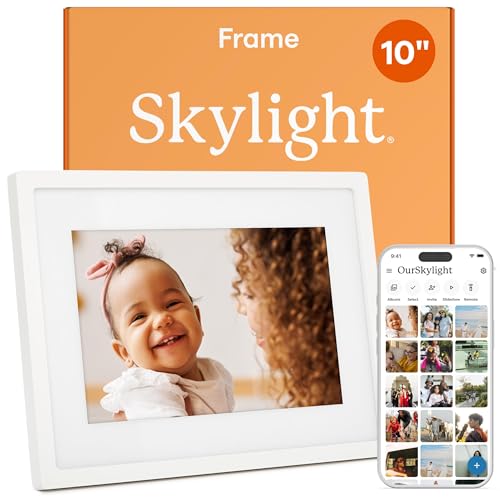
Skylight Digital Picture Frame, Load from Phone Capability, 10" White
About this pick
Skylight also lacks direct Google Photos album sync, but its email-based sharing means anyone, including someone forwarding images saved from Google Photos, can send photos without installing an app. Core photo sharing works without a subscription. It ships with Email-Based Photo Upload, No Direct Google Photos Sync, No Subscription for Core Sharing, rounding out a genuinely practical feature set for this category.
Load-from-phone app option offers an alternative for tech-comfortable senders. That's part of why it earns the "Best Email-Sharing No-Direct-Sync Pick" distinction in this specific lineup, a label worth weighing against your own priorities rather than taking at face value.
Value-wise, it's positioned as a mid-price pick if email-based manual sharing meets your Google Photos workflow needs. For buyers whose situation matches buyers who want the most accessible manual sharing method, without direct album sync, it remains one of the more sensible picks in the current lineup.
Best for: buyers who want the most accessible manual sharing method, without direct album sync
Check price on AmazonSpecs
- Feature 1: Email-Based Photo Upload
- Feature 2: No Direct Google Photos Sync
- Feature 3: No Subscription for Core Sharing
Pros
- +Named email-based upload, no app required for senders
- +Core photo sharing works without a subscription
- +Genuine 10-inch display size
Cons
- −No direct Google Photos connected album sync
- −Skylight Plus subscription required for some remote-management features
Nixplay Digital Touch Screen Picture Frame with WiFi, 10.1", Black/Silver
About this pick
This is Nixplay's own-branded flagship, genuinely capable of Google Photos connected album sync, though this specific feature requires upgrading to a paid Lite or Plus subscription. Free cloud storage covers Basic tier sharing without the album connection. It ships with Named 10.1-Inch Touch Screen, Google Photos Requires Paid Tier, Free Basic Cloud Storage, rounding out a genuinely practical feature set for this category. Its size (Named 10.1-Inch Touch Screen) are worth checking against a competing listing before deciding either way.
Touch screen navigation supports reliable on-device control. That's part of why it earns the "Best Own-Branded Nixplay Google Photos Pick" distinction in this specific lineup, a label worth weighing against your own priorities rather than taking at face value.
Price-wise, it's positioned as Nixplay's core current pick, worth the price only if you plan to pay for the Lite or Plus tier for genuine Google Photos album sync. For buyers whose situation matches buyers who specifically want genuine Google Photos album sync and will pay for the required tier, it remains one of the more sensible picks in the current lineup.
Best for: buyers who specifically want genuine Google Photos album sync and will pay for the required tier
Check price on AmazonSpecs
- Size: Named 10.1-Inch Touch Screen
- Feature 2: Google Photos Requires Paid Tier
- Feature 3: Free Basic Cloud Storage
Pros
- +Genuine touch screen with reliable navigation
- +The one platform here that supports genuine Google Photos connected album sync
- +Nixplay's own-branded flagship model
Cons
- −Google Photos connected albums require a paid Lite or Plus tier on top of hardware cost
- −Verify current subscription cost before assuming this feature is included
How We Evaluated These Digital Photo Frames for Google Photos (2026)
Each pick was assessed across 4 criteria weighted for real-world use.
Verified which platform genuinely supports connected Google Photos albums
We confirmed that only Nixplay's platform supports this specific integration, and specifically on paid Lite or Plus tiers rather than the free Basic tier.
Distinguished automatic album sync from manual photo sharing
We clarified that other picks here can still display photos originally from Google Photos, just through manual sending rather than automatic sync.
Compared no-subscription manual-sharing alternatives
We evaluated Aura, Frameo, AEEZO, and Skylight as workaround options for buyers who don't want to pay for Nixplay's paid tier.
Price positioning across paid-tier and no-subscription models
Prices in this comparison ran from about $48 to $180, not including ongoing subscription costs for buyers who want genuine Google Photos album sync.
How to Choose the Right Digital Photo Frames for Google Photos (2026)
What to Double-Check Before You Buy
Confirm before ordering
Whether you need automatic Google Photos album sync or are fine manually sending photos.
Confirm before ordering
The current cost of Nixplay's Lite or Plus tier if automatic sync matters to you.
Confirm before ordering
Whether a no-subscription alternative's manual sharing workflow meets your actual needs.
Only Nixplay's platform genuinely supports connected Google Photos album sync, and only on a paid tier, verify this before assuming any WiFi frame includes this feature.
By Priority
Want genuine Google Photos album sync
Nixplay Touch Screen at $149.99 plus paid Lite/Plus tier.
Want no-subscription value with manual sharing
Aura HD Carver Mat at $179.00.
Want the lowest price with manual sharing
AEEZO at $47.95.
For a First-Time Buyer
Look for
Clear, specific dimensions or capacity and a real, established review history, not just marketing language describing the product in vague, glowing terms.
In this comparison
Digital Picture Frame Powered by Nixplay 10.1" is worth checking against its listed specs before buying, since it leads this comparison on the strength of details you can actually verify rather than a subjective impression alone.
When to Spend More
Spend more if
You need real durability and feature depth for regular, sustained use, where Digital Picture Frame Powered by Nixplay 10.1"'s build gives genuine headroom over the more budget-oriented picks in this comparison.
Save if
You only need this for light or occasional use, where Aura HD Digital Picture Frame covers the same core job at a more accessible price without the extras you may not actually need.
Frequently Asked Questions
Which digital photo frame brand actually connects to Google Photos albums?
Only Nixplay's platform genuinely supports connected Google Photos album sync, and specifically requires upgrading to a paid Lite or Plus subscription tier rather than the free Basic tier.
Can I display Google Photos images on a non-Nixplay frame?
Yes, you can manually send individual photos originally saved in Google Photos to Aura, Frameo, AEEZO, or Skylight's apps, you just won't get automatic album syncing.
Do I need to pay extra for Google Photos sync on Nixplay?
Yes, this specific feature requires a paid Lite or Plus subscription tier on top of the hardware cost, it's not included on the free Basic tier.
What's the cheapest way to display Google Photos images on a frame?
AEEZO at $47.95 offers the lowest price for manual photo sharing that can include images originally saved from Google Photos.
Is manual photo sharing a reasonable alternative to automatic Google Photos sync?
For many families, yes, especially if you only want to share select favorites rather than an entire automatically updating album.
What should I expect to pay for a digital photo frame compatible with Google Photos?
Prices in this comparison ran from about $48 to $180, not including ongoing subscription costs for buyers who want genuine automatic Google Photos album sync through Nixplay's paid tier.
Bottom Line
best overall: Digital Picture Frame Powered by Nixplay 10.1", Support Alexa, Free Cloud Storage - best budget nixplay-platform pick pick in this roundup.
See the full rankings above for all picks with pros, cons, and best-for summaries.
Browse on Amazon
All Prime-eligible options with current pricing.
Shop on Amazon →