6 Best Casio Large-Button Calculators in 2026
Six Casio desktop and compact calculators compared on display size, digit count, key layout and tax or margin functions for easy everyday number work.



At a Glance
Casio is the name many people reach for when they want a calculator that simply works, and its desktop range covers everything from a pocket-sized six-function unit to a twelve-digit business model. The catch is that Casio markets display size and key feel quite differently from one model to the next, so a quick glance at the box does not tell you which one is easiest on aging eyes.
This guide narrows the field to six Casio models from the listings we reviewed. We looked at digit count, display description, size, power source and the extra function keys each one carries, then placed them against a simple question: how easy is it to read and press without squinting or second-guessing a key?
None of these is a specialist low-vision device, and we say so plainly where a model is more compact than it is large. Treat the ranking as a way to match a Casio to your desk, your checkbook routine and your eyesight.
6 Criteria to Look For Before Buying a Casio Large-Button Calculator
Key buying criteria so you get the right fit the first time.
Display digit count
Digit count decides how much of a long number you can see at once. Eight digits covers grocery and utility sums, while twelve is better for annual budgets or invoices. Among the Casios here the DM-1200BM shows 12 digits, the JF-100BM shows 10, and the MS-80B, SL-300SV and HS-8VA each show 8. If you ever add figures above a million, choose the DM-1200BM.
Physical size of keys
Larger keys cut mistakes, especially if your fingertips are less precise or you wear glasses and cannot see the labels well. A desktop footprint generally means bigger keys than a pocket model. The HS-8VA measures 4 by 2.25 inches and so has the smallest keys, while the DM-1200BM is the roomiest. Test how far apart the keys sit if you tend to hit two at once.
Tax and currency keys
Dedicated tax keys save you from doing percentages by hand, which is where many arithmetic slips happen. Look for them only if you add sales tax or convert prices regularly. The MS-80B offers tax and currency exchange, and the DM-1200BM adds tax plus cost, sell and margin keys. Skip them if you want the plain SL-300SV layout.
Power source reliability
A calculator that dies mid-sum is more annoying than one with a slightly smaller screen. Solar cells remove routine battery changes but need decent light. The SL-300VC is listed as solar powered, which suits a bright desk. Check the listing or the packaging for the power source of any model before you buy.
Memory function style
Memory keys let you hold a number while you work out others, useful for balancing a checkbook. Independent memory keeps the stored value separate from the running total so you do not lose either. The JF-100BM lists independent memory, and the MS-80B and HS-8VA list memory keys. Choose one with memory if you compare several totals in one sitting.
Body size and portability
A big calculator reads better but travels poorly, and the reverse is true for tiny ones. Decide where it will live before you choose. The HS-8VA weighs 1.23 oz and is only 0.3 inches thick, while the SL-300SV is described as compact enough for a briefcase. If it stays on a desk, favour the larger readout over portability.
6 Best Casio Large-Button Calculators in 2026
Casio DM-1200BM Business Desktop Calculator
About this pick
The DM-1200BM carries the biggest readout in this Casio group, a twelve-digit extra-large display aimed at finance and office work. That extra width means long totals such as household budgets or invoice sums fit on screen without being cut off or rounded away.
Dedicated cost, sell and margin keys sit alongside add and subtract tax keys. They are useful if you sell crafts, run a small side business or simply like to check a markup, but they add keys that a casual user will never touch. Someone who only needs basic arithmetic may find the busier layout slightly more to learn than the plainer models.
On a desk it behaves like a proper business unit rather than a pocket gadget, so plan for a bit more room than the HS-8VA needs. Compared with the eight-digit MS-80B it shows four more digits, which is the clearest reason to choose it for larger sums. If you want the most readable Casio here and do not mind extra function keys, this is where to start.
Best for: People who want the widest, most readable Casio display for bigger totals and occasional margin math.
Check price on AmazonSpecs
- Display: 12 digits
- Special keys: Cost/Sell/Margin, tax
- Style: Business desktop
Pros
- +Twelve-digit display handles long totals without cutting numbers off
- +Extra-large screen is the easiest to read in this Casio group
- +Dedicated cost, sell and margin keys speed up markup checks
- +Tax keys add or remove tax in one step
Cons
- −Business keys add clutter if you only need basic sums
- −Larger body needs more desk space than compact models
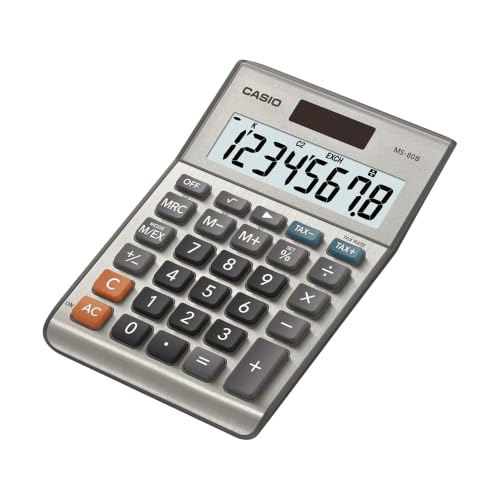
Casio MS-80B Desktop Calculator
About this pick
The MS-80B pairs a clear eight-digit display with tax and currency exchange keys, which makes it a sensible choice for household bills and travel budgeting. Memory keys let you store a running figure, so you can check a few receipts and recall the subtotal without writing it down.
Its strength is that it stays general purpose. You get the practical extras without the profit-margin keys found on the DM-1200BM, so the key layout feels less crowded. The trade-off is the shorter display: eight digits is plenty for grocery and utility sums but too narrow for large business figures.
In daily use it works as a tidy desk companion that sits between the twelve-digit DM-1200BM and the compact SL-300SV. If you convert foreign prices or add sales tax often, those dedicated keys save you from doing the percentage in your head. If you never touch either function, the plainer SL-300SV gives you the same eight digits with less to learn.
Best for: Households that add sales tax or convert currency and want a simple eight-digit display.
Check price on AmazonSpecs
- Display: 8 digits
- Special keys: Tax, currency exchange
- Memory: Memory keys
Pros
- +Currency exchange key suits travel budgets and online orders
- +Tax keys add or remove sales tax without manual percentages
- +Memory keys store a running subtotal while you check receipts
- +Eight digits cover most household sums comfortably
Cons
- −Eight digits is too narrow for large business totals
- −Tax and currency setup needs a rate entered before first use
Casio SL-300SV Standard Function Calculator
About this pick
The SL-300SV is a standard-function desktop model built around a clear eight-digit display. Casio describes it as space saving, and it is meant to fit a small desk or travel in a briefcase without feeling like a toy.
Its appeal is restraint. There are no tax, currency or margin keys to learn, so every press does what the label says, which helps anyone who dislikes menus and special modes. The downside is that you get none of the shortcuts the MS-80B offers, and the compact footprint means smaller keys than a full-size business desktop.
For ownership, it suits a kitchen drawer or a bedside table where you want a dependable calculator for sums and checkbook balancing. Next to the solar SL-300VC it has the same basic purpose but a silver finish rather than blue. Choose it when you want the plainest possible Casio with a readable eight-digit screen.
Best for: Anyone who wants a plain, uncluttered Casio for everyday sums and limited desk space.
Check price on AmazonSpecs
- Display: 8 digits
- Type: Standard function
- Size: Compact
Pros
- +No special modes, so every key does exactly what it says
- +Compact body fits a crowded desk or a briefcase
- +Eight-digit display is clear for bills and checkbooks
- +General purpose layout is quick to learn
Cons
- −Keys are smaller than on a full-size desktop model
- −No tax, currency or memory shortcuts for extra tasks
Casio SL-300VC Solar Powered Calculator
About this pick
The SL-300VC is the solar-powered member of this group, finished in blue. Its listing is brief, naming it a standard function calculator, so the case for it rests on simple operation and not needing to think about batteries.
A solar cell suits a calculator that lives on a desk near a window or under a lamp, because you are unlikely to run into a dead cell during a tax-season session. The compromise is that very dim rooms may matter more here than on a model with a battery backup, and the listing gives us fewer details about display size than the others do.
In practice it is the low-fuss choice when you want something you can leave in a drawer for months. Compared with the SL-300SV it focuses on the power source, while the SL-300SV is the one whose listing states an eight-digit display. Pick it for the colour and the solar convenience, and check the screen in person if reading size is your main concern.
Best for: People who want a basic Casio that does not need battery changes and will sit in a bright spot.
Check price on AmazonSpecs
- Power: Solar
- Type: Standard function
- Color: Blue
Pros
- +Solar power removes routine battery changes
- +Plain standard function layout stays easy to learn
- +Blue finish is easy to spot among desk clutter
- +Suits a desk near a window or lamp
Cons
- −Listing gives few display details, so check readability yourself
- −Dim rooms may limit solar performance
Casio JF-100BM Standard Function Calculator
About this pick
The JF-100BM lists a big display with ten LCD digits, placing it between the eight-digit models and the twelve-digit DM-1200BM. The multicolor body helps you tell keys apart at a glance, which can be a real help when digits blur together.
Independent memory means the stored figure is kept separate from the running total, a feature that suits budgeting where you want to hold a target number while you add other items. The listing is short, so details like key size and power source are not stated and you should confirm them before buying.
As a daily tool it feels like a sensible middle step if eight digits feels tight but a business model feels like too much. It offers two more digits than the MS-80B and two fewer than the DM-1200BM. Choose it if colour contrast and a ten-digit readout matter more to you than tax or currency shortcuts.
Best for: Buyers who want a ten-digit readout and colour-coded keys without business functions.
Check price on AmazonSpecs
- Display: 10 digits
- Memory: Independent
- Color: Multicolor
Pros
- +Ten digits give more headroom than the eight-digit Casios
- +Multicolor body helps separate key groups visually
- +Independent memory holds a target while you add items
- +Standard layout avoids business-key clutter
Cons
- −Listing omits key size and power source details
- −No tax or currency keys for those tasks
Casio HS-8VA Mini 6-Function Calculator
About this pick
The HS-8VA is the smallest Casio here, measuring 4 by 2.25 by 0.3 inches and weighing just 1.23 ounces. It still carries an eight-digit LCD and memory keys, which keeps it useful for quick sums at home, school or the shop.
That tiny body is the whole trade-off. Keys and digits are necessarily smaller than on the desktop models, so it is the weakest pick if reading size is your main worry. It earns its place as a purse or pocket backup rather than as the calculator you use for a long budgeting session.
It makes sense as a second calculator for errands, paired with a larger unit like the DM-1200BM at home. At roughly a fraction of the weight of any desktop model, it travels easily, but it asks for steady fingers. Choose it for portability and treat it as a companion rather than a primary desk tool.
Best for: Anyone who wants a pocketable backup calculator for errands, with the understanding that its keys are small.
Check price on AmazonSpecs
- Size: 4 x 2.25 x 0.3 in
- Weight: 1.23 oz
- Display: 8 digits
Pros
- +Weighs only 1.23 oz, so it slips into a pocket or purse
- +Eight-digit LCD is still readable for quick sums
- +Memory keys store a figure for short checks
- +Thin 0.3 inch body fits in a wallet sleeve
Cons
- −Small keys are harder to hit than on desktop models
- −Not suited to long budgeting sessions
How We Evaluated These Casio Large-Button Calculators
Each pick was assessed across 5 criteria weighted for real-world use.
Readability of the display
We compared the digit count and screen description for each Casio, since readable numbers are the main reason to buy a larger calculator. The DM-1200BM leads with 12 extra-large digits, the JF-100BM follows with 10, and the rest show 8. This is based on product specs, not on a lab reading test.
Key layout and clutter
We looked at how many special-function keys each model adds to the basic arithmetic grid. Fewer extra keys mean less to learn, which favours the SL-300SV and SL-300VC. Models like the DM-1200BM trade a busier layout for business shortcuts.
Useful extras
We counted tax, currency, margin and memory functions that real households use. The MS-80B stands out for currency exchange, while the DM-1200BM stands out for cost, sell and margin. Extras only helped a pick when they fit a plausible everyday task.
Power and portability
We noted solar power, compact size and weight, using the stated numbers from each listing. The HS-8VA is the lightest at 1.23 oz, while the SL-300VC is the one listed as solar powered. Details missing from a listing are flagged rather than guessed.
Fit for the stated purpose
Because every pick is a Casio, we positioned them by use: the DM-1200BM for bigger work, the MS-80B for tax and currency, the SL-300SV for plain sums, and the HS-8VA for carrying. Scores reflect editorial judgment from product specs and buyer feedback, not hands-on measurement.
How to Choose the Right Casio Large-Button Calculators
By Display Size
Digit count is the clearest difference between these Casios, so start there.
| Situation | Pick | Why |
|---|---|---|
| Large totals or invoices | Casio DM-1200BM Business Desktop Calculator | Shows 12 digits on an extra-large display |
| Mid-size sums, wants colour | Casio JF-100BM Standard Function Calculator | Ten digits with a multicolor body |
| Household bills and receipts | Casio MS-80B Desktop Calculator | Eight digits plus tax and memory keys |
| Basic sums on a small desk | Casio SL-300SV Standard Function Calculator | Eight digits, compact, no extra modes |
| Quick sums away from home | Casio HS-8VA Mini 6-Function Calculator | Eight digits in a 1.23 oz body |
If reading comfort is the priority, pick the model with the most digits and the largest body.
By Budget
Relative tiers help you decide how much function you are paying for.
| Tier | Pick | What you get |
|---|---|---|
| Entry | Casio HS-8VA Mini 6-Function Calculator | Pocket size with eight digits and memory keys |
| Entry | Casio SL-300VC Solar Powered Calculator | Basic solar-powered arithmetic |
| Mid | Casio SL-300SV Standard Function Calculator | Compact desktop with an eight-digit display |
| Mid | Casio JF-100BM Standard Function Calculator | Ten digits and independent memory |
| Premium | Casio DM-1200BM Business Desktop Calculator | Twelve digits, margin and tax keys |
The MS-80B sits between mid and premium because it adds tax and currency functions.
Solar vs Battery Power
The power source changes how much you have to think about the calculator.
Solar
A solar cell runs from room light, so you never replace a cell on a regular schedule. The Casio SL-300VC is the pick listed as solar powered. Choose solar if the calculator lives near a window or under a desk lamp.
Battery or unspecified
Other listings here do not state a power source, so check the product page for the DM-1200BM, MS-80B, SL-300SV, JF-100BM and HS-8VA. A battery model works in dim rooms but needs an occasional replacement. Choose these if you work in low light or want the features they carry.
Function Needs
Match the extra keys to what you actually calculate.
| Task | Pick | Key to use |
|---|---|---|
| Add sales tax to a purchase | Casio MS-80B Desktop Calculator | Tax keys |
| Convert foreign prices | Casio MS-80B Desktop Calculator | Currency exchange |
| Check profit on items you sell | Casio DM-1200BM Business Desktop Calculator | Cost, sell and margin keys |
| Hold a target number while adding | Casio JF-100BM Standard Function Calculator | Independent memory |
| Just add and subtract | Casio SL-300SV Standard Function Calculator | Standard function keys |
For Checkbook and Bill Paying Specifically
Bill paying needs clear digits and a way to hold a balance.
Look for
Look for at least eight digits, a memory function and keys that are easy to separate by sight. Avoid cramped pocket models for long sessions. A tilted or larger readout helps if you read from a seated position.
In this comparison
The Casio MS-80B and Casio JF-100BM both include memory, with the MS-80B adding tax keys. The Casio DM-1200BM gives the roomiest readout with 12 digits. The Casio SL-300SV is the simplest if you want no extras.
When to Spend More
A higher tier only pays off when its features match your tasks.
| Spend more if | Save if |
|---|---|
| You add figures into the millions, choose the Casio DM-1200BM | You only do small household sums, choose the Casio SL-300SV |
| You sell items and need margin checks, choose the Casio DM-1200BM | You never calculate markup, skip the business keys |
| You convert currency, choose the Casio MS-80B | You never travel or buy abroad, skip currency keys |
| You want colour-coded keys and ten digits, choose the Casio JF-100BM | Eight digits is enough, choose the Casio HS-8VA |
Extra features help only when you use them.
Frequently Asked Questions
Which Casio here has the biggest display?
The Casio DM-1200BM lists an extra-large 12-digit display, the most digits in this group. The JF-100BM follows with 10 digits, and the other three show 8. If readability is your main concern, the DM-1200BM is the safest starting point.
Are these true large-button calculators?
Not all of them. Casio describes several as having a big or large display, but key size is not stated in most listings. The desktop models are roomier than the HS-8VA, which measures only 4 by 2.25 inches. If key size is critical, compare actual dimensions before buying.
Do I need the business functions on the DM-1200BM?
Only if you calculate profit margins or add and subtract tax regularly. The cost, sell and margin keys are useful for small sellers, but they add buttons a casual user ignores. For plain household arithmetic, the SL-300SV or MS-80B is easier to learn.
Which model is easiest to use for basic sums?
The Casio SL-300SV is the plainest, with a standard function layout and no special modes. The solar SL-300VC is similar in purpose. Both avoid tax and margin keys that can confuse a first-time user.
How do I keep a calculator working for years?
Keep it dry, store it away from direct heat and avoid pressing hard on the keys. Solar models like the SL-300VC need bright light to charge, so avoid leaving them in a dark drawer for long periods. Check the listing for the battery type if your model uses one.
Is the HS-8VA a good primary calculator?
It works better as a backup. At 1.23 oz and 0.3 inches thick it is easy to carry, but the keys and digits are small. For a main desk calculator, choose the DM-1200BM, MS-80B or SL-300SV.
Bottom Line
best overall: Casio DM-1200BM Business Desktop Calculator - best overall pick in this roundup.
See the full rankings above for all picks with pros, cons, and best-for summaries.
Browse on Amazon
All Prime-eligible options with current pricing.
Shop on Amazon →