Best Camera-Free Robot Vacuums
We compared eight current robot vacuums that navigate without an onboard camera, looking at LiDAR versus bump navigation, obstacle handling.


At a Glance
eufy C28 Robot Vacuum and Mop Combo, 15,000 Pa, HydroJet Roller Mop
↓ See why we picked itiRobot Roomba 105 Vac Robot Vacuum with LiDAR Navigation
↓ See why we picked itroborock Q7 M5+ Robot Vacuum and Mop, Up to 7-9 Weeks Self-Empty, 10000Pa
↓ See why we picked itroborock Q10 S5+ Robot Vacuum and Mop, 10,000Pa Suction
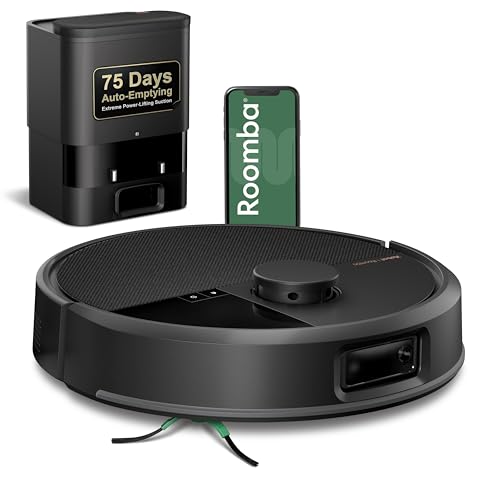
↓ See why we picked itiRobot Roomba Max 705 Robot Vacuum with AutoEmpty Dock, LiDAR Navigation
↓ See why we picked itSome robot vacuums navigate using a small onboard camera for object recognition, which some buyers want to avoid entirely, whether the concern is a camera pointed at the living room floor or simply preferring a simpler sensor stack. The models here rely on LiDAR, structural sensors, or bump-and-mapping instead, with no onboard camera or live-view feed as a hardware fact, not a marketing claim.
One distinction worth being precise about: camera-free is not the same thing as data-free. A robot vacuum without a camera can still build a map of your home, log Wi-Fi network details, and store cleaning history tied to a cloud account. If full data minimization matters to you, not just avoiding a lens, treat this guide as a starting point on hardware and check the account, cloud sync, and data retention settings on each model separately. That broader question is closer to what our Best Privacy-Focused Robot Vacuums guide covers; this guide is narrowly about the presence or absence of an onboard camera.
6 Criteria to Look For Before Buying a Camera-Free Robot Vacuum
Key buying criteria so you get the right fit the first time.
Confirming no onboard navigation or dock camera exists
Some robot vacuums use a front-facing or top-mounted camera for object recognition, and some docks include a camera for self-portrait mapping or remote monitoring. Check the specific model's spec sheet for terms like camera, vision-based, or live view before assuming a model is camera-free just because it is not marketed that way.
Getting this wrong is one of the more common reasons a camera-free robot vacuums purchase disappoints once it actually arrives, since confirming no onboard navigation or dock camera exists affects real day-to-day use in a way marketing photos and bullet points don't always make obvious.
Before buying, check the specific listing's stated details on confirming no onboard navigation or dock camera exists rather than assuming every camera-free robot vacuums in this comparison handles it the same way, since this is exactly the kind of detail that varies more than buyers expect within the same price range.
Cord, sock, and pet-waste avoidance without vision-based detection
Camera-equipped vacuums often use AI object recognition to steer around cords, socks, or pet waste before contact. Camera-free models rely on physical bump sensors or cliff sensors instead, which generally means more direct contact with small obstacles rather than avoidance before the fact. If you have pets or young kids and this matters, keep the floor clear before each run.
This is the kind of detail that looks minor in a spec list but shapes how satisfied you actually are with a camera-free robot vacuums weeks after buying, since cord, sock, and pet-waste avoidance without vision-based detection plays out differently in daily use than it does on paper.
Read the product listing and recent reviews specifically for mentions of cord, sock, and pet-waste avoidance without vision-based detection, since this detail is often understated in the bullet points but shows up clearly once real buyers have used the camera-free robot vacuums for a while.
LiDAR-only vs bump-navigation tradeoffs
LiDAR uses laser distance measurement to build a room map without any camera, and generally produces more methodical, row-by-row cleaning coverage. Bump-sensor models are simpler and often cheaper but clean in a more randomized pattern and may miss corners more often. Both approaches are camera-free; they differ in mapping precision, not in whether a lens is present.
Buyers who skip past lidar-only vs bump-navigation tradeoffs tend to be the ones leaving disappointed reviews later, not because the camera-free robot vacuums was defective, but because this specific detail didn't match what they actually needed.
Compare how each camera-free robot vacuums in this roundup actually handles lidar-only vs bump-navigation tradeoffs rather than assuming they're interchangeable on this point, since the listings here differ on it more than the headline specs suggest.
Local operation and map deletion options
Even without a camera, most connected models store a floor map and cleaning history somewhere, often synced to the manufacturer's cloud by default. Check the companion app for a local-only or map deletion option if you want to limit how long that data persists.
Local operation and map deletion options is easy to overlook next to flashier specs, but it's frequently the difference between a camera-free robot vacuums that fits your routine and one that quietly becomes a hassle.
Confirm the exact detail on local operation and map deletion options directly from the current listing before ordering, since this is one of the more common places where two similarly priced camera-free robot vacuums options genuinely diverge.
Account requirements even without a camera
Many camera-free models still require an account sign-up and Wi-Fi connection to unlock scheduling, mapping, or self-empty features. That account can log usage history and network metadata independent of any camera. Check the manufacturer's current documentation for what is collected and whether offline-only operation is possible if that is a priority for you.
Getting this wrong is one of the more common reasons a camera-free robot vacuums purchase disappoints once it actually arrives, since account requirements even without a camera affects real day-to-day use in a way marketing photos and bullet points don't always make obvious.
Before buying, check the specific listing's stated details on account requirements even without a camera rather than assuming every camera-free robot vacuums in this comparison handles it the same way, since this is exactly the kind of detail that varies more than buyers expect within the same price range.
Self-empty interval and ongoing maintenance
Self-empty intervals range from roughly 7 to 9 weeks on the longer end of this comparison down to models needing more frequent manual emptying. Factor bag or bin cost and swap frequency into the real cost of ownership, not just the upfront price.
This is the kind of detail that looks minor in a spec list but shapes how satisfied you actually are with a camera-free robot vacuums weeks after buying, since self-empty interval and ongoing maintenance plays out differently in daily use than it does on paper.
Read the product listing and recent reviews specifically for mentions of self-empty interval and ongoing maintenance, since this detail is often understated in the bullet points but shows up clearly once real buyers have used the camera-free robot vacuums for a while.
Best Camera-Free Robot Vacuums
eufy Omni C20 Robot Vacuum and Mop Combo for Hardwood and Carpet
About this pick
The Omni C20 combines vacuuming and mopping in a single unit and navigates using structural and cliff sensors rather than a camera, so there is no lens capturing images of your floor as it maps a room. It carries the highest rating and among the highest review counts in this comparison, which is a solid signal of day-to-day reliability across a range of homes.
Because it handles both hardwood and carpet with an automated dock, it suits buyers who want one machine to cover most of a home without swapping accessories. As with any connected vacuum, check the eufy app's account and map-sharing settings if you want to confirm exactly what is stored in the cloud versus kept on the device.
Best for: Buyers who want a full-featured vacuum and mop combo with no onboard camera and top-tier reliability.
Check price on AmazonSpecs
- Feature 1: Vacuum and mop combo
- Material: Hardwood and carpet
- Feature 3: No onboard camera
- Feature 4: Self-cleaning dock
Pros
- +Highest rating in this comparison
- +Vacuum and mop combo covers hardwood and carpet in one pass
- +Self-cleaning dock reduces manual maintenance
Cons
- −Higher price than vacuum-only models here
- −Confirm cloud map storage settings separately if data minimization matters to you
eufy C28 Robot Vacuum and Mop Combo, 15,000 Pa, HydroJet Roller Mop
About this pick
The C28 pairs 15,000 Pa of suction with a HydroJet roller mop that spins to scrub floors rather than dragging a pad behind it, and it navigates without any camera or vision-based object recognition. That suction figure is among the strongest in this lineup, which matters most for homes with rugs or pet hair.
The roller mop system needs periodic cleaning of its own, which is a fair tradeoff for the deeper scrubbing it provides over a passive mop pad. This is a premium option in the lineup, so it fits buyers prioritizing cleaning performance over price.
Best for: Buyers who want strong suction and active mopping without paying attention to a lower price tag.
Check price on AmazonSpecs
- Suction Power: 15,000 Pa suction
- Mopping: HydroJet roller mop
- Feature 3: No onboard camera
- Feature 4: Self-empty base
Pros
- +15,000 Pa suction is among the strongest here
- +Active HydroJet roller mop scrubs rather than just wiping
- +Self-empty base for less manual dust bin maintenance
Cons
- −Highest price in this comparison
- −Roller mop system requires its own periodic cleaning
eufy 11S MAX Robot Vacuum Cleaner, Super Thin, Quiet
About this pick
The 11S MAX is a vacuum-only model that uses a slim body to fit under low furniture, along with bump and cliff sensors instead of a camera or LiDAR turret. It has the highest review count in this comparison, which reflects how often it gets bought as a straightforward, no-frills daily vacuum.
Its navigation is simpler than the LiDAR models here, so it covers a room in a more randomized pattern rather than mapping it methodically. For buyers who mainly want reliable daily suction under couches and beds without paying for mapping features, that tradeoff is usually acceptable.
Best for: Budget-focused buyers who want a slim, quiet, camera-free vacuum for daily maintenance cleaning.
Check price on AmazonSpecs
- Feature 1: Super-thin profile
- Feature 2: Quiet operation
- Feature 3: No onboard camera
- Navigation: Bump-sensor navigation
Pros
- +Lowest price in this comparison
- +Slim profile fits under furniture other models cannot reach
- +Most reviewed model in this lineup
Cons
- −Bump-sensor navigation is less methodical than LiDAR mapping
- −No mopping function
iRobot Roomba 105 Vac Robot Vacuum with LiDAR Navigation
About this pick
The Roomba 105 uses LiDAR rather than a camera to build its map, sweeping rooms in defined rows instead of a randomized bounce pattern. LiDAR relies on laser distance measurement rather than a captured image, which is a meaningfully different sensing approach from vision-based navigation even though both can produce a room map.
At under $160, it undercuts most LiDAR-equipped models by a wide margin while still delivering methodical row-by-row coverage and strong review volume. It is vacuum-only, with no mopping function.
Best for: Buyers who want true LiDAR mapping and methodical cleaning rows without paying LiDAR premium pricing.
Check price on AmazonSpecs
- Navigation: LiDAR navigation
- Feature 2: Neat-row cleaning pattern
- Feature 3: No onboard camera
- Feature 4: Self-charging
Pros
- +LiDAR navigation at a notably low price point
- +Cleans in structured rows rather than randomized bouncing
- +Strong review count relative to price
Cons
- −No mopping function
- −Fewer smart-home features than higher-tier iRobot models
roborock Q7 M5+ Robot Vacuum and Mop, Up to 7-9 Weeks Self-Empty, 10000Pa
About this pick
The Q7 M5+ uses LiDAR-based navigation and pairs it with a self-empty dock rated for up to 7 to 9 weeks between manual dust bag changes, which is longer than most models in this price range. It combines vacuuming and mopping in one unit at 10,000Pa of suction.
Its rating sits a step below the eufy models here, though its long self-empty interval and combined mop function make it a reasonable middle-ground pick for buyers who want to minimize hands-on maintenance without paying premium pricing.
Best for: Buyers who want the longest stretch between emptying the dock without stepping up to a premium price.
Check price on AmazonSpecs
- Suction Power: 10,000Pa suction
- Feature 2: Up to 7-9 week self-empty
- Feature 3: No onboard camera
- Mopping: Vacuum and mop combo
Pros
- +Up to 7 to 9 weeks between self-empty dock changes
- +Combines vacuuming and mopping in one pass
- +10,000Pa suction handles carpet and pet hair well
Cons
- −Lower rating than the eufy models in this comparison
- −Fewer reviews than the higher-ranked picks
roborock Q10 S5+ Robot Vacuum and Mop, 10,000Pa Suction
About this pick
The Q10 S5+ shares the same LiDAR-based, camera-free navigation as its Q7 sibling and matches its 10,000Pa suction rating, making it a strong option for homes with medium-pile carpet or shedding pets. It also combines vacuum and mop functions in one unit.
At a slightly lower price than the Q7 M5+ but without the extended self-empty interval, this is the pick for buyers who prioritize suction and price over how long the dock goes between servicing.
Best for: Carpet-heavy homes that want strong suction and LiDAR mapping at a moderate price.
Check price on AmazonSpecs
- Suction Power: 10,000Pa suction
- Navigation: LiDAR navigation
- Feature 3: No onboard camera
- Mopping: Vacuum and mop combo
Pros
- +10,000Pa suction performs well on carpet
- +LiDAR navigation with no onboard camera
- +Slightly lower price than the Q7 M5+
Cons
- −Shorter self-empty interval than the Q7 M5+
- −Rating and review count trail the top picks in this comparison
Shark Navigator Robot Vacuum + Self-Empty Base, RV2120AE
About this pick
The Navigator RV2120AE relies on bump and cliff sensors rather than a camera or LiDAR turret, and pairs that simpler navigation with a self-empty base and a tangle-resistant brush roll aimed at pet hair specifically. Shark's brush roll design is one of the more commonly cited strengths for pet owners across its vacuum lineup.
It has the lowest review count of the mid-tier models here, so treat it as a newer entrant rather than a long-proven one, though its rating is in line with the other 4.0-rated picks in this comparison.
Best for: Pet owners who want a tangle-resistant brush roll and self-empty convenience without LiDAR mapping.
Check price on AmazonSpecs
- Feature 1: Self-empty base
- Feature 2: No onboard camera
- Navigation: Bump-sensor navigation
- Feature 4: Tangle-resistant brush roll
Pros
- +Tangle-resistant brush roll targets pet hair specifically
- +Self-empty base reduces manual maintenance
- +No onboard camera or LiDAR turret to worry about
Cons
- −Bump-sensor navigation is less precise than LiDAR mapping
- −Lowest review count among the mid-tier picks here
iRobot Roomba Max 705 Robot Vacuum with AutoEmpty Dock, LiDAR Navigation
About this pick
The Roomba Max 705 uses LiDAR navigation with added obstacle and anti-fall detection sensors, none of which require a camera, along with dual rubber anti-tangle brushes built for carpet and hard floors. Its AutoEmpty dock keeps hands-on maintenance to a minimum between larger cleaning sessions.
It is the newest and least-reviewed model in this comparison, and its current rating is the lowest of the eight, so weigh its added obstacle-avoidance sensors against that more limited track record before choosing it over the better-established picks above.
Best for: Buyers who specifically want extra obstacle and anti-fall sensors and are comfortable with a newer, less-reviewed model.
Check price on AmazonSpecs
- Navigation: LiDAR navigation
- Feature 2: Dual rubber anti-tangle brushes
- Feature 3: Obstacle and anti-fall detection
- Feature 4: AutoEmpty dock
Pros
- +LiDAR navigation with added obstacle and anti-fall detection
- +Dual rubber anti-tangle brushes suit multi-surface homes
- +AutoEmpty dock included
Cons
- −Lowest rating and by far the fewest reviews in this comparison
- −Highest price alongside the eufy C28
How We Evaluated These Camera-Free Robot Vacuums
Each pick was assessed across 5 criteria weighted for real-world use.
Verifying camera-free hardware claims
We researched each model's published spec sheet and navigation method to confirm no onboard or dock camera is present, distinguishing LiDAR and bump-sensor navigation from vision-based systems that do include a camera.
Navigation method and cleaning pattern
We compared LiDAR-based row cleaning against bump-sensor randomized cleaning across the eight models, since this is the main functional difference among camera-free vacuums, not the presence or absence of a camera itself.
Rating and review volume
We weighed current rating and review count as a signal of real-world reliability at scale, while noting that a low review count on a newer model is not necessarily a defect, just a shorter track record.
Maintenance and self-empty design
We compared self-empty intervals, brush roll design for pet hair, and mopping capability across models to reflect realistic day-to-day upkeep, not just launch-day suction specs.
Distinguishing camera-free from data-minimal
We did not treat the absence of a camera as evidence about a brand's broader data practices. For account requirements, cloud map storage, and Wi-Fi metadata handling, we point buyers to check the manufacturer's current documentation rather than asserting a verified finding for each brand.
How to Choose the Right Camera-Free Robot Vacuums
By Navigation Precision
LiDAR and bump-sensor navigation are both camera-free, but they clean differently.
| Priority | Recommended Pick |
|---|---|
| Methodical LiDAR mapping on a budget | iRobot Roomba 105 |
| LiDAR mapping with strong suction | roborock Q10 S5+ or Q7 M5+ |
| Simple bump-sensor navigation, lowest price | eufy 11S MAX |
By Home Type
Match suction, mopping, and brush design to your actual floors and pets.
| Home Situation | Recommended Pick |
|---|---|
| Mixed hardwood and carpet, want mopping | eufy Omni C20 |
| Heavy pet hair, some carpet | eufy C28 or Shark Navigator RV2120AE |
| Small apartment, tight budget | eufy 11S MAX |
| Want obstacle and anti-fall sensors without a camera | iRobot Roomba Max 705 |
Vacuum-Only vs Vacuum-and-Mop Combo
Vacuum-only
Simpler mechanism, generally lower price, and one less system to maintain. The eufy 11S MAX, Roomba 105, and Roomba Max 705 fall into this category.
Vacuum and mop combo
Covers hard floors more thoroughly in one pass but adds a water tank and mop pad or roller to clean. The eufy Omni C20, eufy C28, Roborock Q7 M5+, and Q10 S5+ all combine both functions.
If you only have carpet, a vacuum-only model avoids paying for a mop system you will not use.
Camera-Free vs Fully Data-Minimal
These are not the same claim, and buyers sometimes conflate them.
Camera-free (this guide)
Confirms there is no onboard or dock camera capturing images of your home. This is a hardware fact you can verify against the spec sheet.
Fully data-minimal (a separate question)
Requires checking account sign-up requirements, cloud map storage, Wi-Fi metadata logging, and data retention settings, none of which are eliminated just because a camera is absent. Check the manufacturer's current documentation and app settings for each of these separately.
If full data minimization across all of these dimensions is your goal, treat this guide as a hardware starting point and cross-reference privacy-focused settings on top of it.
When to Spend More
Spend more if
You want combined vacuuming and mopping with strong suction and a proven track record. The eufy Omni C20 and C28 justify their higher price for that combination.
Save if
You mainly want reliable daily suction without mopping or advanced mapping. The eufy 11S MAX or the LiDAR-equipped Roomba 105 both cover that at a lower price.
Frequently Asked Questions
Does camera-free mean a robot vacuum collects no data at all?
No. Camera-free only means there is no onboard or dock camera capturing images. A camera-free model can still build a floor map, log Wi-Fi network details, and store cleaning history tied to a cloud account. If full data minimization matters to you, check the manufacturer's current documentation and app settings separately from the camera question.
Is LiDAR navigation the same as camera-based navigation?
No. LiDAR uses laser distance measurement to build a room map and does not capture or store images the way a camera does. Several models in this comparison, including the Roomba 105, Roborock Q7 M5+, and Roborock Q10 S5+, use LiDAR while remaining camera-free.
Do camera-free vacuums avoid cords and pet waste as well as camera-equipped ones?
Generally not as reliably. Camera-equipped vacuums often use AI object recognition to steer around small obstacles before contact, while camera-free models rely on bump and cliff sensors that typically make contact first. Clearing cords and small items before each run reduces the impact of this difference.
Do any of these models require an account or Wi-Fi connection?
Most of them do for scheduling, mapping, and self-empty features, even though none include a camera. Account and Wi-Fi requirements are a separate consideration from camera presence, so check each model's current app requirements if operating without an account matters to you.
Which model here has the longest track record?
The eufy 11S MAX has the highest review count in this comparison at over 59,000 reviews, followed closely by the eufy Omni C20 and C28. The iRobot Roomba Max 705 has by far the fewest reviews, reflecting its more recent release.
How is this guide different from a privacy-focused robot vacuum guide?
This guide is narrowly focused on the hardware fact of whether a camera is present for navigation or a live-view feed. A privacy-focused comparison would additionally weigh cloud account requirements, data retention, and map-sharing settings, which are separate questions that camera-free alone does not answer.
Bottom Line
best overall: eufy Omni C20 Robot Vacuum and Mop Combo for Hardwood and Carpet - best overall pick in this roundup.
See the full rankings above for all picks with pros, cons, and best-for summaries.
Browse on Amazon
All Prime-eligible options with current pricing.
Shop on Amazon →