6 Best Bluetooth Trackers Under $25 in 2026
Six budget Bluetooth trackers compared by phone network, pack size, battery type, and alarm volume, for iPhone, Android, or both.




At a Glance
A Bluetooth tracker is a small tag you attach to keys, a bag, or a wallet so that your phone can ring it when it is nearby and show a last known location when it is not. They do not contain GPS. Instead they lean on the crowd of phones around them, which means the most important question is which network a tag belongs to, not how fancy the tag looks.
We evaluated six models based on product specs and the details on each product page. Three use Apple's Find My network, one uses Google's Find Hub network, one is a dual-network wallet card, and two rely on the Tile network. Because an iPhone cannot use a Find Hub tag and an Android phone cannot use a Find My tag, your phone decides most of the shopping list before price even enters the conversation.
At this budget, the trade is usually fewer features for more tags. You get multi-packs, replaceable coin cells, and simple ring-from-app alerts, but not the precision finding or the rechargeable cells that cost more. Each pick below is explained by what it does well and who should skip it.
6 Criteria to Look For Before Buying a Bluetooth Trackers Under $25
Key buying criteria so you get the right fit the first time.
Which network your phone uses
A tracker only works with the network it was built for, so this is the first filter. The Ultrbeka and UGREEN FineTrack tags use Apple Find My and the XJQX 2-Pack uses Google Find Hub, while the Life360 Tile works on both platforms through its own network. The KIUP card supports either Find My or Find Hub but joins only one at setup. Buy for your phone first, then look at features.
Pack size and cost per tag
Multi-packs lower the cost of each tag and let you cover keys, a wallet, a bag, and a bike. The Ultrbeka and UGREEN FineTrack sets include four tags, and the XJQX set includes two. A single Tile or card is cheaper to start but costs more per item. Count how many things you lose often, then pick the pack that matches that number instead of the biggest one.
Battery type and lifespan
Replaceable coin cells are cheap and easy to swap. The Ultrbeka and XJQX tags use a CR2032, the UGREEN FineTrack lists up to two years, and the XJQX includes two spare cells. The KIUP claims 5 to 10 years, but that is a maker figure that is probably best case. Set a yearly reminder to check any tag, and keep spares for the ones you rely on.
Alarm volume and water rating
A tag you cannot hear is no help in a messy house. The XJQX lists 105 dB and the KIUP lists up to 120 dB, while the Tile listings and UGREEN FineTrack give no figure. For outdoor use, the Ultrbeka lists IP67 and the KIUP lists IP68. If a listing is silent on volume or water rating, assume it is basic and keep it indoors.
Form factor for what you carry
A round tag suits keys and bags, while a card suits wallets and passports. The KIUP card is 0.06 inch thick and the Tile Slim is the thinnest Tile tracker. Bulky tags in a wallet make it uncomfortable to sit on, so match the shape to the item. Keyring cases, like the silicone ones in the XJQX box, make tags easier to attach.
Privacy and safety features
Both major networks warn you when an unknown tag travels with you, which discourages misuse. The Tile adds an SOS alert that notifies family through Life360, and the UGREEN FineTrack is child-safe certified per its listing. Keep coin cells away from small children and do not use trackers to monitor people without their knowledge.
6 Best Bluetooth Trackers Under $25 in 2026
Ultrbeka 4-Pack Air Tracker Tags for Apple Find My
About this pick
The Ultrbeka pack is the most complete iPhone-only option here. Each tag is MFi certified for Apple Find My, carries an IP67 rating against dust and water, and plays a sound through the Find My app when you need to track it down. The pack holds four tags, enough for keys, a backpack, luggage, and a bike.
The limitation is the ecosystem. These tags work only with Apple devices, so an Android phone cannot use them at all, and the listing gives no ring volume figure or precision finding. The CR2032 coin cell is replaceable, which is good for longevity, but you will have to buy and swap it by hand every year or two.
In daily use the setup is a single tap on an iPhone, and the tags behave like any other Find My item. Compared with the UGREEN FineTrack set, which is also a four-pack, the Ultrbeka adds a formal water rating. If you carry things outdoors or in rain, that rating is the difference worth paying attention to.
Best for: iPhone owners who want a four-pack with a real water rating.
Check price on AmazonSpecs
- Network: Apple Find My
- Certification: Apple MFi certified
- Rating: IP67
- Battery: Replaceable CR2032
Pros
- +IP67 rating covers dust and splashes
- +MFi certified for Apple Find My
- +Replaceable CR2032 cell lasts for years
- +Four tags cover keys, bags, and a bike
Cons
- −Apple devices only, no Android support
- −Listing gives no ring volume figure
UGREEN FineTrack Air Tracker Tags 4-Pack (iOS)
About this pick
UGREEN's FineTrack tags pair in one tap with an iPhone or iPad and show up in the built-in Find My app. The listing describes Lost Mode and out-of-range alerts, which send a notice with the last known location when a tag moves away. Four tags come in the box, with a replaceable battery rated for up to two years.
The listing also states the tags are child-safe certified, a detail that matters in homes with small children because coin cells are a hazard if swallowed. What it does not offer is a stated ring volume or water rating, so you cannot judge how loud the tag is or whether it survives rain. Battery life is shorter than the longest claims in this guide.
Because there is no Android support, it is a clear choice only for Apple households. Next to the Ultrbeka pack, the FineTrack skips the IP67 rating but adds the child-safe note. If you keep tags on a diaper bag or a kid's backpack, that certification gives more peace of mind than a water rating would.
Best for: Apple households with young children that want safety certification.
Check price on AmazonSpecs
- Network: Apple Find My (iOS only)
- Pack: 4 tags
- Battery: Replaceable, up to 2 years
- Safety: Child-safe certified per listing
Pros
- +Four tags cover keys, wallet, bag, and a spare
- +Replaceable battery listed at up to 2 years
- +Lost Mode and out-of-range alerts included
- +Child-safe certified, according to the listing
Cons
- −Listing gives no ring volume or water rating
- −iOS only, so Android owners cannot use it
XJQX 2-Pack Tracker Tags for Google Find Hub
About this pick
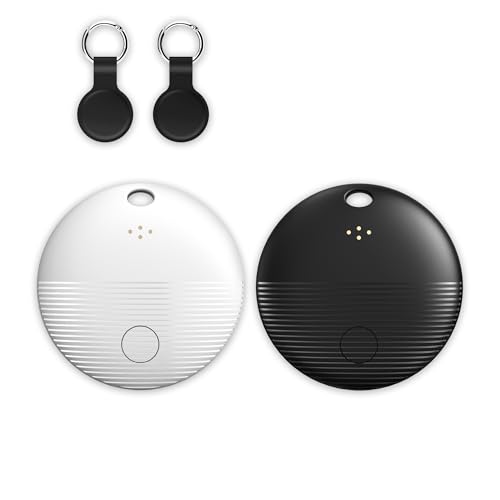
This is the only tag in the group built for Android first. It works on Google's Find Hub network through the Find My Device app, pairs with one tap, and rings at a stated 105 decibels. The set includes black and white tags so partners or roommates can tell theirs apart at a glance.
The pack is small. You get two tags rather than four, and the battery claim of two years or more is a maker figure rather than an independent result. Android is the only supported platform, so an iPhone owner in the same household needs different tags.
Ownership is easy because the box includes two spare CR2032 cells and two silicone cases with keyring loops, which saves a separate purchase. Compared with the KIUP card, the XJQX tags are bulkier but louder on paper at 105 dB versus up to 120 dB claimed by the card. Choose it when you want a keychain tag with a loud ring and no extra app beyond Google's own.
Best for: Android users who want a loud keychain tag with spare batteries.
Check price on AmazonSpecs
- Network: Google Find Hub (Android)
- Alarm: 105 dB
- Range: 350 ft Bluetooth
- Extras: 2 spare CR2032 and 2 silicone cases
Pros
- +Stated 105 dB alarm is loud for a keychain tag
- +Spare CR2032 cells and silicone cases included
- +Black and white tags are easy to tell apart
- +No subscription beyond Google Find Hub
Cons
- −Android only, with no iPhone support
- −Only two tags per pack, fewer than rivals
KIUP Slim Wallet Tracker Card
About this pick
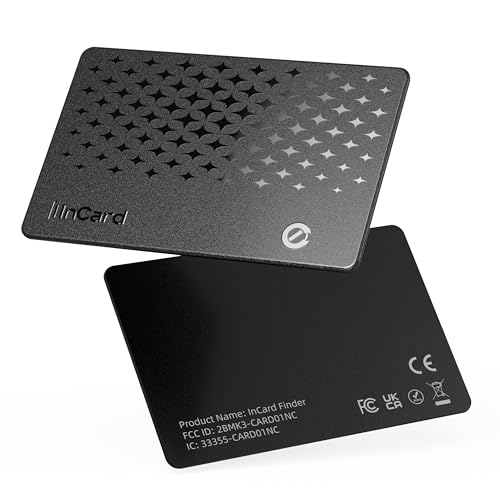
The KIUP is a card instead of a tag, thin enough to slide into a wallet slot without adding bulk. It supports either Apple Find My or Google Find Hub, so one product line suits both iPhone and Android households, though each card joins only one network once set up. A built-in speaker rated up to 120 dB makes it loud, and an IP68 rating adds water protection.
There are caveats. The battery claim of 5 to 10 years is a maker figure and probably best case, and the listing says it is not for Huawei phones. It does not use GPS, so it shows last known location through the network rather than live tracking.
In a wallet the card disappears in daily use, which is its charm. Compared with the Life360 Tile Slim, the KIUP gives you a stated alarm volume and a water rating that the Tile listing omits. If you only want to protect a wallet, it is the better-specified of the two slim options.
Best for: Anyone who wants a wallet tracker thin enough to forget about.
Check price on AmazonSpecs
- Thickness: 0.06 inch
- Alarm: Up to 120 dB
- Rating: IP68
- Network: Apple Find My or Google Find Hub
Pros
- +Alarm is listed at up to 120 dB
- +Works with Google Find Hub or Apple Find My
- +IP68 rating and 0.06 inch body suit a wallet
- +Ultra-wideband style distance view in range
Cons
- −Battery claim of 5 to 10 years is unverified
- −Not for Huawei phones per the listing
Life360 Tile Slim Wallet Finder
About this pick
Tile Slim is the company's thinnest tracker, shaped to slip into a wallet, passport, or luggage sleeve. It works with iPhone and Android through one free Tile app, and pressing the tag rings your phone even if the phone is on silent. A discreet SOS alert and a family map through Life360 round out the safety features.
It runs on the Tile network rather than Apple Find My or Google Find Hub, so its crowd of finder devices differs from the others here. The listing gives no battery type, ring volume, or water rating, and the SOS and map extras only help when family members also use Life360.
Day to day, the phone-finding button is the feature people value most, because it also finds a lost phone. Next to the standard Life360 Tile, the Slim trades some of the tag's chunkiness for a card shape that sits flat. Choose it for travel documents, and pick the KIUP card instead if you want a stated alarm volume.
Best for: Travelers and families who want a thin tracker on any phone.
Check price on AmazonSpecs
- Network: Tile
- Platforms: iOS and Android
- Phone finder: Press tag to ring phone, even on silent
- Extras: Discreet SOS alert, Life360 family map
Pros
- +Thinnest Tile tracker slides into passports
- +One free Tile app works on iPhone and Android
- +Pressing the tag rings your phone on silent
- +Discreet SOS alert suits family travel
Cons
- −Runs on the Tile network, not Find My or Find Hub
- −Listing gives no battery type or water rating
Life360 Tile Bluetooth Tracker
About this pick
The standard Life360 Tile is the safest bet when a household has both iPhones and Androids. A single free app runs on both, you can ring the tag from your phone, and pressing the tag rings your phone back. It is sold as one, two, or four tags, so you can scale to the number of key sets you own.
The tradeoffs are in the details. The listing gives no ring volume, water rating, or battery type, and the SOS button and family map work only if relatives also use Life360. Because it uses the Tile network instead of Find Hub or Find My, the reach depends on how many Tile users are around you.
For mixed households, the neutral platform is the point. Compared with the Ultrbeka and UGREEN FineTrack packs, which lock you to Apple, the Tile removes the question of who owns what phone. If everyone in your home uses an iPhone, an Apple-only pack gives more tags for the money.
Best for: Households that mix iPhone and Android and want one app.
Check price on AmazonSpecs
- Network: Tile
- Platforms: iOS and Android
- Packs: 1, 2, and 4 packs
- Extras: SOS alert and Life360 link
Pros
- +One free app runs on both Android and iPhone
- +Press the tag to ring your phone on silent
- +Sold as 1, 2, and 4 packs for extra sets
- +Life360 link shows family and items on one map
Cons
- −No ring volume, water rating, or battery type listed
- −SOS and map extras need family on Life360
How We Evaluated These Bluetooth Trackers Under $25
Each pick was assessed across 5 criteria weighted for real-world use.
Network compatibility
We compared which phones each tag supports and how many platforms it covers. The Tile and KIUP lead on cross-platform reach, while the Ultrbeka, UGREEN FineTrack, and XJQX each serve one ecosystem. We scored compatibility by how many households each pick fits.
Alarm and ruggedness
Stated decibel levels and ingress ratings were compared. The KIUP lists up to 120 dB and IP68, the XJQX lists 105 dB, and the Ultrbeka lists IP67. Listings with no figure were scored conservatively.
Battery and upkeep
We looked at battery type, claimed life, and whether spares come in the box. The XJQX includes two spare CR2032 cells and the UGREEN FineTrack lists up to two years. Long maker claims, like the KIUP's 5 to 10 years, were treated with caution.
Form and carry options
Thickness, shape, and attachment options decide where a tracker lives. The KIUP and Tile Slim lead for wallets and passports, and the Ultrbeka and UGREEN FineTrack suit keys and bags. We weighed each form against the item it is most likely to protect.
Value within the cap
All six sit under the same cap, so value is about tags per pack and features per tag. The four-packs from Ultrbeka and UGREEN give the most coverage, while the Tile gives the widest phone support. We rewarded picks with a clear audience.
How to Choose the Right Bluetooth Trackers Under $25
By Phone You Own
Your phone decides which of these trackers can even connect.
| Situation | Pick | Why |
|---|---|---|
| iPhone only, want several tags | Ultrbeka 4-Pack Air Tracker Tags for Apple Find My | Four MFi certified tags with an IP67 rating |
| iPhone with young children at home | UGREEN FineTrack Air Tracker Tags 4-Pack (iOS) | Child-safe certified per the listing |
| Android only | XJQX 2-Pack Tracker Tags for Google Find Hub | Built for Find Hub with a 105 dB alarm |
| Mixed iPhone and Android home | Life360 Tile Bluetooth Tracker | One free app works on both platforms |
| Either phone, wallet only | KIUP Slim Wallet Tracker Card | Supports Find My or Find Hub in a 0.06 inch card |
If you plan to switch phones later, the Tile and KIUP are the least likely to be stranded.
By Budget
Every pick is under the same cap. These tiers show where each lands inside it.
| Tier | Pick | What you get |
|---|---|---|
| Entry | Life360 Tile Bluetooth Tracker | A single tag on a cross-platform network |
| Entry to mid | KIUP Slim Wallet Tracker Card | A loud, water-rated wallet card |
| Mid | Life360 Tile Slim Wallet Finder | Thin Tile with phone-ring and SOS extras |
| Mid | XJQX 2-Pack Tracker Tags for Google Find Hub | Two loud Android tags with spares |
| Upper | UGREEN FineTrack Air Tracker Tags 4-Pack (iOS) | Four tags with a safety certification |
| Top of the range | Ultrbeka 4-Pack Air Tracker Tags for Apple Find My | Four tags with an IP67 water rating |
Multi-packs sit higher in the range but cost less per tag than buying singles.
Round Tag vs Wallet Card
The shape of the tracker decides which items it can protect.
Round tag
A coin-shaped tag clips to keys, backpacks, luggage, or a pet collar. The Ultrbeka 4-Pack, UGREEN FineTrack 4-Pack, XJQX 2-Pack, and Life360 Tile all use this style. Choose it when the item has a loop or a pocket to hold the tag.
Wallet card
A flat card slides into a wallet slot, a passport sleeve, or a laptop case. The KIUP Slim Wallet Tracker Card and Life360 Tile Slim Wallet Finder are built for this. Choose it when the item has no place for a bulky tag, and accept a single card per item.
Many people carry both: a round tag for keys and a card for the wallet.
By Battery Preference
Battery habits differ, and some trackers suit forgetful owners better.
| Preference | Pick | Reason |
|---|---|---|
| Spare cells in the box | XJQX 2-Pack Tracker Tags for Google Find Hub | Two spare CR2032 cells are included |
| Standard coin cell, easy swap | Ultrbeka 4-Pack Air Tracker Tags for Apple Find My | Replaceable CR2032 in every tag |
| Longest stated life | KIUP Slim Wallet Tracker Card | Claims 5 to 10 years, though unverified |
| Fewer tags to manage | Life360 Tile Bluetooth Tracker | One tag per item, sold in single packs |
Set a yearly calendar reminder to test every tag, whatever the claimed life.
For Keys and Wallet Specifically
Keys and wallets are the two items most people lose, so it helps to cover both.
Look for
A loud alarm, a sturdy keyring attachment for keys, and a thin body for a wallet. Water protection is a bonus if your keys ride in a coat pocket.
In this comparison
The XJQX 2-Pack Tracker Tags for Google Find Hub give Android users a loud keychain tag with a silicone case. The KIUP Slim Wallet Tracker Card fits the wallet, and the Ultrbeka 4-Pack covers keys and bags for iPhone owners.
Cover your keys first, because a lost key often costs more than a lost wallet.
When to Spend More
Some features sit above this cap, and it helps to know when they matter.
| Spend more if | Save if |
|---|---|
| You want a rechargeable tag instead of the coin cell on the Ultrbeka 4-Pack | Swapping a CR2032 every year or two is fine |
| You want precise finding that the UGREEN FineTrack listing does not describe | Ringing a tag within Bluetooth range is enough |
| You need Find My and Find Hub support on the same tag | A single-network tag like the XJQX 2-Pack fits your phone |
| You want a formal warranty and a long track record | A budget pack with a clear spec sheet is enough |
Budget trackers are good at finding things in the house, and the network does the rest.
Frequently Asked Questions
Do Bluetooth trackers use GPS?
No. They use Bluetooth to talk to nearby phones, and the network forwards a location when another phone passes by. That is why the Ultrbeka, UGREEN FineTrack, XJQX, and Tile all show a last known location rather than live tracking. In a remote area with few phones, updates can be slow.
Can an iPhone use an Android tracker?
Not directly. The XJQX tags are built for Google Find Hub, and the Ultrbeka and UGREEN FineTrack tags are built for Apple Find My. The Life360 Tile and the KIUP card are the exceptions, since the Tile works on both and the KIUP supports either network.
How often should I replace the battery?
The UGREEN FineTrack lists up to two years, and the XJQX makers state two years or more. Real life depends on how often the tag rings. Check the battery in the app when it is offered, and keep a spare CR2032 on hand.
Are coin cells a safety concern?
Yes, they can be dangerous if swallowed. The UGREEN FineTrack listing mentions a child-safe certification, but you should still keep spare cells and loose tags away from small children. Close the battery compartment firmly after every swap.
Will a tracker alert me if I leave something behind?
Some do, depending on the app. Out-of-range alerts are described for the UGREEN FineTrack, and the Tile can ring your phone from the tag. Check your app settings, because alerts are often off until you turn them on.
Is a wallet card as loud as a keychain tag?
It can be. The KIUP lists up to 120 dB, which is louder than the 105 dB claimed for the XJQX tag. The Tile Slim lists no volume figure, so keep expectations modest if you rely on it.
Do I need a subscription?
The listed features for these trackers rely on free apps from Apple, Google, or Tile. The Life360 family map and SOS extras are tied to the Life360 service, so check what your plan includes before counting on them. The basic ringing and last-seen location work without a paid plan.
Bottom Line
best overall: Ultrbeka 4-Pack Air Tracker Tags for Apple Find My - best overall for iphone pick in this roundup.
See the full rankings above for all picks with pros, cons, and best-for summaries.
Browse on Amazon
All Prime-eligible options with current pricing.
Shop on Amazon →