6 Best Bluetooth Trackers for Android in 2026
Six Bluetooth trackers for Android compared on Find Hub support, ring volume, battery life and size, so you can pick a tag that suits your phone and keys.




At a Glance
An Android phone changes which tracker you should buy, because the big crowd network behind it is Google's Find Hub, formerly called Find My Device. A tag that only speaks Apple's language will sit in a drawer, and plenty of listings are written for iPhone first. The good news is that Find Hub tags need no subscription and no second app.
We evaluated six trackers based on product specs and buyer feedback, sorting them by which network they use, how loud they ring, how the battery works and what shape they take. Four are built for Android and Google Find Hub alone, one pairs with either Apple or Google networks, and one runs on its own Tile network for every phone.
Start with the compatibility notes, since that decides what will work at all, then use the tables to settle on battery style, pack size and the item you lose most.
6 Criteria to Look For Before Buying a Bluetooth Trackers for Android
Key buying criteria so you get the right fit the first time.
Check Find Hub support first
Android phones use Google's Find Hub network, so a tag must say it works with Find Hub or Find My Device. Many listings are iPhone only, and a tag can only join one network at a time. The Lifemate, MiLi, XJQX and Ajblg are Android and Find Hub only, while the UGREEN Finder Duo lets you choose Find My or Find Hub. Check that your phone runs Android 9 or later, the floor named on the Lifemate, MiLi and Ajblg listings.
Ring volume you can hear
A tag you cannot hear under a cushion only helps with the map. Stated figures are manufacturer claims, but they rank the tags usefully: the Lifemate lists up to 120 dB, the XJQX 105 dB and the Ajblg 80 to 100 dB. The MiLi, UGREEN Finder Duo and Tile give no decibel number. If your hearing is weaker in high pitches, lean toward the loudest tag.
Coin cell or rechargeable
Coin cells are cheap and swappable, while rechargeable tags need a cable once a year. The MiLi lists a CR2032 lasting up to 1 year, the XJQX lists more than 2 years per cell with spares included, and the UGREEN Finder Duo lists 365 days per USB-C charge. Pick the chore you will actually do. A yearly phone reminder works for any of them.
Shape that fits the item
A round tag belongs on a keyring and a card belongs in a wallet. The XJQX includes two silicone cases with keyring loops, so it clips onto keys, bags or collars straight away. The Ajblg card is thin enough for a wallet or passport but cannot hang from keys. Buy the shape for the thing you lose most, then add a second tag for the rest.
Water and dust protection
Keys and bags get rained on, so a published rating is worth having. The Ajblg lists IP68 and the MiLi lists IP67, which the listings describe as handling splashes and brief submersion. The Lifemate gives a different test, 30 minutes underwater at 3 ft. The XJQX, UGREEN Finder Duo and Tile list no rating, so keep those in a pocket or bag.
Range and the Find Hub crowd
Bluetooth only reaches so far, then the Find Hub crowd of passing Android devices reports a last known location. The Lifemate and MiLi both list 150 m (500 ft) and the XJQX lists 350 ft. Far finding works best in busy areas and can be stale in empty ones. Treat any tag as a locator, not live GPS.
6 Best Bluetooth Trackers for Android in 2026
Lifemate Air Tracker Tags for Android
About this pick
The Lifemate Air Tracker is the clearest Android-first tag in this group. It works through the Google Find My Device app, now called Find Hub, on phones running Android 9 or later, so there is no extra app to install. The listing quotes a sound as loud as 120 dB and a Bluetooth range of 150 m (500 ft), the strongest figures here. Away from home, the hundreds of millions of Android devices in the Find Hub network can update its location.
It is built for everyday splashes: the listing calls it dust-resistant and says it survives up to 30 minutes underwater at 3 ft. The tradeoff is that it is Android only, so an iPhone cannot use it, and the listing names no battery type or battery life. A household with mixed phones needs a different tag.
Setup is a pairing prompt in the app, after which you ring it from your phone or by voice. At 120 dB it is louder than the XJQX pair at 105 dB, and its 500 ft range is longer than the 350 ft quoted for the XJQX. Unlike the XJQX bundle, the listing mentions no cases or spare batteries.
Best for: Android owners who want the loudest ring and longest range from a simple Find Hub tag.
Check price on AmazonSpecs
- Network: Google Find Hub
- Phone support: Android 9 or later
- Sound: Up to 120 dB
- Bluetooth range: 150 m (500 ft)
- Water test: 30 minutes at 3 ft
Pros
- +Listing quotes a sound as loud as 120 dB for hunting under couch cushions
- +Works through Google Find Hub on Android 9 or later with no extra app
- +Bluetooth range of 150 m (500 ft) is the longest stated in this group
- +Survives 30 minutes underwater at 3 ft according to the listing
Cons
- −Android only, so an iPhone cannot pair with this tag at all, ever
- −Listing gives no battery type or battery life to plan swaps around
- −No cases or spare batteries are mentioned for attaching to keys
MiLi Air Tracker Tags for Android, 1 Pack
About this pick
The MiLi Air Tracker is a one-pack tag aimed squarely at Android owners. It connects to the Google Find Hub network and the listing says it supports Android 9 and above, with no iOS support. Within a Bluetooth range of 150 m (500 ft) you can trigger a loud sound from the app or by voice command. Outside that range, nearby Android devices in the network update its last detected location.
Privacy is a selling point: the listing describes the network as encrypted and anonymous and says location history is not stored on the tracker. Power comes from a CR2032 coin cell that the listing says lasts up to 1 year, depending on temperature and use, and the tag is rated IP67. The catch is a yearly battery chore and no decibel figure on the listing.
Setup follows the usual Find Hub pairing prompt, and swapping the coin cell is the only upkeep. Against the Lifemate it matches the 150 m range but states no volume, while its IP67 rating is a firm number where the Lifemate gives a 30 minute, 3 ft claim. Compared with the XJQX pair, which lists more than 2 years per CR2032, the MiLi asks for battery changes more often on paper.
Best for: Android owners who want one plain tag with a clear IP67 rating and voice ringing.
Check price on AmazonSpecs
- Network: Google Find Hub
- Phone support: Android 9 or later
- Bluetooth range: 150 m (500 ft)
- Battery: CR2032, up to 1 year
- Water rating: IP67
Pros
- +Rings by app or voice command within a 150 m (500 ft) Bluetooth range
- +Listing states IP67 water and dust protection, a firm and checkable rating
- +Uses a replaceable CR2032 cell rated for up to 1 year per battery
- +Location history is not stored on the tag, per the listing's privacy note
Cons
- −Android only, with no support for iPhone or iPad owners at all
- −No decibel figure is given, so loudness is hard to compare with others
- −About 1 year per coin cell means a yearly swap, the shortest here
XJQX 2-Pack Bluetooth Tracker Tags for Android
About this pick
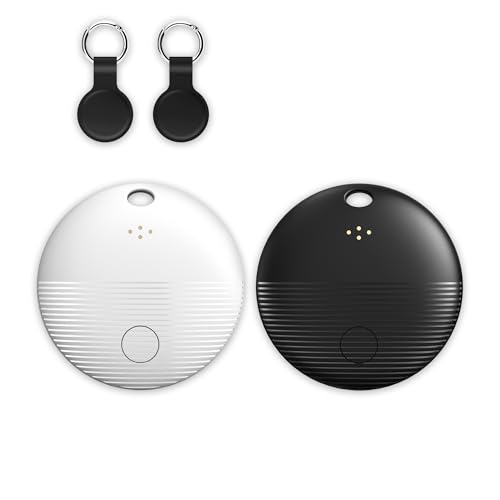
The XJQX pack is the bundle for couples and roommates. It includes one black and one white tag so each person can tell theirs apart, plus two silicone cases with keyring loops. The tags pair with Google Find Hub through the Find My Device app, and the listing says there is no subscription or extra app. A 105 dB alarm and a 350 ft Bluetooth range handle the nearby search.
Batteries are generous: two CR2032 cells come pre-installed and two spares are in the box, and the listing says each cell gives more than 2 years. That is the longest stated life among the coin cell tags here. The tradeoff is that the listing is written for Android and Google Find Hub only, and the 105 dB figure is a manufacturer claim.
The cases mean you can clip a tag onto keys, a bag or a pet collar right away. Compared with the Lifemate at 120 dB it is quieter, but it ships two tags with spare cells while the MiLi comes as a single tag at about 1 year per cell. For a household with two Android users it is the most ready-to-use box in this lineup.
Best for: Two Android users who want matching tags, cases and spare batteries in one box.
Check price on AmazonSpecs
- Network: Google Find Hub
- Pack: 2 tags, black and white
- Alarm: 105 dB
- Bluetooth range: 350 ft
- Batteries: 2 installed, 2 spare CR2032
Pros
- +Black and white tags let two people tell their own trackers apart
- +Two spare CR2032 cells are included with the two installed ones
- +Listing states more than 2 years per battery, the longest coin cell life
- +Silicone cases with keyring loops are in the box for keys or collars
Cons
- −The 105 dB alarm is quieter than the Lifemate at up to 120 dB
- −Listing targets Android and Google Find Hub only, so no iPhone support
- −Loudness and battery life are manufacturer claims, not independent data
UGREEN Finder Duo Air Tracker Tags 4 Pack
About this pick
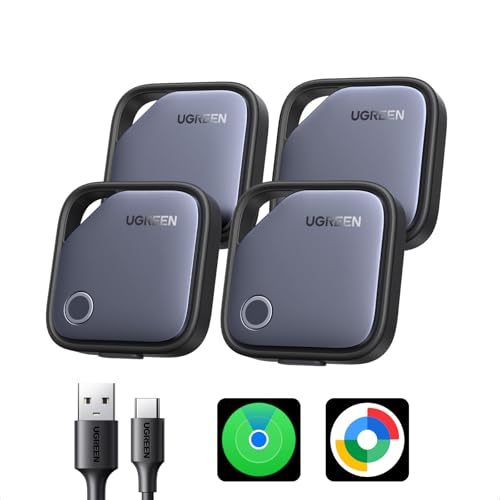
The UGREEN Finder Duo is the four-pack that lets an Android phone and an iPhone share a household. Each tag pairs with either Apple Find My or the Google Find Hub app, and the listing says it is certified by both Apple and Google. One tag still joins only one network at a time.
Power is rechargeable: a USB-C port charges the sealed cell, and the listing says a charge lasts 365 days. That removes coin cells but adds a yearly charging task. Lost alerts send a last known location when a tag moves out of range, Lost Mode lets you leave contact details for a finder, and the privacy claim is end-to-end encryption. The listing gives no ring volume or water rating, so those are unknowns.
Four tags cover keys, a bag, a backpack and a spare for a partner. Compared with the XJQX pair, you get two more tags and USB-C charging instead of coin cells, but no stated decibel level. Against the Lifemate's 120 dB it is a flexibility pick, not a loudness pick.
Best for: Families with both Android and iPhone users who want four rechargeable tags.
Check price on AmazonSpecs
- Networks: Apple Find My or Google Find Hub
- Pack: 4 tags
- Battery: Rechargeable, 365 days
- Charging: USB-C
- Privacy: End-to-end encryption
Pros
- +Pairs with Apple Find My or Google Find Hub, so any phone in a home works
- +USB-C charging means no coin cells to buy, with 365 days per charge
- +Four tags in one box cover keys, bags and a spare for a partner
- +Out of range alerts and Lost Mode add safety nets beyond a plain ring
Cons
- −Each tag still joins only one network, so you must choose at setup
- −Sealed rechargeable cell needs a yearly charge and cannot be swapped
- −Listing gives no ring volume or water rating to compare with others
Ajblg Wallet Tracker Card 2 Pack for Android
About this pick
The Ajblg card is a slim tracker for wallets, passports and luggage tags. It connects directly to Google Find Hub, and the listing says it needs Android 9 or later and does not work with iOS. A built-in buzzer of 80 to 100 dB handles close range searches in sofa gaps and drawers. Data is described as moving over encrypted anonymous networks with no location history stored.
The card is rated IP68, which the listing says handles rain splashes and brief submersion. Pairing is a quick step in the Find Hub app. The tradeoff is the lowest stated volume here, and the listing gives no battery type or battery life, so we cannot say how long it runs or whether it can be replaced.
A card shape does not hang from a keyring, so treat it as a second tag rather than a replacement for a key fob. Compared with the Lifemate at 120 dB, its 80 to 100 dB is clearly quieter, but a wallet is a smaller space to search. Next to the MiLi at IP67, the Ajblg lists a higher IP68 rating.
Best for: Android users who lose a wallet or passport more often than their keys.
Check price on AmazonSpecs
- Network: Google Find Hub
- Phone support: Android 9 or later, not iOS
- Buzzer: 80 to 100 dB
- Water rating: IP68
- Pack: 2 cards
Pros
- +Ultra thin card shape slides into a wallet, passport holder or luggage tag
- +Listing states an IP68 rating, higher than the IP67 on the MiLi
- +Buzzer of 80 to 100 dB helps with drawers, bags and sofa gaps
- +Two cards in the pack cover a wallet plus a passport pouch at once
Cons
- −Quietest stated sound in this group, well below the Lifemate's 120 dB
- −Listing gives no battery type or life, so upkeep is unclear to us
- −Android only and no keyring hole, so it cannot replace a key tag
Life360 Tile Bluetooth Tracker, iOS and Android
About this pick
The Life360 Tile is the pick when family members use different phone brands. It runs through its own free app and network rather than Google Find Hub, so it works on Android and iPhone alike. You can ring the tag from the app, or press it to ring your phone even when the phone is silenced.
Extras set it apart: a discreet SOS alert can notify loved ones, and Tiles can be added to the Life360 app to show things and people on one map. The tradeoff is that the Tile network is a separate crowd from Android's Find Hub network, which matters when a tag is far away, and the listing gives no battery type, range, water rating or volume. The SOS and map features also depend on family members using Life360.
Setup is an app download and a pairing step. Compared with the UGREEN Finder Duo, which also works on both phone types but through Apple and Google networks, the Tile uses its own network and sells here as a single tag. Against the Lifemate it offers less data on volume and range but more family tools, so it suits a mixed household more than a solo Android user.
Best for: Families mixing Android and iPhone who want one app and a safety alert.
Check price on AmazonSpecs
- Compatibility: iOS and Android
- Network: Tile app and network
- Find phone: Rings even when silenced
- Safety: Discreet SOS alert
- Pack: 1-pack (black)
Pros
- +One free app works for Android and iPhone users in the same family
- +Press the tag to ring your phone, even when the phone is silenced
- +Discreet SOS alert can notify loved ones when someone feels unsafe
- +Add tags to the Life360 app to see things and people on one map
Cons
- −Runs on the Tile network instead of Google Find Hub's Android crowd
- −Listing gives no battery, range, water rating or loudness figures
- −SOS and map extras only help if family members also use Life360
How We Evaluated These Bluetooth Trackers for Android
Each pick was assessed across 5 criteria weighted for real-world use.
Android network support
We first checked which tags clearly work with Google Find Hub and which Android versions they name. The Lifemate, MiLi and Ajblg list Android 9 or later, while the UGREEN Finder Duo adds Apple Find My. A clear, stated compatibility line earned the most weight because the wrong network makes a tag useless.
Ring volume and range
We compared the loudness and Bluetooth reach each listing states. The Lifemate leads with up to 120 dB and 150 m, the XJQX offers 105 dB and 350 ft, and the Ajblg gives 80 to 100 dB. These are manufacturer claims, so we balanced them against buyer feedback and treated them as relative.
Battery design
We looked at battery type and stated life as written. The XJQX lists more than 2 years per CR2032 with spares, the MiLi lists up to 1 year, and the UGREEN Finder Duo lists 365 days per USB-C charge. Where a listing was silent, as with the Lifemate, Ajblg and Tile, we did not assume a figure.
Form, durability and extras
We considered whether the shape suits the job and what is in the box. The Ajblg is wallet thin at IP68, the MiLi lists IP67, and the XJQX bundles cases and spare cells. Stated ratings and included accessories counted for more than general claims of toughness.
Lineup positioning
We placed each pick by what it does best here, not by popularity. The Lifemate leads on volume and range, the MiLi on a simple IP67 single tag, the XJQX on bundle value, the UGREEN Finder Duo on dual network flexibility, the Ajblg on wallet fit and the Tile on cross-phone family tools.
How to Choose the Right Bluetooth Trackers for Android
By Phone Setup
Your household's phones decide which tags can work at all.
| Situation | Best pick | Why |
|---|---|---|
| Only Android phones, want the loudest tag | Lifemate Air Tracker Tags for Android | Lists up to 120 dB and 150 m on Google Find Hub. |
| Android phone, want a plain single tag | MiLi Air Tracker Tags for Android, 1 Pack | Voice ringing, IP67 and one CR2032 for up to 1 year. |
| Two Android users sharing a purchase | XJQX 2-Pack Bluetooth Tracker Tags for Android | Two tags, two cases and four CR2032 cells in the box. |
| Android and iPhone in one home | UGREEN Finder Duo Air Tracker Tags 4 Pack | Each tag joins Apple Find My or Google Find Hub. |
| Family on different phone brands, want SOS | Life360 Tile Bluetooth Tracker, iOS and Android | One free app runs on both phone types. |
If you may switch phones later, the UGREEN Finder Duo is the least likely to be stranded.
By Budget
Think in tiers based on how many tags you need and which extras you will use.
| Tier | Pick | What you get |
|---|---|---|
| Entry | MiLi Air Tracker Tags for Android, 1 Pack | One IP67 Find Hub tag with a CR2032 for up to 1 year. |
| Entry | Ajblg Wallet Tracker Card 2 Pack for Android | Two IP68 cards with an 80 to 100 dB buzzer. |
| Mid | Lifemate Air Tracker Tags for Android | The loudest listing at up to 120 dB and 150 m range. |
| Mid | XJQX 2-Pack Bluetooth Tracker Tags for Android | Two tags with 105 dB, cases and spare cells. |
| Premium | UGREEN Finder Duo Air Tracker Tags 4 Pack | Four rechargeable tags at 365 days per charge. |
Tiers are relative, because pack sizes differ between listings.
Android Only vs Both Phone Types
A tag locked to Google Find Hub is simple, while a dual network tag trades simplicity for flexibility.
Android only, Google Find Hub
These tags use the Android crowd and need no second app. The Lifemate, MiLi, XJQX and Ajblg all fall here, and the XJQX adds two cases and four CR2032 cells. Choose this side if every phone in the home runs Android 9 or later.
Works on both phone types
The UGREEN Finder Duo pairs with Apple Find My or Google Find Hub, and the Life360 Tile runs on its own network for any phone. Each costs you either a rechargeable sealed cell or a different crowd network. Choose this side if an iPhone user will ever hold the tag.
Android-only households get the most volume and range from the first group.
By Item You Track
What you lose most decides the shape and toughness you need.
| Item | Pick | Why |
|---|---|---|
| House and car keys | XJQX 2-Pack Bluetooth Tracker Tags for Android | Included silicone cases have keyring loops. |
| Wallet or passport | Ajblg Wallet Tracker Card 2 Pack for Android | Thin IP68 card slides in with the cards. |
| Bag left in a noisy room | Lifemate Air Tracker Tags for Android | Up to 120 dB cuts through background noise. |
| Backpack in the rain | MiLi Air Tracker Tags for Android, 1 Pack | Listing states IP67 water and dust protection. |
| Family bags and keys together | UGREEN Finder Duo Air Tracker Tags 4 Pack | Four tags with Lost Mode and out of range alerts. |
Trackers find objects. Do not rely on one for a person's safety.
For Keys and Wallets Specifically
Keys and wallets are the most lost items, and each wants a different shape.
Look for
For keys, look for a keyring loop and a loud ring. For a wallet, look for a flat card body and a published water rating. Confirm that the tag names Google Find Hub and Android 9 or later.
In this comparison
The XJQX covers keys with 105 dB and silicone cases, and the Lifemate adds up to 120 dB. The Ajblg Wallet Tracker Card covers wallets with IP68 and an 80 to 100 dB buzzer. The UGREEN Finder Duo can do both if you want four tags in one box.
Many people end up with a XJQX tag on keys and an Ajblg card in the wallet.
When to Spend More
Pay up only when a feature fixes a problem you actually have.
| Spend more if | Save if |
|---|---|
| You search noisy rooms, choose the Lifemate at up to 120 dB. | Your home is small and quiet, so the MiLi will do. |
| You have an iPhone user at home, choose the UGREEN Finder Duo. | Everyone uses Android, so the XJQX pair covers it. |
| You hate buying coin cells, choose the UGREEN Finder Duo at 365 days per charge. | You are happy swapping a CR2032, as on the MiLi or XJQX. |
| You want family SOS and a shared map, choose the Life360 Tile. | You only need a ring, where the Ajblg card is enough. |
A tag you remember to attach beats an expensive one left in a drawer.
Frequently Asked Questions
Which Bluetooth tracker is best for an Android phone?
For most Android owners the Lifemate Air Tracker is the strongest all-round pick because it works with Google Find Hub and lists up to 120 dB and 150 m of range. The MiLi suits people who want a single IP67 tag. If an iPhone user lives in the house, the UGREEN Finder Duo is the safer buy.
Do Android trackers need a subscription?
The Find Hub tags here, including the Lifemate, MiLi and XJQX, are described without a subscription or extra app. Locations come through the Google Find My Device app on your phone. Check the app for optional extras before buying, since we only know what the listings state.
Can I use an Apple AirTag with Android?
No, and this is a common misconception. Apple's AirTag is built around the Find My network and needs an iPhone, so it will not work as a full tracker on Android. Pick a Find Hub tag, or a dual network tag like the UGREEN Finder Duo, if you want the Android side to work.
Do I have to change the battery?
It depends on the design. The MiLi lists a CR2032 lasting up to 1 year, the XJQX lists more than 2 years per cell with two spares in the box, and the UGREEN Finder Duo recharges over USB-C every 365 days. Set a yearly reminder and test the ring when you swap or charge a tag.
Is a Bluetooth tracker the same as GPS?
No. These tags ring over Bluetooth when nearby and rely on passing Android phones in the Find Hub network to report where they last were. If no compatible phone walks by, the location can be old. They suit keys, wallets and bags, not live tracking.
Will it work with older Android phones?
The Lifemate, MiLi and Ajblg listings name Android 9 or later as the minimum. A phone older than that may not run the Find Hub app properly. Check your Settings for the Android version before buying, and keep Bluetooth and location services switched on.
Can a tag be used to follow me without my knowing?
Certified tags are designed so phones can warn you about an unknown tracker traveling with you, which is a privacy safeguard. If you see an unknown tracker alert, follow the prompts on your phone. Never place a tag on another person or their property without their consent.
Bottom Line
best overall: Lifemate Air Tracker Tags for Android - best overall for android pick in this roundup.
See the full rankings above for all picks with pros, cons, and best-for summaries.
Browse on Amazon
All Prime-eligible options with current pricing.
Shop on Amazon →