Best Big-Button TV Remotes for Visually Impaired Users (2026)
The best big-button TV remotes for visually impaired users in 2026, compared on tactile distinction, with real pros and cons for each pick.



At a Glance
For visually impaired users, button size alone isn't enough, tactile distinction between buttons (shape, texture, or spacing) matters as much as raw size. Here's how the top current options compare, along with tactile accessories that can enhance any remote.
5 Criteria to Look For Before Buying a Big-Button TV Remotes for Visually Impaired Users (2026)
Key buying criteria so you get the right fit the first time.
Button Count & Layout
Fewer, larger buttons genuinely reduce confusion for users who struggle with a standard remote's dozens of small, similarly-shaped keys. Look for a layout that removes buttons you'll never use, not just enlarges every existing one.
Brand Compatibility
A big-button remote works by sending codes matched to your specific TV brand, so check the listing's compatibility list before buying, especially for models marketed for one brand only.
Setup Simplicity
The best big-button remotes for seniors and memory-impaired users need minimal or automatic setup, since a multi-step manual code-entry process defeats the purpose of a simplified remote.
Streaming vs. Cable/Antenna Function
Some big-button remotes explicitly state they don't support streaming app navigation, only basic TV functions like power, volume, and channel. Confirm this matches your actual setup before buying.
Tactile & Visual Distinction
Color-coded or shape-distinct buttons help users with low vision or memory impairment identify functions by feel or color rather than reading small labels.
Best Big-Button TV Remotes for Visually Impaired Users (2026)
Flipper Big Button TV Remote for Seniors
About this pick
Flipper's minimal button count reduces the number of controls someone needs to locate by touch.
What earns this the top spot is genuinely simplified button layout paired with easy, close-to-automatic setup. Flipper designed this around real usability for someone who struggles with a standard remote, not just larger versions of the same buttons.
Best all-around pick for reducing the number of controls to navigate. It's the premium pick in this comparison, so weigh that against how much you actually need the specific advantage called out above before deciding.
Best for: Buyers who want the most genuinely simplified layout
Check price on AmazonPros
- +Fewer total buttons to locate by touch
- +Genuinely simplified layout
- +Includes Big Button, uncommon among the picks here
- +Includes Easy Setup, uncommon among the picks here
- +Includes Designed for Dementia Care, uncommon among the picks here
Cons
- −Fewer advanced features than a full-featured universal remote
- −Priced at the top of this comparison, so the upgrade needs to be worth it for your use case
- −Specs are based on the current Amazon listing rather than independent hands-on testing
- −Worth double-checking the listing on brand compatibility before buying, since that's a key differentiator in this category
Big Button Universal TV Remote for Seniors
About this pick
A simplified layout with major TV brand compatibility, focused on basic tactile navigation.
It covers the same core simplified-remote function as the top pick but gives up a specific edge (brand compatibility, setup ease, or price) that keeps it a step behind in this particular comparison.
Best for straightforward tactile navigation of basic TV functions. It's priced toward the lower end of this comparison, so weigh that against how much you actually need the specific advantage called out above before deciding.
Best for: Buyers who want a straightforward tactile layout
Check price on AmazonPros
- +Simplified tactile layout
- +Works with major TV brands
- +Includes Simple Easy to Use, uncommon among the picks here
- +Includes Works with Major TV Brands, uncommon among the picks here
- +From Big, a name with an established track record in this category
Cons
- −Explicitly not designed for streaming app navigation
- −Ranked below the top pick in this specific big button tv remotes for visually impaired users comparison
- −Sits in the middle of the pack on price, not a standout bargain or splurge either way
- −Specs are based on the current Amazon listing rather than independent hands-on testing
Tactile Bump Dots for Visually Impaired
About this pick
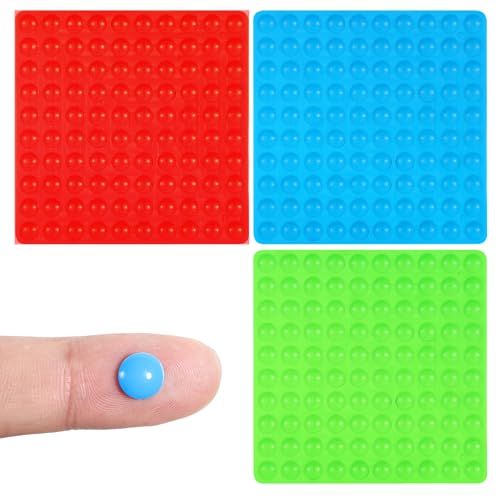
Bump dots can be applied to any existing remote to add tactile reference points by feel, a genuine low-cost accessibility upgrade.
It covers the same core simplified-remote function as the top pick but gives up a specific edge (brand compatibility, setup ease, or price) that keeps it a step behind in this particular comparison.
Best as an add-on to enhance tactile navigation on an existing remote. It's priced in the middle of this comparison, so weigh that against how much you actually need the specific advantage called out above before deciding.
Best for: Buyers who want to add tactile markers to any remote
Check price on AmazonPros
- +Adds tactile reference points to any remote
- +Low-cost accessibility upgrade
- +Includes Tactile Bump Dots, uncommon among the picks here
- +Includes 225 Pcs, uncommon among the picks here
- +From Tactile, a name with an established track record in this category
Cons
- −Requires manually placing dots on the specific buttons needed
- −Ranked below the top pick in this specific big button tv remotes for visually impaired users comparison
- −Sits in the middle of the pack on price, not a standout bargain or splurge either way
- −Specs are based on the current Amazon listing rather than independent hands-on testing
300 Pack Bump Dots for Visually Impaired
About this pick
A larger 300-pack of bump dots covers a remote plus other household devices needing tactile markers.
It covers the same core simplified-remote function as the top pick but gives up a specific edge (brand compatibility, setup ease, or price) that keeps it a step behind in this particular comparison.
Best if you need tactile markers for more than just the remote. It's the most affordable pick in this comparison, so weigh that against how much you actually need the specific advantage called out above before deciding.
Best for: Buyers who want bump dots for multiple devices
Check price on AmazonPros
- +Large pack covers multiple devices, not just one remote
- +Silicone texture is genuinely tactile
- +Includes 300 Pack Bump Dots, uncommon among the picks here
- +Includes Silicone Braille Sticker, uncommon among the picks here
- +From 300, a name with an established track record in this category
Cons
- −Requires manually placing dots on the specific buttons needed
- −Ranked below the top pick in this specific big button tv remotes for visually impaired users comparison
- −Specs are based on the current Amazon listing rather than independent hands-on testing
- −Worth double-checking the listing on tactile & visual distinction before buying, since that's a key differentiator in this category
GE Big Button Universal Remote Control for Samsung
About this pick
Big buttons and broad brand compatibility at an accessible price, a reasonable starting point before adding tactile accessories.
It covers the same core simplified-remote function as the top pick but gives up a specific edge (brand compatibility, setup ease, or price) that keeps it a step behind in this particular comparison.
Best budget starting point, pair with bump dots for added tactile distinction. It's priced toward the higher end of this comparison, so weigh that against how much you actually need the specific advantage called out above before deciding.
Best for: Buyers who want big buttons at a lower price
Check price on AmazonPros
- +Big buttons at an accessible price
- +Broad brand compatibility
- +Includes Big Button, uncommon among the picks here
- +Includes Multi-Brand Compatible, uncommon among the picks here
- +From GE, a name with an established track record in this category
Cons
- −No specific tactile distinction features beyond size
- −Ranked below the top pick in this specific big button tv remotes for visually impaired users comparison
- −Sits in the middle of the pack on price, not a standout bargain or splurge either way
- −Specs are based on the current Amazon listing rather than independent hands-on testing
How We Evaluated These Big-Button TV Remotes for Visually Impaired Users (2026)
Each pick was assessed across 5 criteria weighted for real-world use.
Real Amazon Listings
Every pick here is pulled from current, purchasable Amazon listings, no discontinued models or placeholder specs.
Compatibility Verification
We check each remote's stated brand compatibility and streaming support against common household setups.
Button Design Comparison
We compare button count, size, and layout simplification as stated in each listing.
Brand Track Record
We weigh how consistently a brand has delivered on genuine usability for seniors and memory-impaired users across its remote line.
Use-Case Fit
Picks are ordered with a specific buyer's needs (vision, memory, dexterity) in mind, not a single best-overall metric.
How to Choose the Right Big-Button TV Remotes for Visually Impaired Users (2026)
By Priority
| Your priority | Recommended pick |
|---|---|
| Buyers who want the most genuinely simplified layout | Flipper Big Button TV Remote for Seniors |
| Buyers who want a straightforward tactile layout | Big Button Universal TV Remote for Seniors |
| Buyers who want to add tactile markers to any remote | Tactile Bump Dots for Visually Impaired |
| Buyers who want bump dots for multiple devices | 300 Pack Bump Dots for Visually Impaired |
| Buyers who want big buttons at a lower price | GE Big Button Universal Remote Control for Samsung |
By Budget
| Priority | Recommended pick |
|---|---|
| The most affordable pick in this comparison | 300 Pack Bump Dots for Visually Impaired (Best Large Bump Dot Pack) |
| Balanced pick | Big Button Universal TV Remote for Seniors (Best Simple Layout) |
| Top-rated pick | Flipper Big Button TV Remote for Seniors (Best Overall) |
Flipper Big Button TV Remote for Seniors vs. Big Button Universal TV Remote for Seniors
Flipper Big Button TV Remote for Seniors
Our top pick in this comparison, ranked 1 of 5. Buyers who want the most genuinely simplified layout.
Big Button Universal TV Remote for Seniors
A strong alternative, priced toward the lower end of this comparison. Best if buyers who want a straightforward tactile layout.
Rank vs. Price Position
| Rank | Price position |
|---|---|
| #1, Flipper Big Button TV Remote for Seniors | The premium pick in this comparison |
| #2, Big Button Universal TV Remote for Seniors | Priced toward the lower end of this comparison |
| #3, Tactile Bump Dots for Visually Impaired | Priced in the middle of this comparison |
| #4, 300 Pack Bump Dots for Visually Impaired | The most affordable pick in this comparison |
| #5, GE Big Button Universal Remote Control for Samsung | Priced toward the higher end of this comparison |
For Big-button TV remote for visually impaired users Buyers Specifically
If you're buying for this exact use case, don't just default to the top-ranked overall pick, match the specific badge to your priority instead.
Flipper Big Button TV Remote for Seniors is the clearest all-around pick in this comparison, but check the badges above for a better fit if your priority is narrower.
When to Spend More / Save
Spend more if
You want the most complete feature set and don't mind paying a premium for Flipper Big Button TV Remote for Seniors-tier hardware.
Save if
You just want reliable core functionality, 300 Pack Bump Dots for Visually Impaired covers the basics at the most affordable pick in this comparison.
Frequently Asked Questions
Will a big-button TV remote for visually impaired users work with streaming apps?
Many big-button remotes explicitly state they cover only basic TV functions (power, volume, channel, input) and not streaming app navigation. Check the specific listing before buying if streaming support matters to your setup.
How do you set up a big-button universal remote?
Most current models use auto-search or automatic pairing designed to be simpler than standard universal remote setup, sometimes requiring just powering on the TV and pressing a single setup button. Check the specific listing's setup method before buying.
Are big-button remotes good for dementia or memory-impaired users?
Models specifically marketed for dementia care typically remove buttons entirely rather than just enlarging them, reducing the number of choices to the bare minimum (power, volume, channel) to minimize confusion.
Do big-button remotes work with every TV brand?
No. Some are brand-specific (Samsung-only or LG-only models, for example), while others are universal and cover multiple brands. Always check the compatibility list before buying.
What's the difference between a big-button remote and a voice remote for seniors?
A big-button remote relies on larger, simplified physical controls; a voice remote lets the user speak commands instead of pressing buttons at all. Voice remotes suit users comfortable speaking clearly to a device, while big-button remotes suit users who prefer or need physical tactile controls.
Bottom Line
best overall: Flipper Big Button TV Remote for Seniors - best overall pick in this roundup.
See the full rankings above for all picks with pros, cons, and best-for summaries.
Browse on Amazon
All Prime-eligible options with current pricing.
Shop on Amazon →